What’s New
The latest release of Signals introduces significant enhancements to the ChemDraw+ application. HELM editing capabilities have been substantially expanded, now featuring the ability to create complementary strands with hydrogen bonding with several different new tools. We've improved the user drawing experience by incorporating a new drawing tool and access to symbols commonly used in chemical names and reactions. Finally, several bug fixes have been extended with this release.
The following improvements are available for users of Signals ChemDraw. Certain features may only be available with enablement by an administrator.
ChemDraw+
- Selection of attachment points between monomers to create biopolymer crosslinks
- Complementary strands generated from text tab now contain hydrogen bonds
- Generate complementary strand tool
- HELM Auto-pair tool
- Show 3' and 5' ends of oligonucleotides
- Chemical Symbols
- Join tool
ChemDraw+
Selection of attachment points between monomers to create biopolymer crosslinks
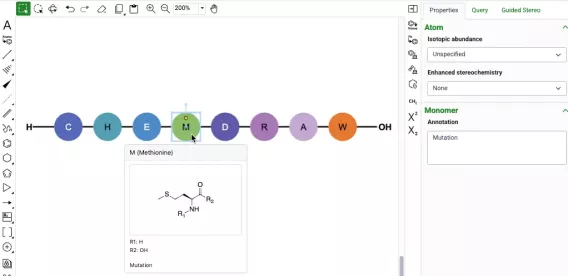
The creation of biopolymer crosslinks between monomers with multiple possible attachment points is now supported. When creating a crosslink, the monomers will now expand, allowing users to select specific attachment points to make the connection. After making the selection, users can finalize the process by selecting "Connect," and the monomers will be successfully crosslinked.
Complementary strands generated from text tab now contain hydrogen bonds
Complementary strands of RNA or DNA that are created from the text tab of the HELM editor are now created with hydrogen bonds automatically mapped between the strands. The hydrogen bonds are placed according to Watson-Crick base pairing. Hydrogen bond pairing information is also now supported in ChemDraw when inserting HELM strings or pasting them on the canvas. Additionally, when generating a HELM string for a sequence containing hydrogen bonds, the resulting HELM string will now contain the pairing details.
Generate complementary strand tool
Complementary strands of oligonucleotides can now be generated from a selected oligonucleotide on the ChemDraw canvas. This new tool is available on the right-hand context toolbar allows users to generate a complementary strand when an oligonucleotide is selected. When this new tool is used, a complementary strand will be generated with hydrogen bonds automatically mapped between the strands. The hydrogen bonds are placed according to Watson-Crick base pairing. For sequences containing custom monomers, the complement will be based on the natural monomer equivalents of the selected sequence.
HELM Auto-pair tool
Complementary strands of oligonucleotides can now be selected and automatically paired in the new ChemDraw editor. When paired, hydrogen bonds will be placed between the strands according to Watson-Crick base pairing, with maximum overlap in complementarity between the strands. For sequences containing custom monomers, the hydrogen bonding will be placed according to Watson-Crick base pairings based on the natural monomer analogs. The auto-pair tool will appear on the right-hand context toolbar when two oligonucleotide sequences are selected.
Show 3' and 5' ends of oligonucleotides

A new option has been added to the Biopolymer section of the Properties panel in the new ChemDraw editor which allows users to display the 3' and 5' ends of an oligonucleotide on the canvas. When an oligonucleotide is selected, users can choose to show or hide the label by selecting or unselecting this option.
Chemical Symbols
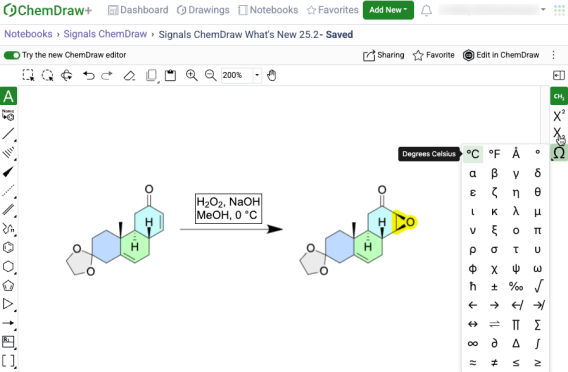
Common symbols used in chemical names and reaction conditions can now be added to a ChemDraw text element in the new ChemDraw editor using the new Chemical Symbols tool. This tool will be available on the right-hand context toolbar when editing in a text element on the ChemDraw canvas.
Join tool
A new join tool is now available on the right-hand context toolbar of the new ChemDraw editor. When used, the join tool allows users to combine structures on the ChemDraw canvas by merging two or more selected atoms into a single atom.