
Revvity Signals Developer Guide - Tutorials - External Checking for Chemical Drawings in Signals Notebook
External Checking for Chemical Drawings in Signals Notebook
This guide walks through the process of integrating with Signals Notebook's External Checking feature for chemical drawings using the REST API. We'll build a Flask application. that serves as an External Action, allowing users to review and validate chemical reactions directly from Signals Notebook.
Overview
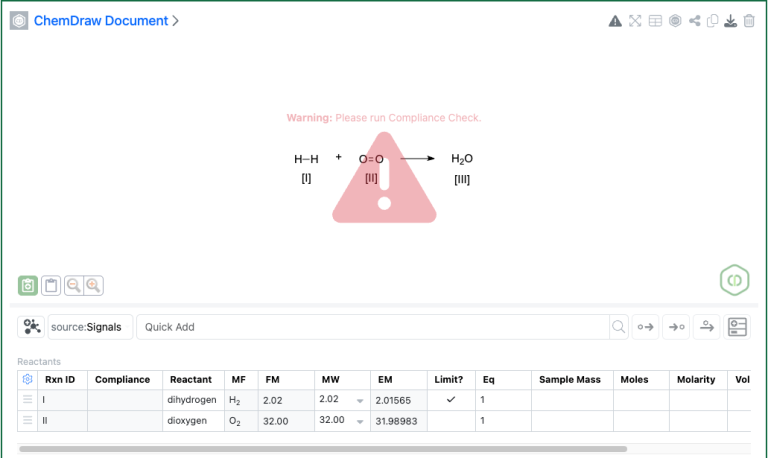
External Checking is a feature in Signals Notebook that allows organizations to implement custom compliance validation for chemical drawings. When enabled, users receive a warning indicator whenever they create or edit a chemical drawing. This warning persists until an external system validates the drawing and dismisses it via the API.
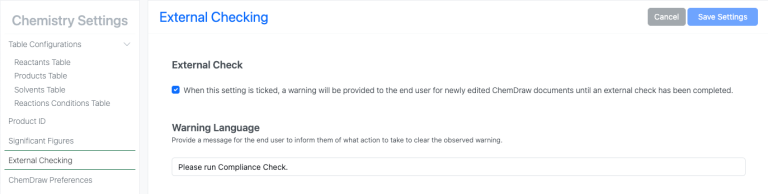
Enabling External Checking:
- From Signals System configuration navigate to "Chemistry Settings"
- Select "External Checking" in the left pane
- Enable the tick box and set your desired warning message
How it works:
- Each chemical drawing has a
selfhash that Signals Notebook generates automatically - The
externalhash is set by your external validation system - When these hashes match, the compliance warning is dismissed
- Editing the drawing generates a new
selfhash, causing a mismatch and the warning to return
What we'll build:
A Flask web application that integrates with Signals Notebook as an External Action. When triggered from a chemical drawing, it will:
- Check if the drawing has already been reviewed
- Display the reaction details (reactants and products)
- Allow reviewers to mark each component as compliant, warning, or non-compliant
- Write the compliance status back to the stoichiometry table
- Dismiss the External Checking warning when appropriate
Technology Used: Python with Flask for the web application, leveraging the Signals Notebook REST API.
Important Note: The code examples in this guide are intended as a proof of concept, focusing on simplicity to illustrate basic integration techniques. They are not intended to be production-quality and lack robust error handling and security considerations.
Downloads
Download the complete example files:
- app.py - Flask application
- templates/index.html - HTML template
Prerequisites
Before starting, ensure you have:
- Signals Notebook access with API Key privileges
- External Checking enabled in your tenant's system settings
- A "Compliance" column added to your stoichiometry table (products and reactants) via Chemistry Settings
- Python 3.7+ with required libraries:
pip install flask requestsSetting Up the Compliance Column
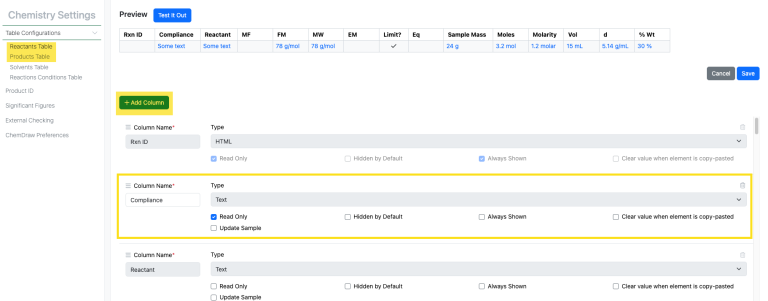
Before using this integration, you need to add a "Compliance" column to your stoichiometry tables:
- Navigate to System Configuration > Chemistry Settings
- Under Stoichiometry Table Columns, add a new column:
- Title: Compliance
- Type: Text
- Read Only: Yes (recommended, so only API can update it)
- Add this column to both Reactants and Products grids
- Save your changes
Considerations
This tutorial highlights the concepts and basic usage of the External Checking functionality. What determines compliance, how it is reflected in the UI, beyond dismissing the warning, and expected user input will depend on your own specific needs.
Part 1: Understanding the Compliance API
The compliance functionality is accessed through the /entities/{eid}/compliance endpoint. This endpoint supports two HTTP methods:
| Method | Purpose |
GET |
Retrieve the current compliance status (self and external hash) |
POST |
Update the external hash to dismiss or trigger warnings |
Fetching Compliance Status
To retrieve the current compliance status for a chemical drawing:
curl -X GET "https://YOUR_TENANT/api/rest/v1.0/entities/chemicalDrawing:429762d7-422b-4737-9c7d-2cbbdcc68044/compliance" \
 -H "x-api-key: YOUR_API_KEY" \
 -H "Accept: application/vnd.api+json"
Example Response:
{
 "data": {
   "type": "compliance",
   "id": "chemicalDrawing:429762d7-422b-4737-9c7d-2cbbdcc68044",
   "attributes": {
     "self": {
       "hash": "Y2hlbWljYWxEcmF3aW5nOjZjMmMwYmNjLTgwNjUtNDg2Yi04..."
     },
     "external": {
       "hash": ""
     }
   }
 }
}
The self.hash is automatically generated by Signals Notebook on the chemical drawing creation. The external.hash is empty until set by an external system.
Dismissing the Warning
To dismiss a compliance warning, update the external.hash to match the self.hash. First, copy the self.hash value from the GET response, then use it in the PATCH request:
curl -X PATCH "https://YOUR_TENANT/api/rest/v1.0/entities/chemicalDrawing:429762d7-422b-4737-9c7d-2cbbdcc68044/compliance?force=true" \
 -H "x-api-key: YOUR_API_KEY" \
 -H "Content-Type: application/vnd.api+json" \
 -H "Accept: application/vnd.api+json" \
 -d '{
   "data": {
     "attributes": {
       "external": {
         "hash": "Y2hlbWljYWxEcmF3aW5nOjZjMmMwYmNjLTgwNjUtNDg2Yi04..."
       }
     }
   }
 }
Once the hashes match, the External Checking warning in Signals Notebook will be dismissed. If the user edits the chemical drawing, a new self.hash is generated, causing a mismatch and the warning will reappear.
Part 2: Building a Flask Compliance Review App
Now let's build a basic Flask application that serves as an External Action for reviewing chemical drawing compliance.
How External Actions Work
When you configure an External Action in Signals Notebook for chemical drawings, clicking the action button will open your defined URL (https://localhost:5000/review in the tutorial) in either a new window or a dialog with the the entity ID passed as a query parameter. The default parameter name is __eid:
https://localhost:5000/review?__eid=chemicalDrawing:429762d7-422b-4737-9c7d-2cbbdcc68044
Your application can then:
- Fetch the stoichiometry data using the provided EID
- Display a review interface
- Update Signals Notebook via API based on user decisions
This tutorial is focused on the External Checking feature and not intended to be a fully developed External Action which accounts for security or other best practices around External Actions. For more details on configuring External Actions, see the Revvity Signals Developer Guide - External Actions.
Project Structure
The application uses Flask's template system to separate HTML from Python code:
compliance-app/
├── app.py                      # Flask application
└── templates/
   └── index.html              # HTML template for External Action
The Flask Application (app.py)
The main application handles API communication and routes:
"""
Chemical Compliance Review Flask Application
This application serves as an External Action for Signals Notebook,
allowing users to review and validate chemical reactions for compliance.
"""
from flask import Flask, request, render_template
import requests
app = Flask(__name__)
# Configuration - Replace with your values
CONFIG = {
   "base_url": "https://your-tenant.signalsnotebook.com/api/rest/v1.0",
   "api_key": "your-api-key"
}
HEADERS = {
   "x-api-key": CONFIG["api_key"],
   "Content-Type": "application/vnd.api+json",
   "Accept": "application/vnd.api+json"
}
# Compliance status options with Unicode indicators
COMPLIANCE_OPTIONS = {
   "compliant": {"symbol": "🟢", "label": "Compliant", "text": "🟢 Compliant"},
   "warning": {"symbol": "🟡", "label": "Warning", "text": "🟡 Compliant with Warning"},
   "non_compliant": {"symbol": "🔴", "label": "Non-Compliant", "text": "🔴 Non-Compliant"}
}

def get_stoichiometry(eid):
   """Fetch stoichiometry data for a chemical drawing."""
   url = f"{CONFIG['base_url']}/stoichiometry/{eid}"
   response = requests.get(url, headers=HEADERS)
   response.raise_for_status()
   return response.json()

def get_compliance(eid):
   """Fetch compliance data for a chemical drawing."""
   url = f"{CONFIG['base_url']}/entities/{eid}/compliance"
   response = requests.get(url, headers=HEADERS)
   response.raise_for_status()
   return response.json()

def update_stoichiometry_row(eid, row_id, compliance_key, status_text):
   """Update the compliance column for a stoichiometry row."""
   url = f"{CONFIG['base_url']}/stoichiometry/{eid}/{row_id}"
   payload = {
       "data": {
           "attributes": {
               "values": {
                   compliance_key: status_text
               }
           }
       }
   }
   response = requests.patch(url, headers=HEADERS, params={"force": "true"}, json=payload)
   response.raise_for_status()
   return response.json()

def dismiss_external_warning(eid):
   """Dismiss the external checking warning."""
   compliance = get_compliance(eid)
   self_hash = compliance["data"]["attributes"]["self"].get("hash")
   if not self_hash:
       return False
   url = f"{CONFIG['base_url']}/entities/{eid}/compliance"
   payload = {
       "data": {
           "attributes": {
               "external": {
                   "hash": self_hash
               }
           }
       }
   }
   response = requests.patch(url, headers=HEADERS, params={"force": "true"}, json=payload)
   response.raise_for_status()
   return True

def find_compliance_column_key(column_definitions, grid_type):
   """Find the key for the Compliance column in column definitions."""
   columns = column_definitions.get(grid_type, [])
   for col in columns:
       if col.get("title", "").lower() == "compliance":
           return col.get("key")
   return None

def is_already_compliant(eid):
   """Check if the chemical drawing is already compliant (hashes match)."""
   try:
       compliance = get_compliance(eid)
       attrs = compliance["data"]["attributes"]
       self_hash = attrs.get("self", {}).get("hash")
       external_hash = attrs.get("external", {}).get("hash")
       return self_hash and external_hash and self_hash == external_hash
   except:
       return False

@app.route("/review")
def review():
   """Display the compliance review interface."""
   eid = request.args.get("__eid")
   if not eid:
       return "Error: No entity ID provided. Expected ?__eid=chemicalDrawing:...", 400
   # Check if force re-review is requested
   force_review = request.args.get("force", "").lower() == "true"
   try:
       # Check if already compliant (unless force review is requested)
       if not force_review and is_already_compliant(eid):
           return render_template("index.html", eid=eid, state="already_compliant")
       stoich_data = get_stoichiometry(eid)
       attributes = stoich_data["data"]["attributes"]
       reactants = attributes.get("reactants", [])
       products = attributes.get("products", [])
       return render_template(
           "index.html",
           eid=eid,
           state="review",
           reactants=reactants,
           products=products,
           options=COMPLIANCE_OPTIONS
       )
   except Exception as e:
       return f"Error fetching data: {str(e)}", 500

@app.route("/submit", methods=["POST"])
def submit_review():
   """Process the compliance review submission."""
   eid = request.form.get("eid")
   if not eid:
       return "Error: No entity ID provided", 400
   try:
       # Get stoichiometry data to find column keys and row IDs
       stoich_data = get_stoichiometry(eid)
       attributes = stoich_data["data"]["attributes"]
       # Get column definitions to find compliance column keys
       included = stoich_data.get("included", [])
       column_defs = {}
       for item in included:
           if item.get("type") == "columnDefinitions":
               column_defs = item.get("attributes", {})
               break
       reactant_compliance_key = find_compliance_column_key(column_defs, "reactants")
       product_compliance_key = find_compliance_column_key(column_defs, "products")
       # Track compliance statuses
       all_statuses = []
       reactants_updated = 0
       products_updated = 0
       # Process reactants
       reactants = attributes.get("reactants", [])
       for reactant in reactants:
           row_id = reactant.get("row_id")
           if row_id and reactant_compliance_key:
               status_key = request.form.get(f"reactant_{row_id}", "compliant")
               status_text = COMPLIANCE_OPTIONS[status_key]["text"]
               all_statuses.append(status_key)
               update_stoichiometry_row(eid, row_id, reactant_compliance_key, status_text)
               reactants_updated += 1
       # Process products
       products = attributes.get("products", [])
       for product in products:
           row_id = product.get("row_id")
           if row_id and product_compliance_key:
               status_key = request.form.get(f"product_{row_id}", "compliant")
               status_text = COMPLIANCE_OPTIONS[status_key]["text"]
               all_statuses.append(status_key)
               update_stoichiometry_row(eid, row_id, product_compliance_key, status_text)
               products_updated += 1
       # Determine overall compliance
       has_non_compliant = "non_compliant" in all_statuses
       has_warnings = "warning" in all_statuses
       all_compliant = all(s == "compliant" for s in all_statuses) if all_statuses else True
       # Dismiss warning if no non-compliant items
       warning_dismissed = False
       if not has_non_compliant:
           warning_dismissed = dismiss_external_warning(eid)
       return render_template(
           "index.html",
           eid=eid,
           state="result",
           all_compliant=all_compliant,
           has_warnings=has_warnings and not has_non_compliant,
           reactants_updated=reactants_updated,
           products_updated=products_updated,
           warning_dismissed=warning_dismissed
       )
   except Exception as e:
       return f"Error processing review: {str(e)}", 500

if __name__ == "__main__":
   app.run(debug=True, port=5000)
Part 3: Key Concepts Explained
This section provides a deeper look at the core mechanisms used in the application.
Hash-Matching Mechanism for Compliance
The External Checking feature uses two hashes to track compliance state:
self.hash— Auto-generated by Signals Notebook whenever the drawing changesexternal.hash— Set by your external system to indicate review completion
When these hashes match, the warning is dismissed. Editing the drawing generates a new self.hash, creating a mismatch and reactivating the warning.
Checking if already compliant:
def is_already_compliant(eid):
   """Check if the chemical drawing is already compliant (hashes match)."""
   try:
       compliance = get_compliance(eid)
       attrs = compliance["data"]["attributes"]
       self_hash = attrs.get("self", {}).get("hash")
       external_hash = attrs.get("external", {}).get("hash")
       return self_hash and external_hash and self_hash == external_hash
   except:
       return False
Dismissing the warning (copying self → external):
def dismiss_external_warning(eid):
   """Dismiss the external checking warning."""
   compliance = get_compliance(eid)
   self_hash = compliance["data"]["attributes"]["self"].get("hash")
   if not self_hash:
       return False
   url = f"{CONFIG['base_url']}/entities/{eid}/compliance"
   payload = {
       "data": {
           "attributes": {
               "external": {
                   "hash": self_hash
               }
           }
       }
   }
   response = requests.patch(url, headers=HEADERS, params={"force": "true"}, json=payload)
   response.raise_for_status()
   return True
Stoichiometry API Structure
The stoichiometry endpoint returns reaction data including reactants and products arrays. Each item contains chemical details plus a row_id used for updates.
Fetching stoichiometry data:
def get_stoichiometry(eid):
   """Fetch stoichiometry data for a chemical drawing."""
   url = f"{CONFIG['base_url']}/stoichiometry/{eid}"
   response = requests.get(url, headers=HEADERS)
   response.raise_for_status()
   return response.json()
Extracting reactants and products from the response:
stoich_data = get_stoichiometry(eid)
attributes = stoich_data["data"]["attributes"]
reactants = attributes.get("reactants", [])  # List of reactant objects
products = attributes.get("products", [])    # List of product objects
Updating a specific row's compliance value:
def update_stoichiometry_row(eid, row_id, compliance_key, status_text):
   """Update the compliance column for a stoichiometry row."""
   url = f"{CONFIG['base_url']}/stoichiometry/{eid}/{row_id}"
   payload = {
       "data": {
           "attributes": {
               "values": {
                   compliance_key: status_text
               }
           }
       }
   }
   response = requests.patch(url, headers=HEADERS, params={"force": "true"}, json=payload)
   response.raise_for_status()
   return response.json()
Column Key Discovery Logic
Custom columns (like "Compliance") have system-generated keys that differ from their display titles. The stoichiometry response includes column definitions in the included array, which maps column titles to their internal keys.
Finding the compliance column key:
def find_compliance_column_key(column_definitions, grid_type):
   """Find the key for the Compliance column in column definitions."""
   columns = column_definitions.get(grid_type, [])  # "reactants" or "products"
   for col in columns:
       if col.get("title", "").lower() == "compliance":
           return col.get("key")
   return None
Extracting column definitions from the response:
included = stoich_data.get("included", [])
column_defs = {}
for item in included:
   if item.get("type") == "columnDefinitions":
       column_defs = item.get("attributes", {})
       break

reactant_compliance_key = find_compliance_column_key(column_defs, "reactants")
product_compliance_key = find_compliance_column_key(column_defs, "products")
Form Processing Flow
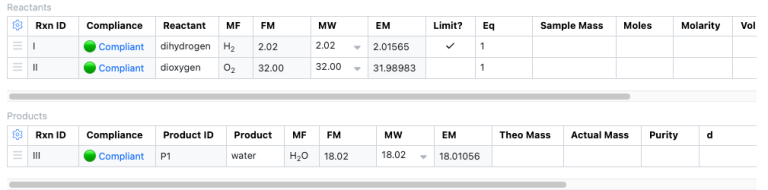
The /submit route handles the form submission in four steps:
- Retrieve current data — Fetches stoichiometry to get row IDs and column definitions
- Process each component — Loops through reactants and products, reading the selected compliance status from the form and updating each row via the API
- Determine overall result — Checks if any items are non-compliant or have warnings
- Dismiss warning conditionally — If no items are marked non-compliant, dismisses the External Checking warning by syncing the hashes
The result page then shows a summary indicating whether all items passed, some have warnings, or issues were found.
Part 4: HTML Template
The application uses a single HTML template with Jinja2 that adapts based on the current state. Flask automatically looks for templates in a templates/ folder.
Learn more about Flask here.
Understanding Jinja2 Templates
Jinja2 is Flask's default templating engine. It allows you to:
- Insert variables with
{{ variable }} - Use control flow with
{% if %},{% for %}, etc. - Call Flask functions like
{{ url_for('route_name') }}
Single Template Approach
Instead of multiple template files, we use a single index.html that renders different content based on a state variable passed from Flask:
state="review"- Shows the compliance review formstate="already_compliant"- Shows message that drawing is already compliantstate="result"- Shows the submission result
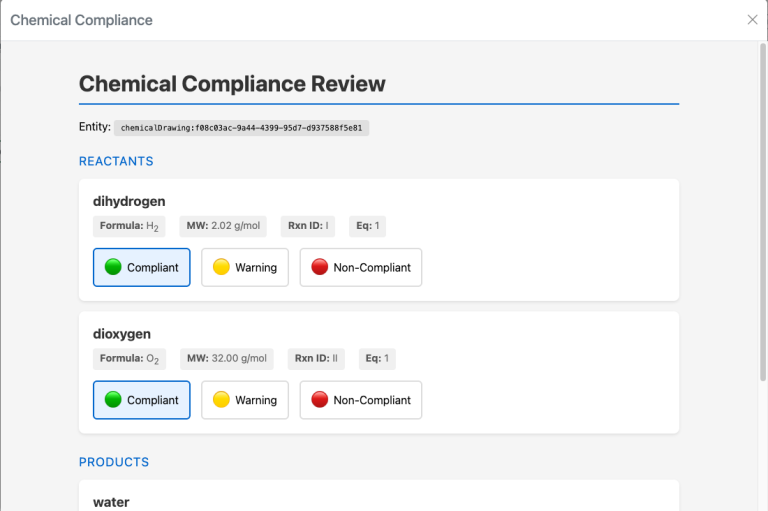
Template Structure (index.html)
<!DOCTYPE html>
<html>
<head>
   <title>Chemical Compliance Review</title>
   <style>
       /* Shared styles for all states */
       body {
           font-family: -apple-system, BlinkMacSystemFont, 'Segoe UI', Roboto, sans-serif;
           max-width: 900px;
           margin: 0 auto;
           padding: 20px;
           background: #f5f5f5;
       }
       .card {
           background: white;
           border-radius: 8px;
           padding: 20px;
           margin: 15px 0;
           box-shadow: 0 2px 4px rgba(0,0,0,0.1);
       }
   </style>
</head>
<body>
   <h1>Chemical Compliance Review</h1>
   <p>Entity: <span class="eid-display">{{ eid }}</span></p>
   {% if state == 'already_compliant' %}
       <!-- Already compliant message -->
       <div class="message-box">
           <div class="symbol success">✅</div>
           <h2>Already Compliant</h2>
           <p>This chemical drawing has already been reviewed.</p>
       </div>
       <a href="{{ url_for('review', __eid=eid, force='true') }}" class="btn">Review Again</a>
   {% elif state == 'result' %}
       <!-- Result after submission -->
       <div class="message-box">
           {% if all_compliant %}
               <div class="symbol success">✅</div>
               <h2>Review Complete</h2>
           {% elif has_warnings %}
               <div class="symbol warning">⚠️</div>
               <h2>Review Complete with Warnings</h2>
           {% else %}
               <div class="symbol error">❌</div>
               <h2>Issues Found</h2>
           {% endif %}
       </div>
   {% else %}
       <!-- Review form (default state) -->
       <form method="POST" action="{{ url_for('submit_review') }}">
           <input type="hidden" name="eid" value="{{ eid }}">
           <div class="section">
               <div class="section-title">Reactants</div>
               {% for reactant in reactants %}
               <div class="card">
                   <div class="compound-name">{{ reactant.name }}</div>
                   <div class="compliance-options">
                       {% for key, opt in options.items() %}
                       <label class="compliance-option">
                           <input type="radio" name="reactant_{{ reactant.row_id }}" value="{{ key }}">
                           <span>{{ opt.symbol }} {{ opt.label }}</span>
                       </label>
                       {% endfor %}
                   </div>
               </div>
               {% endfor %}
           </div>
           <!-- Products section (similar structure) -->
           <button type="submit">Submit Compliance Review</button>
       </form>
   {% endif %}
</body>
</html>
This approach keeps all UI logic in one file, making it easier to understand and digest in our tutorial.
Running the Application
1. Create the project structure:
mkdir compliance-app
cd compliance-app
mkdir templates
2. Download or create the files:
- Save
app.pyin the root folder - Save the HTML template in the
templates/folder
3. Update the configuration in app.py with your Signals Notebook URL and API key
4. Install dependencies and run:
pip install flask requests
python app.py
5. Test locally:
http://localhost:5000/review?__eid=chemicalDrawing:your-drawing-idPart 5: Configuring the External Action
To connect your Flask application to Signals Notebook, you need to configure an External Action.
Steps to Configure
- Navigate to System Configuration > External Actions
- Click Add External Action
- Configure the action:
- Name: Compliance Review
- Entity Type: Chemical Drawing
- URL:https://localhost:5000/review
- Parameter Name:__eid(this is the default)
- Submit Method: GET
- Open in Dialog: Yes (recommended for better UX)
- Requires Write Access: Yes - Save the configuration
The Parameter Name setting determines what query parameter Signals Notebook uses to pass the entity ID. The default __eid works with our Flask application.
URL Parameters
When the External Action is triggered, Signals Notebook will append the entity ID to your URL using the parameter name you configured (default is __eid):
https://localhost:5000/review?__eid=chemicalDrawing:429762d7-422b-4737-9c7d-2cbbdcc68044Your application receives this __eid parameter and uses it to fetch the relevant stoichiometry data.
Summary
In this guide, we covered:
- Understanding External Checking - How the self and external hash mechanism works to track compliance status
- Building a Flask Application - Creating a web interface for reviewing chemical reaction compliance
- Key Concepts Explained - Deep dive into hash-matching, stoichiometry API structure, column key discovery, and form processing
- HTML Template - Using a single state-based template with Jinja2
- Configuring External Actions - Connecting your application to Signals Notebook
Key Endpoints Used
| Endpoint | Method | Purpose |
/entities/{eid}/compliance |
GET | Fetch compliance status |
/entities/{eid}/compliance |
PATCH | Update external hash (dismiss warning) |
/stoichiometry/{eid} |
GET | Fetch reaction data |
/stoichiometry/{eid}/{rowid} |
PATCH | Update stoichiometry row |
Compliance Status Indicators
| Status | Symbol | Description |
| Compliant | 🟢 | Fully approved, no issues |
| Warning | 🟡 | Approved with noted concerns |
| Non-Compliant | 🔴 | Not approved, requires attention |
Next Steps
Consider extending this integration to:
- Add authentication - Implement proper user authentication for production use
- External compliance rules - Check compounds against regulatory systems/databases
For more information on the Signals Notebook API, refer to the Revvity Signals Developer Guide.