Katalyst D2D®

Streamline High Throughput Experimentation, Process Development and Materials Studies

Accelerate lead optimization, pharmaceutical development, and materials studies with digitalized workflows from Design to Decide.
 Katalyst D2D

Explore

Automated, Digitalized Experimentation

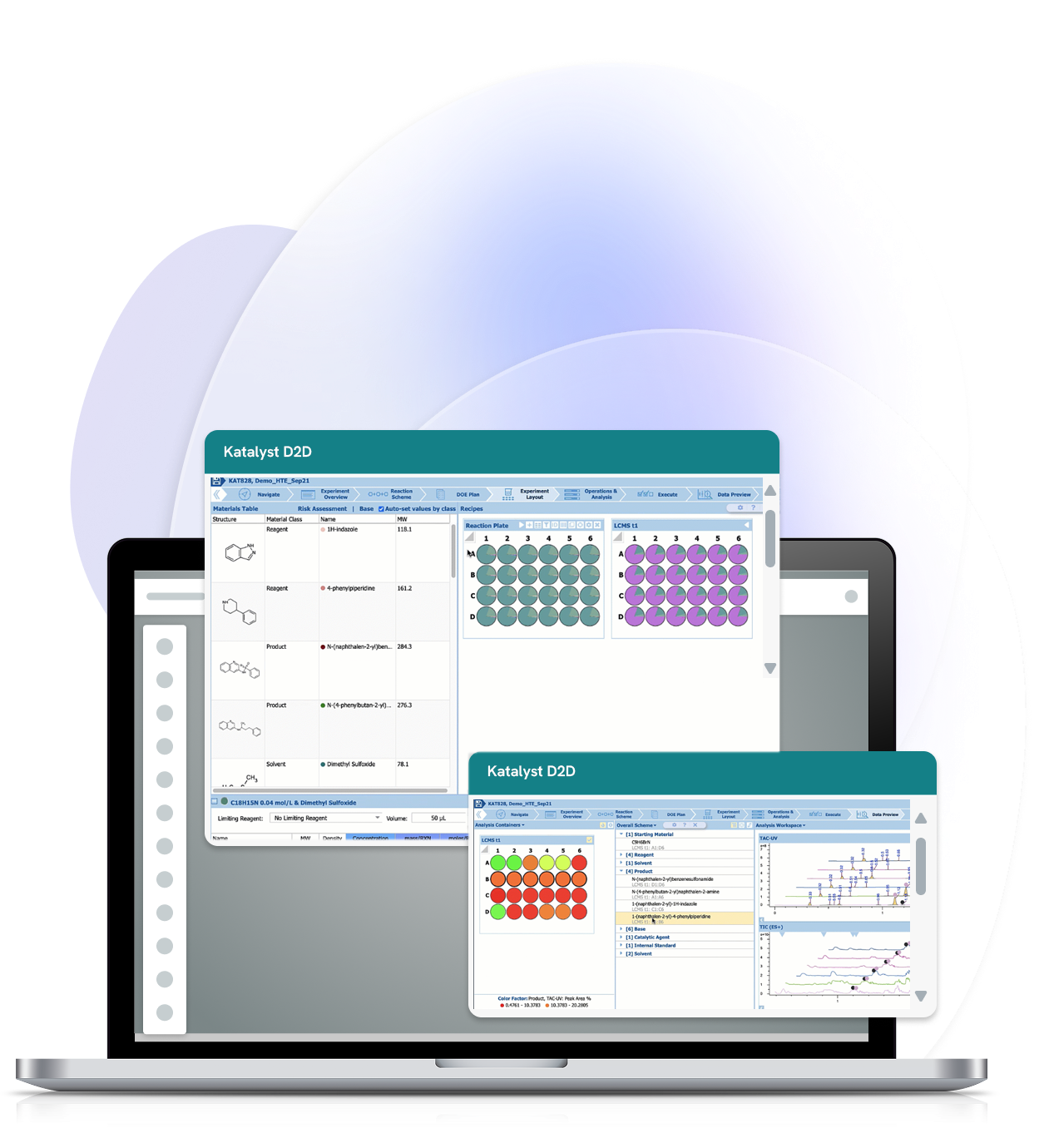
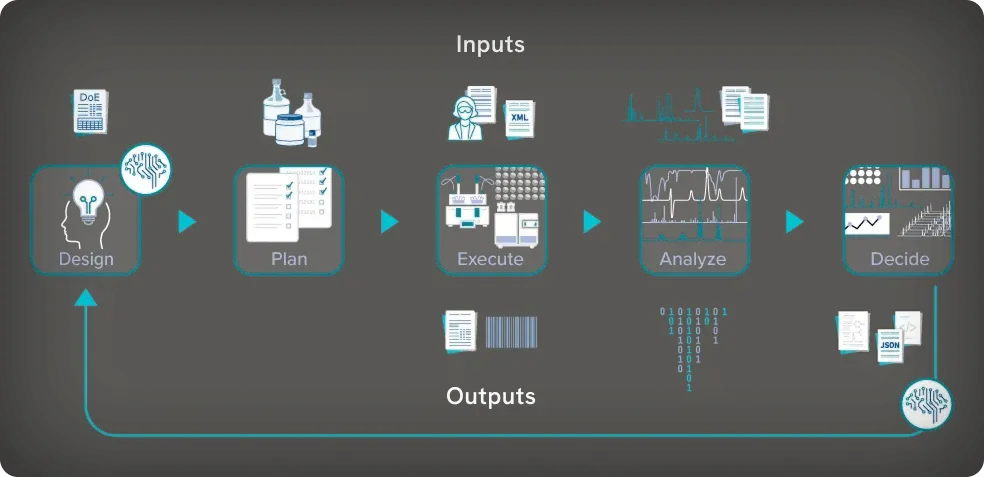
Katalyst D2D® (Design-to-Decide) provides integrated experiment design, planning, execution, and analysis for high-throughput synthesis, process optimization, and preformulation studies.

Execute experiments more efficiently and connect data with decisions across the design-make-test-analyze (DMTA) cycle. Whether you’re optimizing reaction conditions, scaling synthetic routes, or screening solid forms, use Katalyst to:

Manage data across your entire workflow

Support visualization and interpretation of analytical results

Use structured data for decisive decision-making and AI/ML
Streamline Experiments from Design to Decide

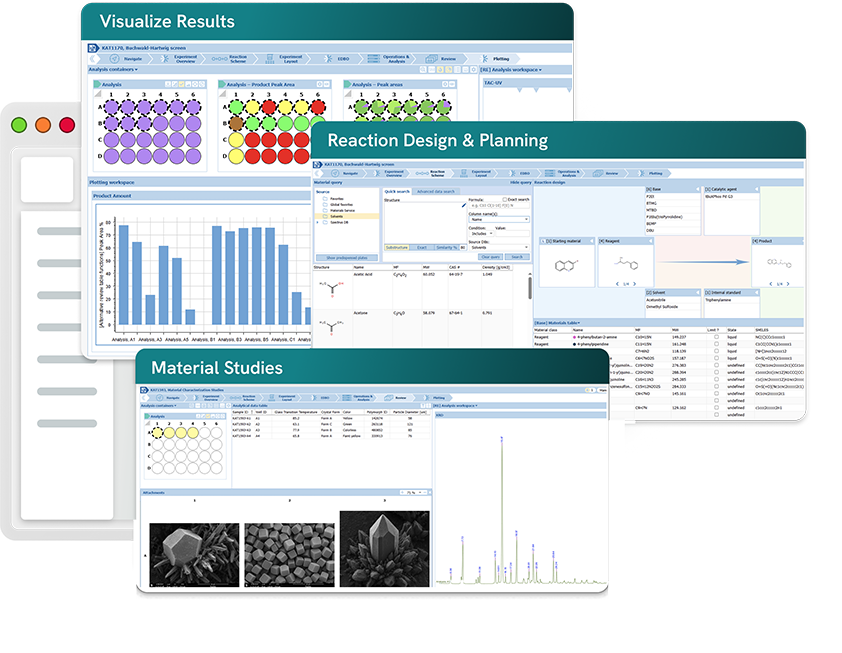
High Throughput Experimentation

 

  • Design, execute, and analyze HT experiments in a single interface.
  • Identify optimal reaction conditions with connected data, automatically assembled in one place.
  • Leverage HT data to accelerate future projects.

Process Chemistry


  • Design, execute, and analyze process optimization and scale-up synthesis in one software.
  • One interface for lab-scale process optimization and pilot-scale workflows.
  • Review automatically assembled real-time and sampling data to identify optimal process scale-up conditions.

Material Studies


  • Design, execute, and analyze diverse material studies in one interface.
  • Auto-assemble critical process parameters (CPPs) and material attributes—solubility, stability, thermal properties etc. for efficient decision-making.
  • Ensure CMC data traceability for regulatory readiness with connected, contextual data.

Benefits

Accelerate Experimental Workflows

Automate Workflows in One Interface

  • Katalyst is purpose-built to support your workflow—whether it is HT experimentation, reaction scale-up, or solid-state characterization.
  • Integrate with your networked hardware, laboratory execution systems, lab automation equipment, analytical instruments, and informatics systems.

Ensure Data Integrity

  • Reduce the risk of error propagation from data transcription between systems.
  • Eliminate manual transcription between the multiple software applications you currently use to design, plan, execute, and analyze experiments.
  • Assure compliance with FAIR and ALCOA+ principles.

AI/ML-Enabled Reaction Design

  • Use integrable third-party AI models to guide design of experiments (DoE) across a wide range of CMC studies including synthetic route optimization, process scale-up, work-up, and crystallization.

Decide Faster with Assembled Results

  • Automatically assemble all your data from entire studies in one application.
  • Reprocess batch analytical data or a selection of datasets in the same interface, no matter the instrument.

Flexible Data Analysis

Visualize experimental results within the Katalyst interface or, because your data is not locked into our environment, export for analysis into your preferred software application.

Leverage Structured Data for AI/ML

Pipeline the volumes of structured data you generate and manage with Katalyst, to ML (machine learning) and AI (artificial intelligence) models.

The Best Choice for Your Whole Team
    Increased Efficiency

    • Reduce time spent assembling, managing, and sharing data
    • Execute experiments quicker with automatic procedure and instrument sampling/worklists
    • Plan HT experiments faster with built-in templates and pre-dispensed plates (kits)

    Seamless Sharing

    • Find and review data for your experiment efficiently with automatic data transfer from all the systems in your workflow, into the Katalyst interface
    • Access data from other experiments of interest, in the same interface. Break free of the instrument lab or office computer to manage your data.
    Product screenshot

    Structured Data

    • Katalyst delivers normalized, structured data that can be readily exported for use in data science applications

    Contextualized Data

    • Connection of data throughout scientific workflows ensures context for meaningful insights and re-usable knowledge

    Product screenshot

    Streamlined Deployment & Maintenance

    • Browser-based software means simpler roll-out, implementation of updates, and maintenance
    • Deploy on-premises or on the cloud (hosted in your environment)
    • Admin tools help you manage the application environment remotely, review problems, and provide resolution steps
       

    Peace of Mind with Supported Integrations

    Katalyst is designed to integrate with instrument hardware, software, and many applications typically used by lab teams. Our professional services and support teams help ensure these integrations continue to operate as intended.
    Product screenshot

    How it Works

    Features of Katalyst D2D

        • Import HT experiment designs created in third-party statistical DoE software (e.g., JMP) or use the integrable AI/ML tools to investigate critical process parameters
        • Drag and drop pre-defined material classes (reagent, catalyst, ligand, solvent, etc.) into the Composite Reaction Scheme to create your high throughput experimental design
        • Save and share experimental designs as templates to speed up future projects
        • Chemically-aware design allows you to draw, import, or search your inventory and registration systems to include specific materials and related material metadata into your design
        • Support for a wide range of plate-based experiment dimensions.
        • Define material dispense locations by array patterns (well, row, column, block, stripe, etc.) and dispense types (single channel pipettes, multi-channel, etc.)
        • Define material dispense amounts by weight, volume, molar, and various referential units (molar equivalents of limiting reagents, etc.)
        • Define equipment-specific and scientist operations (dispense, heat, stir, etc.) for each experiment using a fully configurable operations list
        • Define pre-process, in-process, and post-process sampling times for reaction profiling studies
        • Automated calculation of material amounts for each experiment array. Adjust amounts based on material availability.
        • Fully integrated hazard assessment for all reaction materials, equipment and operations
        • Manual dispensing of materials
          • Generate a report with step-by-step instructions for weighing materials and preparing reagent stock solutions
        • Material dispensing via lab automation/robotics
          • Generate machine-readable files for import into instrument software
          • Send instructions directly to instruments
          • Plan downstream sample preparation for preparative chromatography, registration and inventory, and high throughput analytical data
        • Sampling for analysis
          • Prepare sample lists for analytical instruments
        • Import robot log files
          • After experiment execution via solid and liquid handling robots, import the resulting log file containing the actual dispensed amounts of materials, recorded parameters (temperature, stir rate, pH, etc.), time stamps, and comments
        • Automatically perform targeted analytical data processing
          • Process and analyze data from LC/MS, HPLC, UHPLC, and NMR instruments
          • Native support for >150 instrument vendor data formats including Empower, MassLynx, ChemStation, LabSolutions, and Bruker. Review the list of supported formats
        • Automatically associate results with each respective well in your high throughput experiment
        • Manually reprocess single data sets or batch reprocess entire plates of data on-demand
        • Visualize analytical results linked with the vessel or by well-plate location
        • Compare stacked chromatograms, spectra, and other analytical data
        • Export results to
          • PDF, Microsoft Office Word/Excel/PowerPoint
          • Third-party systems for further data analysis and AI/ML modeling
          • Import experiment designs created in third-party statistical DoE software (e.g., JMP) or use the integrable AI/ML tools to investigate critical process parameters
          • Drag and drop pre-defined material classes (reagent, catalyst, ligand, solvent, etc.) into the Composite Reaction Scheme to create your experimental design for process optimization
          • Save and share experimental designs as templates to speed up future projects
          • Chemically-aware design allows you to draw, import, or search your inventory and registration systems to include specific materials and related material metadata into your design
          • Support for a wide range of experiment dimensions including single-vessel jacketed lab reactors
          • Define material dispense amounts by weight, volume, molar, and various referential units (molar equivalents of limiting reagents, etc.)
          • Define equipment-specific and scientist operations (dispense, heat, stir, etc.) for each experiment using a fully configurable operations list
          • Define pre-process, in-process, and post-process sampling times for reaction profiling studies
          • Fully integrated hazard assessment for all reaction materials, equipment and operations
          • Manual dispensing of materials
            • Generate a report with step-by-step instructions for weighing materials and preparing reagent stock solutions
          • Material dispensing via lab automation/robotics
            • Generate machine-readable files for import into Mettler Toledo iControl software
            • Send instructions directly to instruments
            • Plan downstream sample preparation for preparative chromatography, registration and inventory, and analytical data collection
          • Work-up operations
            • Define and perform work-up steps like filtration, extraction, and recrystallization
          • Sampling for analysis
            • Prepare sample lists for analytical instruments
          • Import robot log files
            • After experiment execution via Mettler Toledo robotic instruments, import the resulting log file containing the actual dispensed amounts of materials, recorded parameters (temperature, stir rate, pH, etc.), time stamps, and comments
          • Automatically perform targeted analytical data processing
            • Process and analyze data from LC/MS, HPLC, UHPLC, and NMR instruments
            • Import processed data and images from IR, Raman, XRPD, and microscopy instruments
            • Native support for >150 instrument vendor data formats including Empower, MassLynx, ChemStation, LabSolutions, and Bruker. Review the list of supported formats
          • Automatically associate results with each reaction vessel in your experiment
          • Manually reprocess single data sets or batch reprocess multiple data sets on-demand
          • Visualize analytical results linked with the vessel
          • Compare stacked chromatograms, spectra, and other analytical data
          • Export results to
            • PDF, Microsoft Office Word/Excel/PowerPoint
            • Third-party systems for further data analysis and AI/ML modeling
            • Import experiment designs created in third-party statistical DoE software (e.g., JMP) or use the integrable AI/ML tools to investigate critical process parameters
            • Drag and drop pre-defined material classes (reagent, catalyst, ligand, solvent, etc.) into the Composite Reaction Scheme to create your experimental material study design
            • Save and share experimental designs as templates to speed up future projects
            • Chemically-aware design allows you to draw, import, or search your inventory and registration systems to include specific materials and related material metadata into your design
            • Support for a wide range of experiment dimensions—from single-vessel jacketed lab reactors to plate-based arrays.
            • Define material-dispense locations by array patterns (well, row, column, block, stripe, etc.) and dispense types (single channel pipettes, multi-channel, vol/time, etc.)
            • Define material dispense amounts by weight, volume, molar, and various referential units (molar equivalents of limiting reagents, etc.)
            • Define equipment-specific and scientist operations (dispense, heat, stir, etc.) for each experiment using a fully configurable operations list
            • Define sampling times for time studies
            • Fully integrated hazard assessment for all reaction materials, equipment and operations
            • Manual dispensing of materials
              • Generate a report with step-by-step instructions for weighing materials and preparing reagent stock solutions
            • Material dispensing via lab automation/robotics
              • Generate machine-readable files for import into instrument software
              • Send instructions directly to instruments
            • Sampling for analysis
              • Prepare sample lists for analytical instruments
            • Import robot log files
              • After experiment execution via robotic instruments, import the resulting log file containing the actual dispensed amounts of materials, recorded parameters (temperature, stir rate, pH, etc.), time stamps, and comments
            • Automatically perform targeted analytical data processing
              • Process and analyze data from LC/MS, HPLC, UHPLC, and NMR instruments
              • Import images and numerical/textual results from solubility, IR, Raman, XRPD, microscopy, Karl Fischer titration, DSC, and TGA studies
              • Native support for >150 instrument vendor data formats including Empower, MassLynx, ChemStation, LabSolutions, and Bruker. Review the list of supported formats
            • Automatically associate results with each vessel in your experiment
            • Manually reprocess single data sets or batch reprocess multiple data sets on-demand
            • Visualize analytical results linked with the vessel or well-plate location
            • Compare stacked chromatograms, spectra, and other analytical data
            • Export results to
              • PDF, Microsoft Office Word/Excel/PowerPoint
              • Third-party systems for further data analysis and AI/ML modeling

            Product  Comparison

            Capability Katalyst D2D Third-Party Analytical Data Software (e.g. Virscidian, MestreLab) Experiment Execution Systems (e.g. ChemSpeed, UnChained Labs)
            Experiment design / reaction planning
            Empty_Bullet.svg
            Half_Bullet.svg
            Workflow execution
            Half_Bullet.svg
            Half_Bullet.svg
            Analytical data processing
            Half_Bullet.svg
            Multi-step workflow continuity
            Half_Bullet.svg
            Half_Bullet.svg
            Hardware integration
            Half_Bullet.svg
            Half_Bullet.svg
            Structured AI-ready data
            Half_Bullet.svg
            Half_Bullet.svg


            Yes     Partial/Limited     No

            Please refer to the Product Comparison Chart to find your best match

            What Our Customers Say About Katalyst D2D

            Quote from Adrian Ramirez Galilea

            “Reaction optimization which would take months is now happening in weeks. Our old bottleneck was analytical data processing; the new bottleneck is manual reagent and reaction prep.”

            Adrian Ramirez Galilea Takeda

            Quote from Kayleigh Mercer

            “Katalyst [D2D] gives us the flexibility to identify the best reaction conditions using the heat map and well-size visualization available, or by creating charts and plots of our own.”

            Kayleigh Mercer GSK

            Quote from Jason Stevens

            “Katalyst D2D provides a robust database and data architecture that allows you to go from an experiment to a data science model very quickly, without the very tedious data cleaning. From a data science perspective, the data goes directly from running the experiment to being written to the database. You can pull that into Python to then do your data science workflows almost seamlessly”

            Jason Stevens Bristol Myers Squibb

            Quote from Kevin Arendt

            “Colleagues not skilled with HTE were able to design a 96-well experiment in less than 5 minutes and get into the lab to run them the same day with Katalyst D2D.”

            Kevin Arendt Bristol Myers Squibb

            Quote from Iulia Strambeanu

            “Katalyst ensures that our HT data is captured correctly for AI/ML purposes. It’s high quality, consistent data—including reaction conditions, yields, side-product formation, and outcomes—that we can use directly to build robust predictive models.”

            Iulia Strambeanu Johnson & Johnson

            Quote from David Battersby

            “Katalyst D2D is a wonderful tool for high throughput chemistry. From initial fabrication of the experiment, to analysis and processing of the data—it keeps everything all in one place.”

            David Battersby GSK

            Compatible with Your Experimentation and Analysis Hardware

            Seamless Integration with Signals Notebook

            Spend less time re-entering information and more time iterating experiments

            • Create your experiment in Signals Notebook
            • Import the experiment into Katalyst D2D
            • Push your experiment back to Signals Notebook for 
              auto-population of sub-experiments, material amounts and yield values

            Remote video URL

            Katalyst D2D FAQs

            Ready to take the next step?

            Talk to our team

            Schedule a consultation with our experts to discuss your workflow, requirements, and implementation needs

            Contact Us

            Take a Tour

            See how Katalyst D2D can transform your experimentation. Unlock the power of streamlined workflows and AI-ready data.

            Request a Demo

            Stay up to date

            Stay up-to-date on all the latest insights, research and product news from Revvity Signals.

            Stay up to date