
Validation Readiness and Deferred Release in Signals

Summary
Signals Notebook and Signals One, offers the choice of two different release cadences for software updates. In this overview, we explain Agile and Deferred Releases within our customers' purchased environments for Signals Standard, Signals E3 and Signals Private Cloud. We also cover where to access documentation that accompanies each release to facilitate validation activities. Additional topics include Changing between Release Cadences and the process of “Dropping Back,” Bug fixes and Minor Releases, Deferred Release and Beta Capabilities, as well as alerts that announce updates. Customers who are early in their deployment such as project leads and those managing regulatory matters will find this information particularly helpful.
Important Terms as used in this document
- Signals Notebook Standard: Customers receive one production tenant and can purchase an additional sandbox tenant.
- Signals Notebook E3: E3 stands for Enhanced Enterprise Edition. Customers receive three tenants: a Sandbox tenant on an environment on Agile Release, and one tenant each on a Staging and a Production environment.
- Signals Notebook Private Cloud: Customers receive seven tenants, one Sandbox, three Staging, and three Production.
- Signals One: A broader solution which includes Signals Notebook. Signals One is offered in a Standard, E3 or Private Cloud models.
- Tenant (production, staging, sandbox): A customer-specific logical separation of data and business rules in a shared environment.
- Environment: A given application containing multiple tenants along with shared services and a shared application layer.
- Application Layer: The code used in a given Environment, shared by all tenants.
- Verification: Testing that occurs during the update process to ensure that the application is working as designed.
- Validation: The process of determining that the application works as needed to support a given customer's desired workflows.
- Major Release: An update to the application that includes functional enhancements. Typically Major Releases involve some system downtime.
- Minor Release: An update to the application that includes resolution of defects. Typically Minor Releases involve no system downtime.
- Scheduled Patch: A minor update where the timing of the update in planned and announced in advance. The contents of the update are determined as needed.
- IQ: Installation Qualification. The documents establishing that the application is correctly installed.
- OQ: Operational Qualification. The documents establishing that the application is operating as intended.
- QA: Quality Assurance. The team and process responsible for establishing that a software application reaches a satisfactory level of quality.
- PQ: Performance Qualification: The documents establishing that the application meets the user's needs and intended use.
Introduction
- Signals Notebook and Signals One are a software application that supports end-to-end experimental and other workflows for scientific research. It comes in various offerings with the choice of two different release cadences for software updates.
- Signals Notebook and Signals One are a multitenant SaaS application. All customers in a given environment share the same application layer, which is a set of databases and services. However customers have separate content storage and configurations. Because updates are made to the application layer, all tenants receive them simultaneously within that environment.A dashboard, where a user can see their recently edited and favorited documents and be able to create documents from stylesheets.
Product Offerings: Signals
- Signals Notebook and Signals One are available in one of three product offerings: Standard Edition, Enhanced Enterprise Edition (E3), or Private Cloud. Table 1 outlines the main features of each. The application is fundamentally the same between the three offerings, however, the number of tenants, the location of those tenants in environments, and the cadence of update deployment differ.
-
Signals One consists of a broader solution of capabilities which includes Signals Notebook. The Signals Notebook capability within Signals One is validation-ready and fully detailed in this document. Our Data Intelligence capability is not covered in this document.
|
Table 1. Main Features and Release Cadences |
|||
|---|---|---|---|
|
Signals Edition |
Standard Edition |
Enhanced Enterprise Edition (E3) |
Private Cloud |
|
Packaging |
Dedicated SKU |
Dedicated SKU |
Dedicated SKU |
|
Configurable Business Rules |
Yes |
Yes |
Yes |
|
Data Isolation |
Yes |
Yes |
Yes |
|
Application Deployment |
Shared |
Shared |
Isolated |
|
Provisioned Tenants |
1 Production (additional Sandbox for purchase) |
1 Sandbox |
1 Sandbox |
|
Release Cadence, Update Frequency |
Agile, when ready |
Sandbox – Agile, when ready. |
Sandbox – Agile, when ready. |
|
Validation Ready (IQ, OQ, Go Live & Ongoing) |
No |
Yes |
Available |
|
Possible Changes to Release Cadence |
No |
No |
Yes, can change from Agile to Deferred at specific times (3x per year) |
|
Can decline updates |
No |
No |
No |
Release Cadences
As shown in Table 1, updates to the Signals Notebook and Signals One environments are released on either Agile or Deferred cadences, depending on which environment and product offering the customer purchases.
Signals Standard:
These customers receive a single Production tenant. (Customers can choose to purchase as many additional tenants as needed.) The environments are updated on an Agile Release cadence whenever new capabilities are built and ready for release. This means that releases don’t take place on a strictly regular schedule. Major releases typically occur four to six weeks apart, with approximately ten major releases per year. There may be additional minor releases in between, where minor releases only address defects and don’t deliver new capabilities.
We schedule major releases on weekends during non-core hours for the majority of users in that environment. They usually take three to six hours to complete. An alert in the application announces system downtime for the major releases, approximately three days in advance.
The What’s New webpage describes functional enhancements for the major releases, posted around the time of the update. Minor releases usually require no system downtime.
Signals E3:
These customers receive three tenants, all updated at different staggered times.
The first tenant is known as a Sandbox tenant. This is set up on one of the same shared environments that we use for Signals Standard customers. As described above, this tenant is also updated on the Agile cadence and provides the first access to upcoming capabilities. The Sandbox tenant is normally used to determine the utility of a given capability and to plan any validation activities related to implementing that feature.
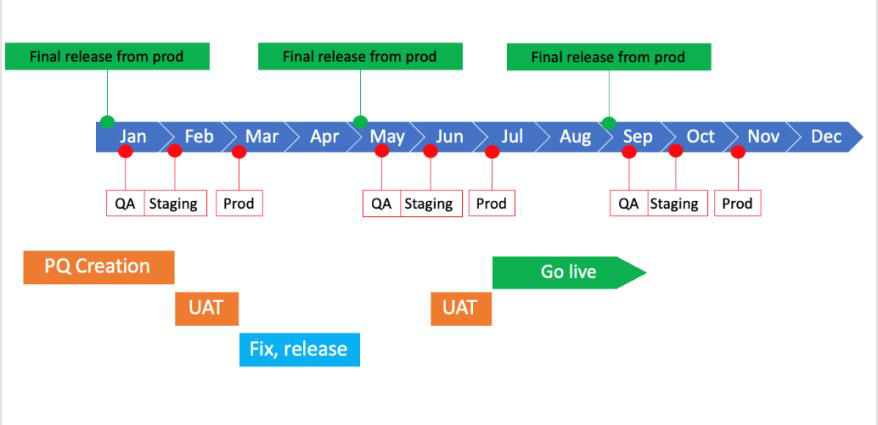
The second tenant is a Staging tenant. This is set up on a shared “Staging” environment, updated on a Deferred Release cadence. These environments are updated three times per year, at the beginning of February, June and October. They combine all updates made to the Sandbox tenant via the Agile release during a four-month period, from approximately one to five months prior to their release on the Staging tenant. This tenant is used to execute the activities needed to take the validation-ready offering to a fully validated state.
The third tenant is the Production tenant, used by all of an organization’s end users. This tenant is set up on a shared Production environment and updated on the Deferred Release cadence, one month after the Staging environment. Updates occur on this environment at the beginning of March, July, and November, the months between the Staging and Production environment updates. This allows the completion of the validation activities so the Production tenant remains validated.
Private Cloud:
These customers are the only customers who can chose their release cadence, and potentially change between the two offered. Customers receive two dedicated environments and seven tenants.
The first tenant is a Sandbox tenant, which is set up on one of the environments also used for Signals Standard. This tenant is updated on the Agile release cadence.
Three tenants are set up on a Staging environment. This is for the exclusive use of that customer and is not shared. The tenants are named Dev, QA, and Pre-Prod to indicate assumed usage, although Private Cloud customers are free to use these tenants as needed for preproduction activities.
Three other tenants are set up in a Production environment, which is also for the exclusive use of that customer. The tenants are named Dev, QA, and Prod to indicate assumed usage. In this Production environment, the Prod tenant is licensed for the appropriate number of users and is intended for production usage. The Dev and QA tenants can be used as needed. If additional Production tenants are required, the licenses can be distributed between them. Additional non production tenants can also be created as needed.
Although the update cadence for the Sandbox tenant is set, update cadences for the Staging and Production environments can be either Agile or Deferred Release as described in the section Changing Between Release Cadences below.
Verification
Validation:
Software validation is the process of establishing documented evidence that confirms a computer system has been installed correctly and will meet the user's needs and functions according to its intended use. Each validation process varies depending on the actual end user workflows implemented via the application, as well as the customer Master Validation which outlines what the customer will and won’t do based on their risk/benefit analysis.
Signals Notebook and Signals Notebook within Signals One comes Validation Ready. This assumes that the customer will verify that the application is suitably configured to support their specific workflows.
Updates to Staging and Production Environments:
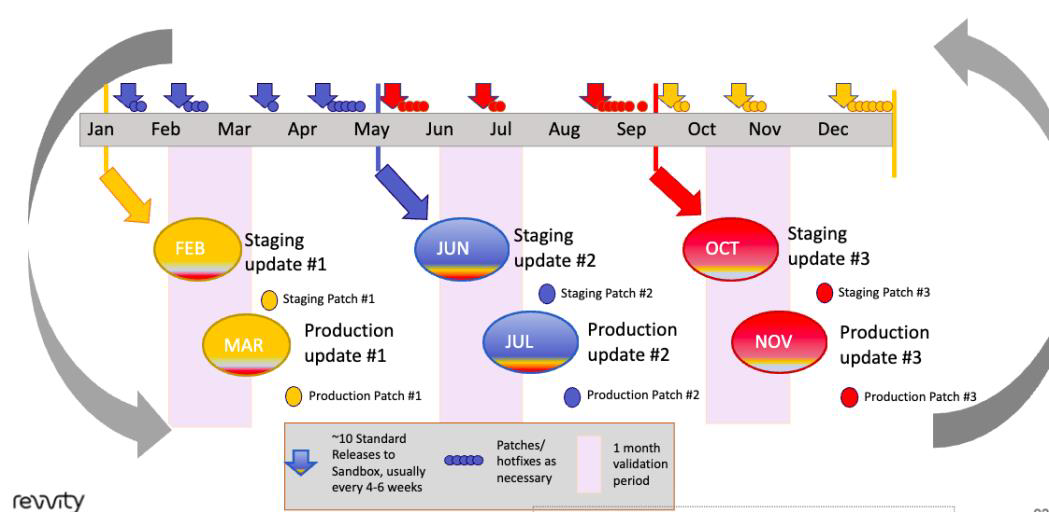
As shown in Figure 1, the precise dates for updates to the Staging and Production environments are predictable and announced up to nine months in advance. Updates to the Staging environments occur on the first Fridays of February, June and October. Updates to the Production environments occur on the first Saturdays of March, July and November, except when this falls on a major US public holiday such as the July 4th weekend. Scheduled patch updates to Staging environments occur approximately 3 weeks after the Production update, with the patch update to Production following approximately 1 week later. Scheduled patches contain approved issues for immediate resolution. If no issues exist, no scheduled patch will be delivered. This will be communicated via the Support News Feed.
Major vs. Minor Releases:
A major release contains both functional enhancements and some bug fixes. A minor release contains only bug fixes that are too critical to wait until the next major release. A given Deferred Release includes all major releases deployed via the Agile release over a four-month period, plus any minor releases made to the final major release of that cycle. Updates to Staging and Production environments contain all the major releases, occuring as follows:
- June and July from January 1st until April 30th
- October and November from May 1st until Aug 31st
- February and March from September 1st until December 31st
An in-application alert announces updates, usually a few days in advance. Although updates to Staging environments may occur within core working hours, updates to Production environments occur on weekends out of core hours for the majority of users, and are normally completed within the same day.
Updates to all Deferred Release environments take place within the same period. There is no ability to opt out of any given update. There is no ability to opt out of scheduled patch updates if there are critical defects that impact common customer workflows. If there are no reported defects, the scheduled patch update will be skipped in the deferred release cycle.
Updates to Sandbox Tenant:
Fully utilizing the Sandbox tenant yields the highest success for verification projects. This provides access to the most up-to-date releases. It also allows optimum planning of the verification activities that occur on the Staging tenant once that is updated in the month prior to the update for the Production tenant.
The Sandbox tenant delivered to E3 customers is located in one of the environments used for Signals Notebook or Signals One customers, and is updated on our Agile Release cadence. Although Agile releases occur when ready, there are typically ten standard releases to the Sandbox tenant per year, occurring approximately every four to six weeks. This is also shown in Figure 1. Therefore, this Sandbox tenant gives validation-ready customers access to upcoming functionality around two to six months prior to that functionality’s release on their Deferred Release production tenant.
The What’s New webpage, updated around the time of the Sandbox tenant update, explains functional enhancements for major releases. These changes are consolidated into a Release Notes document, provided when the Staging environment is updated, as explained in more detail in the Documentation section below.
Changing Between Release Cadences
Private Cloud customers can choose either the Agile or Deferred Release cadence.
Because updates are made to the application layer at the environment level, all tenants on the environment receive the same update simultaneously. With the exception of those on Private Cloud Staging and Production environments, these tenants are licenced across multiple customers. Once a given tenant is created on a given environment it can’t be moved to a different environment. Therefore, Signals Standard or E3 customers can’t change the release cadence once the tenant has been created.
However, Private Cloud customers can choose to change the release cadence. Often, they might initially deploy on the Agile Release cadence to take advantage of the earliest access to functional enhancements. Then, as an organization increases its need to validate their application, they may choose to “Drop Back” to the Deferred Release.
Dropping Back involves pausing deployment of major releases until the Deferred Release has caught up. Therefore, there are three opportunities to Drop Back per year - at the end of April, August or December. Once the customer decides to Drop Back, we deploy the final major version until the end of April, August or December. In addition, we deploy any minor releases that are applied tothat version. We then pause delivery of updates until the next new Deferred Release for that environment. This would occur approximately seven months later, at the beginning of November, March or July, respectively. If the customer decides to change after the next major update deploys, we are not able to Drop Back until the next of these three opportunities.
Regardless of how and when a customer chooses to drop back, this should always be planned in close coordination with the Revvity Signals team.
The same is true for Private Cloud customers who wish to “Jump Forward" and change back from the Deferred to the Agile release. This, too, requires close coordination with Revvity Signals along with dedicated testing activities. Although possible, jumping forward is highly unusual and may incur additional expenses.
Deferred Release Documentation
Signals E3 or Private Cloud customers receive a series of documents to facilitate their validation activities for every release:
- The What's New webpage adds descriptions of new functionality whenever the Sandbox tenant is updated. This content provides the best opportunity to fully plan validation activities, and gives approximately two to six months advance notice of features anticipated for the Deferred Release.
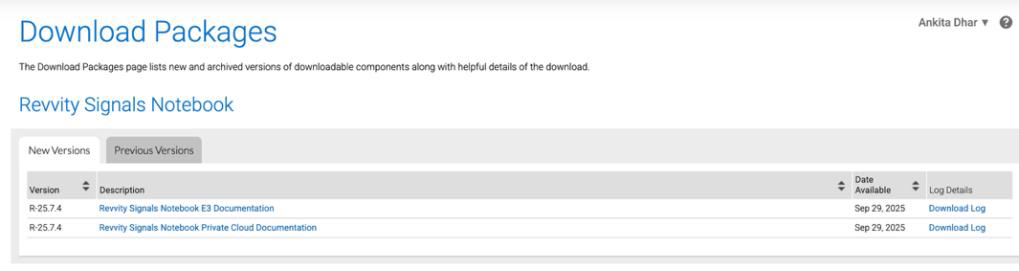
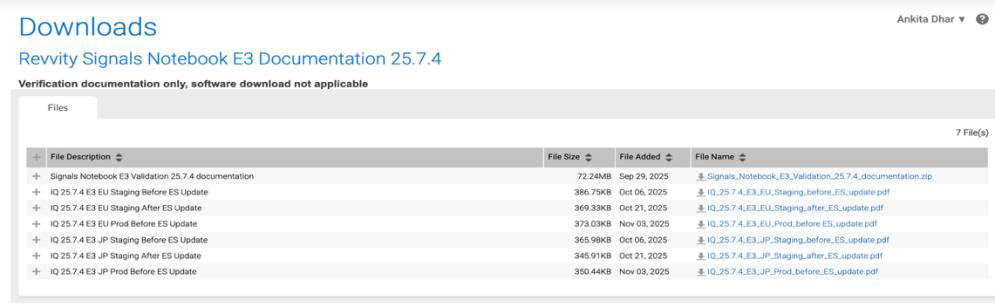
- Delta Validation documents are delivered in every release as a single zip file (Table 2), available to the primary contact for the order via Flexera. We publish this file around the time that the Staging environment is updated. We make every effort to provide these documents one or two days prior to the update. (Our Fulfillment organization manages contact information. Please make changes to your contact through your account manager.)
- Initial validation documents and historical delta documentation are also available under Previous Versions. (See Table 2 and Figures 2 and 3 for information on downloading documents.) Revvity Signals Software Support supports this software. Please contact your Sales or Services representative for more information about ChemOffice v23.0. This document is intended for general use with Revvity ChemDraw Suite 23.0 customers.
-
Scheduled Patch updates will include a Patch Summary Report, IQ, and Validation Certification. The Patch Summary Report will list descriptions of the critical defects that are included in the patch. Patch documentation will be shared via Flexera. Communication regarding scheduled patch releases, skipped patches, and other patch updates will be provided to customers via the Support News feed and through CSM teams near the deferred release patch deployment dates.
|
Table 2. Documents Available for Customer Download For Signals E3 or Private Cloud |
|||
|---|---|---|---|
|
Validation_x.y.z_Documentation Zip File |
|||
|
Folder |
Contents |
Naming Format |
Details |
|
Reports |
OQ test results |
“OQ Reports” folder |
|
|
Validation Summary Report |
“Validation_Summary_Report_x.y.z.pdf” |
||
|
Verification Summary Report |
“Verification_Summary_Report-_x.y.z.pdf” |
||
|
Release Notes |
IQ |
“IQ_x.y.z._E3_QA.pdf” |
|
|
Signals Validation |
“Signals Validation x.y.z.pdf” |
|
|
|
What’s New website content |
“Signals x.y (MonthYYY).pdf” |
||
|
Validation Certificate |
“Validation Certificate x.y.z.pdf” |
||
|
Patch_x.y.z_ Zip File |
|||
|
Patch Documentation Package |
Patch Summary Report |
“Patch_Summary_Report_x.y.z.pdf” |
|
|
IQ Test Results |
“IQ_x.y.z._E3_QA.pdf” |
||
|
Validation Certification |
“Validation Certificate x.y.z.pdf” |
||
Example Documents In Validation_x.y.z_Documentation Zip File (See Table 2)
- A folder named in this format: “Reports” contains:
- OQ test results, in a folder named in this format: “OQ_Results.pdf”
- A Validation Summary Report, in a document named in this format: “Validation_Summary_Report_x.y.z.pdf”
- A Verification Summary Report, in a document named in this format: “Verification_Summary_Report x.y.z.pdf”
- An IQ report for the QA system named “IQ_x.y.z._E3_QA.pdf”
- A folder named in this format: “Release Notes” contains:
- Release Notes in a document named in this format: “Signals Validation x.y.z.pdf”. The Release Notes provide a summary of the What’s New webpage content referenced above. The document also describes any exceptions, such as “beta” or other features not applicable to E3 or Private Cloud customers. In addition, the document lists any key issues resolved in the release, which are included in the associated Agile Releases, as well as any key issues known and still existing at the time of the document’s publication. The document also lists planned dates for upcoming releases.
- Copies of the associated What’s New website content covered by the release, in multiple Documents named in this format: “Signals Notebook x.y (Month YYYY).pdf”
- The Validation Certificate, a document named “Validation Certificate x.y.z.pdf”
Example Documents In Patch_x.y.z Zip File
- Patch Summary Report x.y.z.pdf
- IQ_x.y.z_E3_QA.pdf
- Validation Certification x.y.z.pdf
IQ Documentation:
We also provide environment-specific IQ documentation for each Staging and Production environment. IQ documentation can only be created after updates to a particular environment. Each customer receives different documents depending on their access to various environments. Therefore, delivery of IQ documents differs by product offering purchased, as shown in Table 3.
|
Table 3. Delivery of IQ Documents For The Three Environments |
|||
|---|---|---|---|
|
Environment |
Time Delivered |
Offering |
Location |
|
Staging Environment |
Shortly after completing update to Staging Environments |
Signals Notebook E3 or Signals One E3 |
Via update to the Download Packages in Flexera |
|
Signals Notebook Private Cloud or Signals One Private Cloud |
Via your Customer Success Manager |
||
|
Production Environment |
Shortly after completing update to Production Environments |
Signals Notebook E3 or Signals One E3 |
Via update to the Download Packages in Flexera |
|
Signals Notebook Private Cloud or Signals One Private Cloud |
Via your Customer Success Manager |
||
Delivery of IQ Documents for the Three Environments (See Table 3)
- QA Environment: The IQ document for the update to the QA environment is provided in the initial documentation package provided prior to the update to the Staging environments.
- Staging Environment: The IQ document for the update to the Staging environment is provided shortly after the completed update to the Staging environments. For E3 customers, this is provided via an update to the Download packages in Flexera. Because there are multiple Staging environments, customers should take care to choose the document relevant to them. For Signals Private Cloud customers, this document is delivered via your Customer Success Manager.
- Production Environment: The IQ document for the update to the Production environment is provided shortly after the completed update to the Production environments. For E3 customers, this is provided via an update to the Download packages in Flexera. Because there are multiple Staging environments, customers should take care to choose the document relevant to them. For Signals Private Cloud customers, this document is delivered via your Customer Success Manager.
Other Documentation
Signals Notebook is covered under the requirements of 21CFR11, the FDA guidelines for electronic Records and Signatures. An explanation of how Signals supports the various requirements of 21CFR11 Is available through your Account Manager.
Evidence supporting tenant creation, for use in customer PQ documentation, can be obtained through the Account Manager, Professional Services lead working directly with the customer, or Revvity Signals Support.
Security Updates and Other Non-Release Activities
Signals environments are kept up to date with the latest security updates. Since our Agile Release environments update frequently, we make security updates concurrently for those environments. We schedule monthly security updates for our Deferred Release environments to stay current with the latest security guidance. These security updates only impact the environment infrastructure and do not include changes to the application layer. The updates normally require little downtime. An in-application alert announces any downtime a few days ahead of the update.
If needed, Revvity Signals reserves the right to deploy security updates without prior notice.
Deferred Release and Defect Resolution
Quality is a top priority for Signals Notebook and Signals One. An advantage for customers on environments with Deferred Release is that the deployed capabilities have been available in Production to our Signals Standard customers for up to six months. This provides deep user acceptance testing of any new feature across a significantly large and diverse user population. Furthermore, all deferred release customers have access to the Standard releases in the Sandbox environment for up to six months. Deferred release customers are encouraged to leverage that extended timeline to plan and begin testing prior to the official deferred release in their Staging environment. Therefore it’s much less likely to discover significant issues in the Deferred Release than in the Agile release cadence.
A given release of Standard contains both functional enhancements and bug fixes. Figure 4 illustrates an example of a bug fix when moving to production rollout for a deferred release customer. We classify bugs on their priority and severity, based on various factors such as: if they are a regression, what the propensity is for irretrievable changes to data, and what the overall impact is across all customers. Only the most critical issues are considered for inclusion in a minor release. Virtually all bug fixes are initially deployed via the Agile release.
These then become available in the Deferred Release of the next available scheduled update.
Because the majority of issues are resolved first on our Agile release cadence, it’s helpful for customers on our Deferred Release cadence to test and promptly report important issues in their Sandbox tenants. This allows us time to resolve the issue prior to completing the final Deferred Release candidate. Our large userbase reporting such issues greatly helps. However, when a feature or workflow may be more bespoke, or used less frequently, prompt notification from any of those customers becomes even more critical.
When we identify severe issues, we have the capability to deliver off-cycle fixes through minor releases to our Deferred Release track. However, we carefully evaluate each situation since these updates require extensive re-verification to ensure continued reliability for all customers using this release path.
Given that majority of our customers are on the Agile release cycle—which includes frequent updates and improvements—critical issues are typically identified and resolved quickly through our standard process. We reserve special Deferred Release updates for only the most exceptional circumstances where immediate action is essential for customer operations.
These processes are reserved only for issues that broadly prevent the application from full and normal operation for most users and lack a reasonable workaround. The one exception would be if a breaking change occurred in a third-party application that caused a new issue, which applied equally to all users across release cadences. One such example happened when a breaking change in Google Chrome would have prevented users from viewing content. Although customer input is always welcome, the final decision to resolve a given issue out of our normal update cycles is made by the Revvity Signals team.
In our deferred release cycle, we also have a scheduled patch process for bugs identified by customers that are critical and impact common customer workflows. These bugs must be deemed critical by customers with no viable workaround, generally require no downtime, and result in a failed PQ test case. Critical bugs must also be deemed as low-risk for the Production deployment.
This scheduled patch process will ensure that critical bug fixes are delivered to customers in a controlled, validated manner while minimizing disruption to Production environments. This process assumes that the defect was identified late-stage in the customer PQ cycle on their Staging system, or immediately after the Production upgrade. These patches will only be deployed IF there are critical issues to address. If no critical issues are identified, a patch will not be deployed and this process will be skipped until the next deferred release cycle.
The diagram below details the process for escalating critical bugs to your Customer Success Manager (CSM) or Support representative. Please ‘follow’ the Deferred Release Announcement support channel here to receive updates.
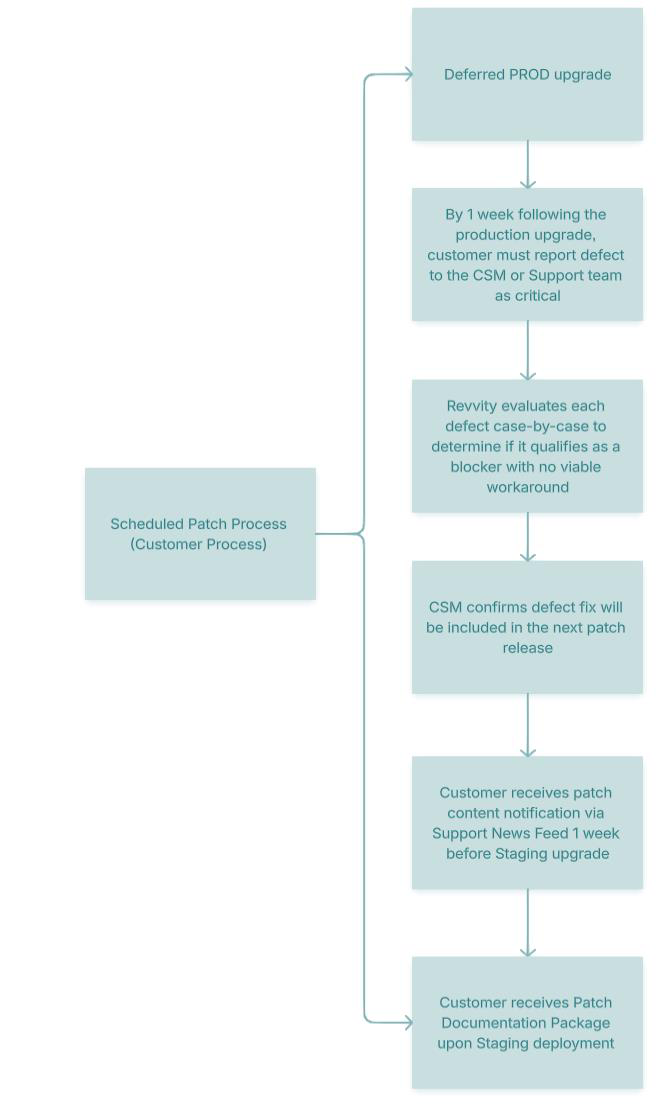
There will be three patch windows per year one month after each deferred release deployment. The patch will be released in Staging environments one week prior to PROD environments to allow for a customer’s risk assessment. If a patch is deployed, customers will receive Patch Documentation Package with a Patch Summary Report, IQ documentation, and a Validation Certificate via Flexera. Patch communication regarding patch releases, skipped patches, and other patch updates will be shared to customers via the Support News feed near the patch deployment date.
Beta Functionality
When building larger sets of functionalities, we may release capabilities as beta. For a beta capability we update the application layer used by all tenants with the relevant changes. However, we manage a “flag” that determines if the given feature is exposed to the tenant administrators or users via the graphical interface. We assign the designation of “beta” to a given set of functionalities, allowing us to first, gather more interactive end-user feedback, second, sequentially deliver functionality within the master set, and third, focus on initially releasing important functionality while tolerating known defects until a later release.
Signals Standard customers are welcome to request a beta feature on any Production or non-production tenant, although we may recommend against enabling it on a Production tenant. The same is true for Signals Private Cloud customers if their environments are utilizing our Agile Release cadence.
Once activated, a beta feature cannot be deactivated. However, the feature will eventually be designated as a general release and available to all tenants.
We do not enable beta capabilities for environments on our Deferred Release cadence. Signals E3 and Private Cloud customers, with environments using this cadence, can request enabling of beta capabilities on their Sandbox tenant, but not any Staging or Production tenants. Private Cloud customers, where the environments are on our Agile release, should be careful about activating beta features if they plan to drop back to our deferred release. We do not drop back environments where any tenant has an activated beta feature.
End-to-end workflow support across scientific disciplines.
Intuitive data capture and collaboration with self-service integration.
Turning drawings and ideas into knowledge.

End-to-end workflow support across scientific disciplines.

The Standard for Chemical Drawing.

End-to-end Clinical Data Science Platform.