Search

Your Notifications (0)

There are currently no notifications. You're all set!

What's New

Explore recent and historical product updates for Revvity Signals' Cloud Native SaaS Software 

Collapse All

21 releases — this page expanded. Collapse


What’s New

We're delighted to introduce ChemDraw Desktop 26.1, which delivers enhancements that improve security, administrative flexibility, and chemistry workflows. This release adds support for modern authentication standards, expanded deployment controls for administrators, and improvements to structure naming and editing capabilities. We have also addressed several bugs and usability issues to provide a more seamless experience.

ChemDraw Desktop

  • Authentication & Administration Improvements 
  • Chemistry & Drawing Improvements

ChemDraw Desktop

Authentication & Administration Improvements

Administrators can now disable automatic updates for ChemDraw Desktop deployments. This provides greater control over software rollout and validation processes in regulated or managed IT environments. Configuration options are available for both Windows and macOS deployments.

ChemDraw for Excel now prompts users to sign in only when ChemDraw functionality is accessed. Previously, users were prompted to authenticate whenever Excel was launched with the add-in installed.

Signals ChemDraw now supports Proof Key for Code Exchange (PKCE) authentication when signing into Signals. This enhancement improves compatibility with modern authentication standards and organizational security requirements.

Chemistry & Drawing Improvements
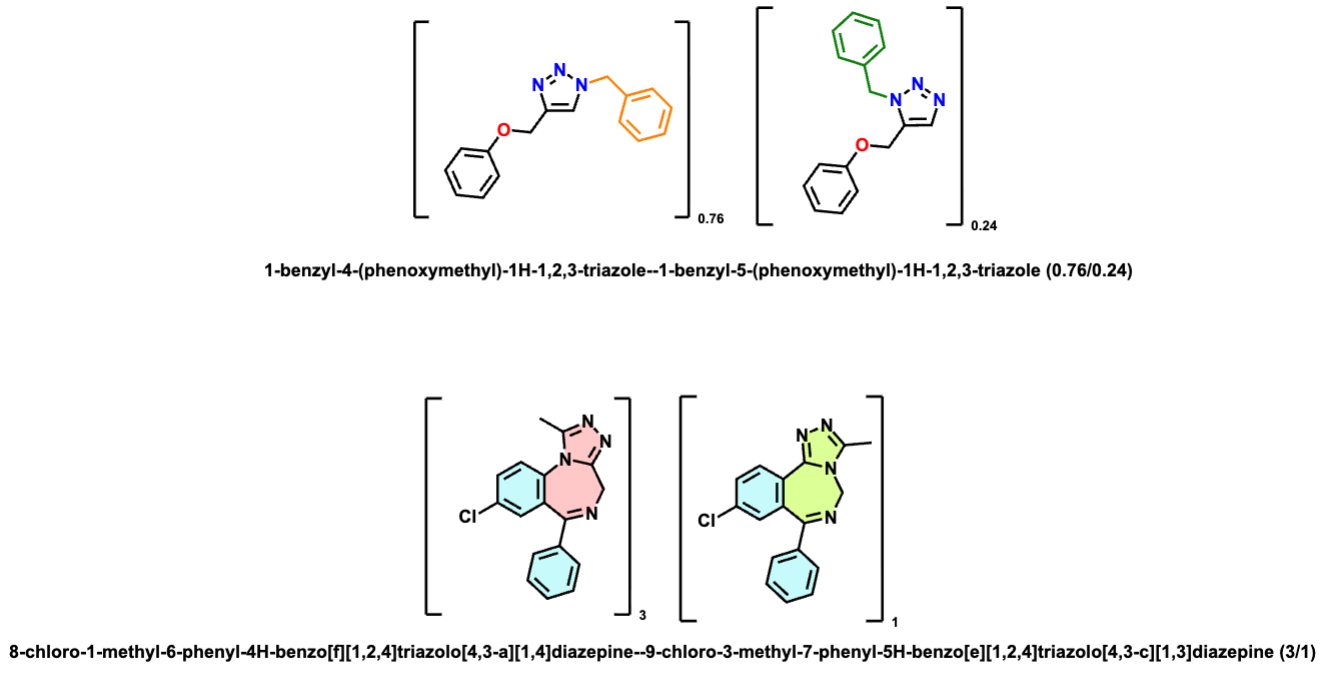
Image 1 from 26.1 ChemDraw Desktop September 2026.docx

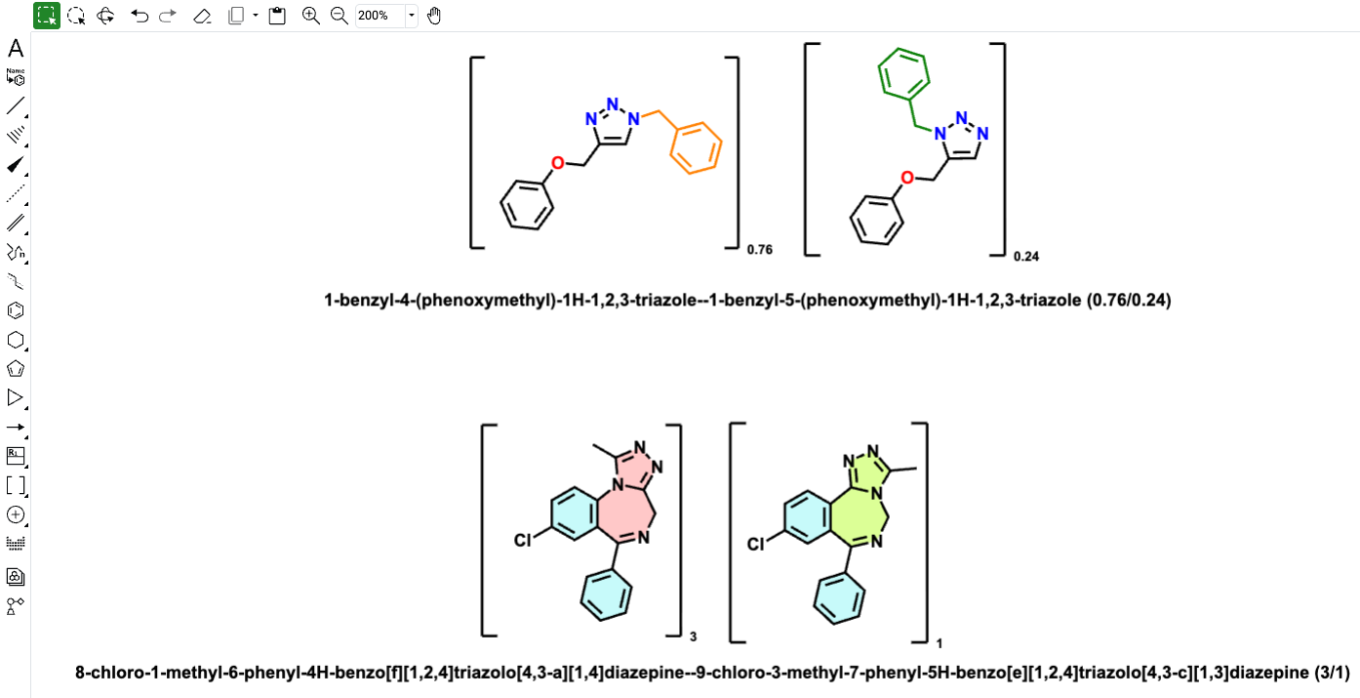
ChemDraw naming capabilities have been expanded to support mixtures containing non-integral component ratios. This improves handling of chemically relevant mixtures and generates more accurate nomenclature for these structures.
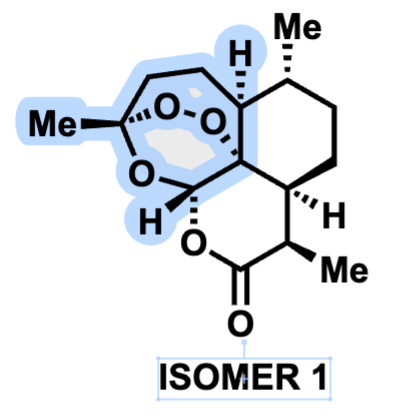
Image 2 from 26.1 ChemDraw Desktop September 2026.docx

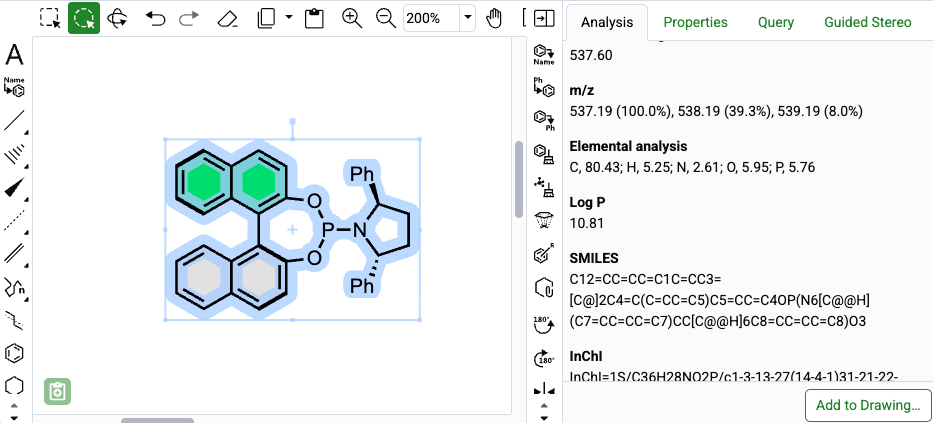
When a structure contains an attached data label, selecting the label now automatically highlights the atoms associated with that label. This makes it easier to identify the portion of the structure represented by the selected data.
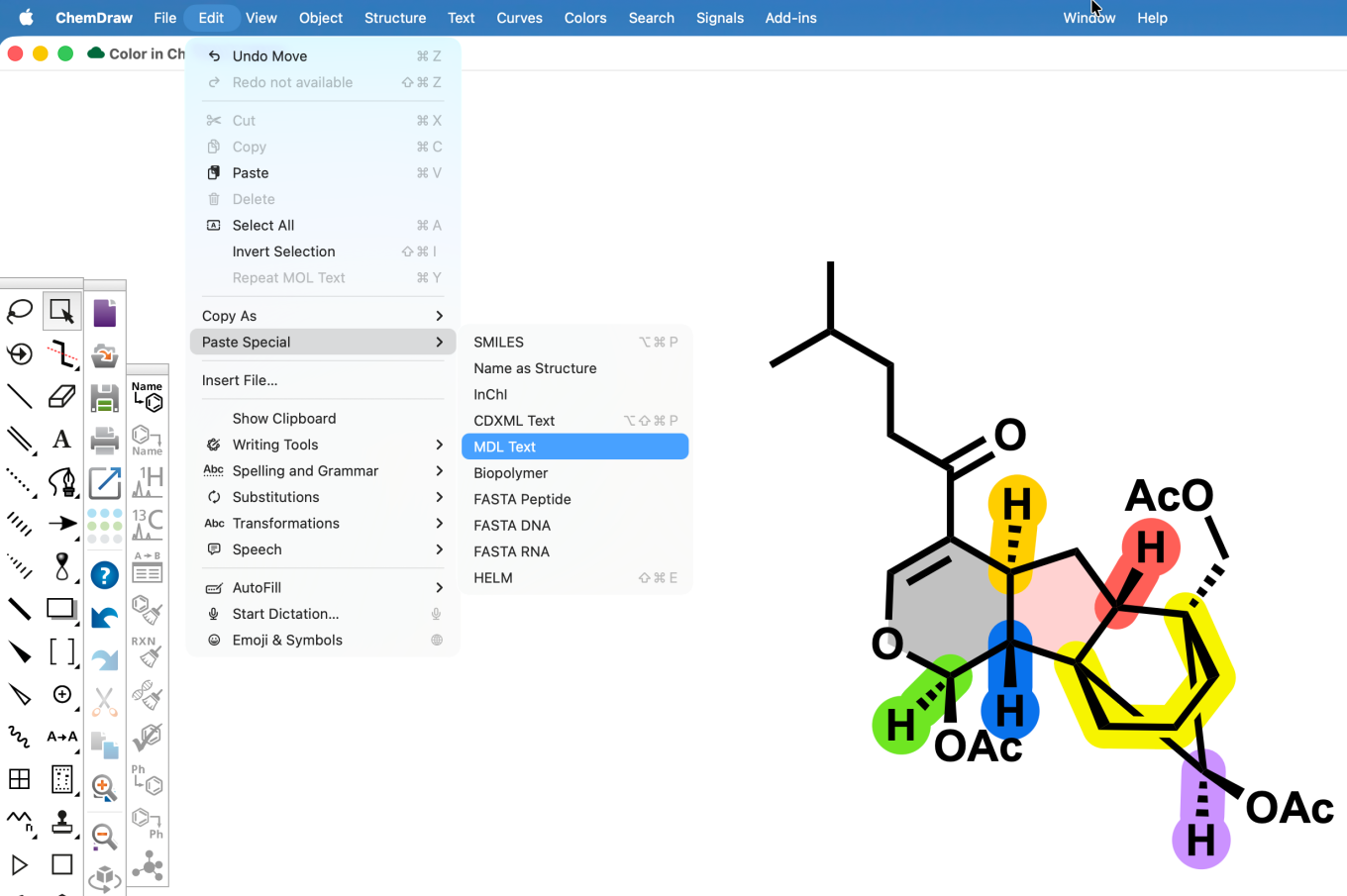
Image 3 from 26.1 ChemDraw Desktop September 2026.docx

The Edit > Paste Special menu has been updated to provide separate options for CDXML Text and MDL Text. Previously, both formats were combined into a single menu item. The existing keyboard shortcut remains associated with CDXML Text, while MDL Text is available as a separate option.
What’s New

This latest Signals release includes updates to ChemDraw+. Highlights include coloring by element and updates to naming of mixtures. This release also includes bug fixes.

The following improvements are available for users of Signals ChemDraw. Certain features may only be available with enablement by an administrator.

ChemDraw+

  • Color by element
  • Naming of mixtures now reflects component ratios

ChemDraw +

Color by element

Selected chemical objects can now be colored by element from the Properties panel. ChemDraw+ applies a standard element color palette to the selected structure. If required, individual object colors can still be adjusted using the Properties panel for additional customization.

Naming of mixtures now reflects component ratios

Image 1 from Signals ChemDraw What's New 26.7_Sept_2026.docx

Generated names for grouped mixtures now reflect assigned component ratios more clearly. When a mixture name is regenerated, whole-number and fractional ratios are preserved so the composition is represented more accurately.

What’s New

This latest Signals release includes updates to ChemDraw+. Highlights include a streamlined ability to create reactions on the canvas. This release also includes bug fixes.

The following improvements are available for users of Signals ChemDraw. Certain features may only be available with enablement by an administrator.

ChemDraw+

  • Streamlined reaction creation

ChemDraw+

Streamlined reaction creation

A new streamlined reaction arrow workflow is now available, which facilitates quick addition of reaction conditions and reagents when drawing reactions via shortcut keys (Ctrl/Cmd + Arrow). When used while drawing a reaction, it automatically generates aligned placeholder text boxes above and below (or beside) the reaction arrow, allowing users to seamlessly enter multi-line text and navigate between fields using Ctrl/Cmd + Enter. The text boxes dynamically adjust and maintain proper spacing relative to the arrow, ensuring reaction conditions stay cleanly formatted and associated with the reaction.

What’s New

We’re delighted to introduce new enhancements that improve accuracy, performance, and flexibility in version 26.0 of ChemDraw Desktop. This release focuses on more efficient chemical property calculations, expanded HELM rendering capabilities, updated atomic standards, and extended Python support. We have also addressed several bugs to ensure a smoother experience.

ChemDraw Desktop

  • Chemistry Improvements
  • Advanced Biopolymer (HELM) Improvements
  • Extended Python Support

Chemdraw Desktop

Chemistry Improvements

Image 1 from 26.0 ChemDraw Desktop May 2026.docx

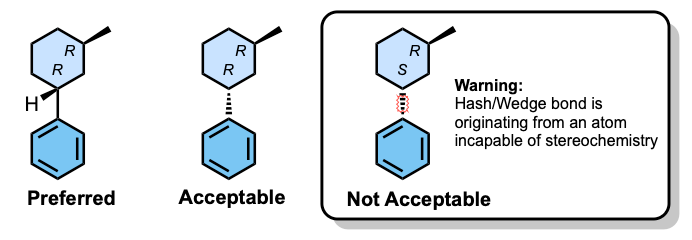
A stereochemical warning is now shown when a stereo bond originates from a non-stereo atom, improving structural validation.

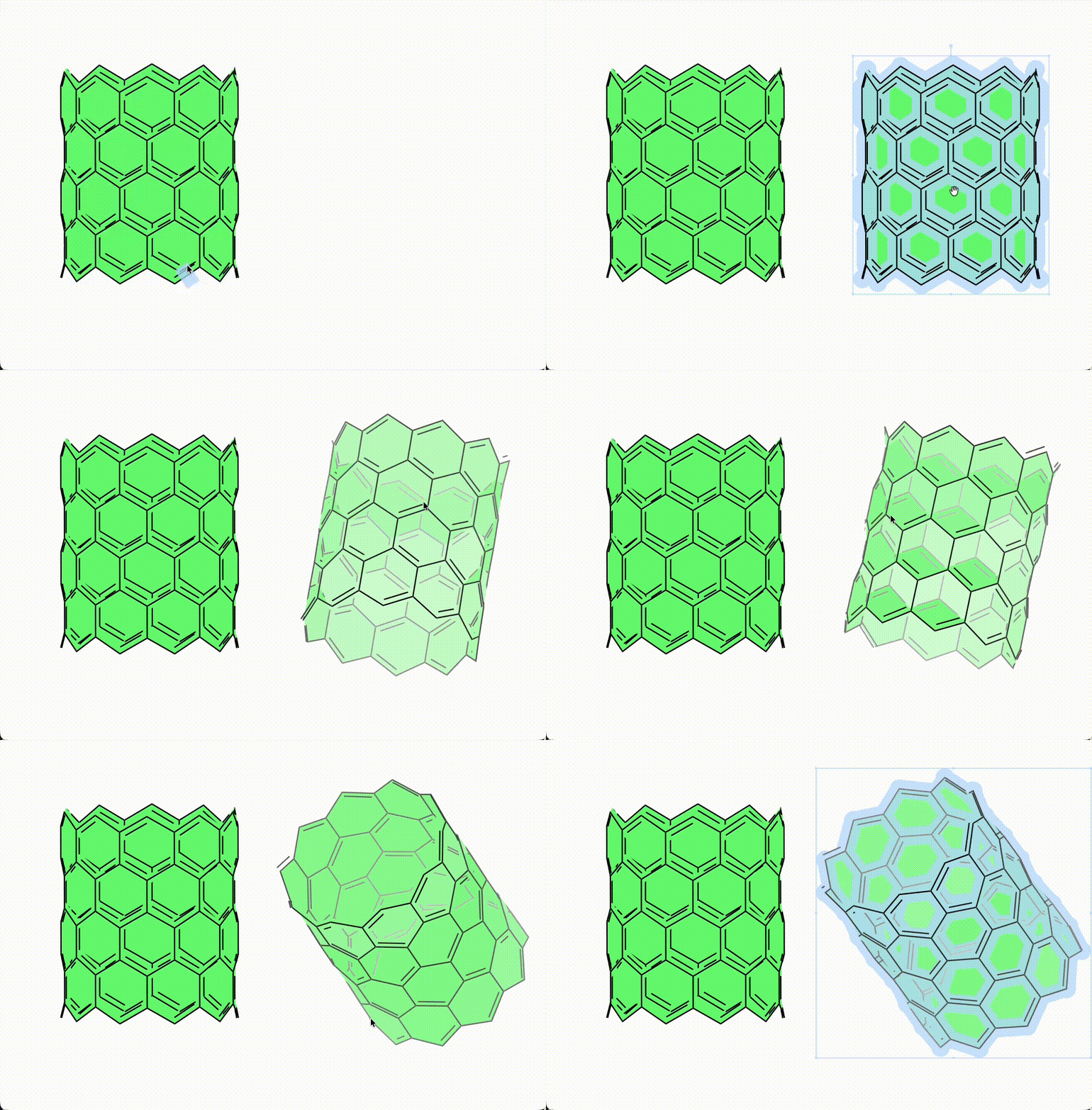
When viewing structures in 3D, selection highlighting is suppressed while dragging so that depth and perspective shading are easier to observe.

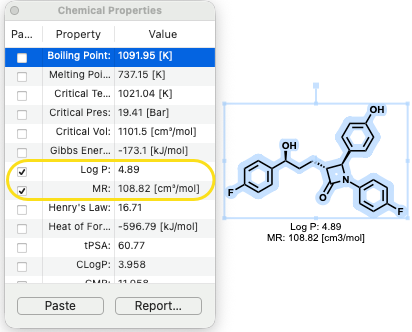
Chemical property calculations now run more efficiently, allowing you to continue drawing and editing seamlessly, even with large structures.

LogP calculations support up to 150 heavy atoms or 50 fluorine atoms, while other property calculations support up to 1,000 atoms.

Element atomic weights have been updated to IUPAC 2024 standards for Gadolinium, Lutetium, and Zirconium.

HELM Improvements

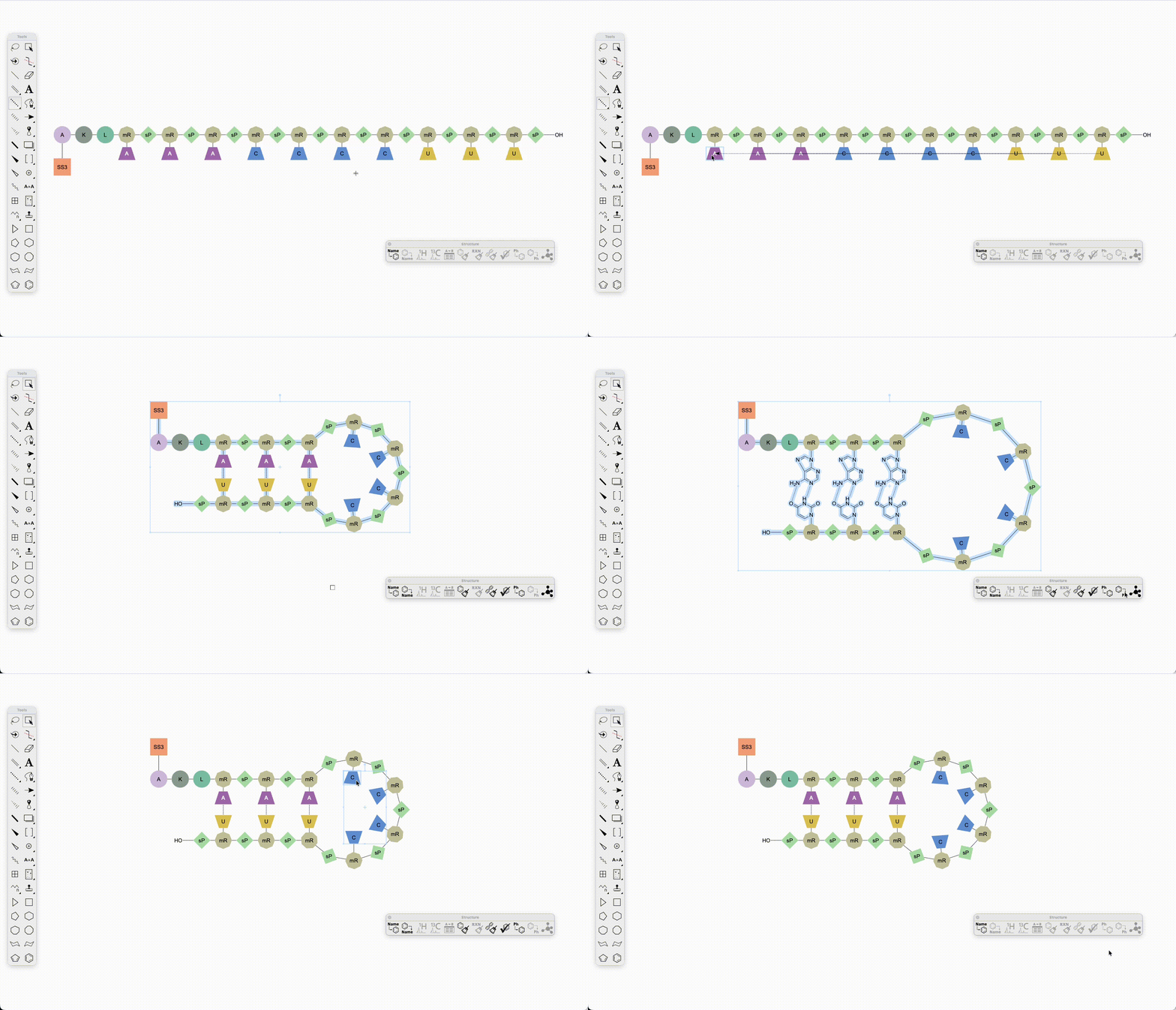
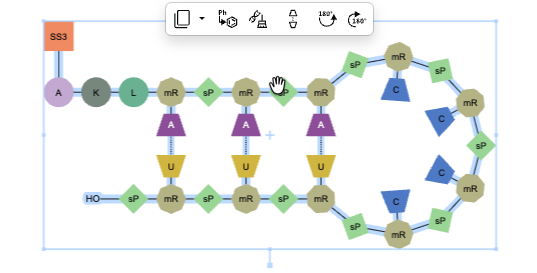
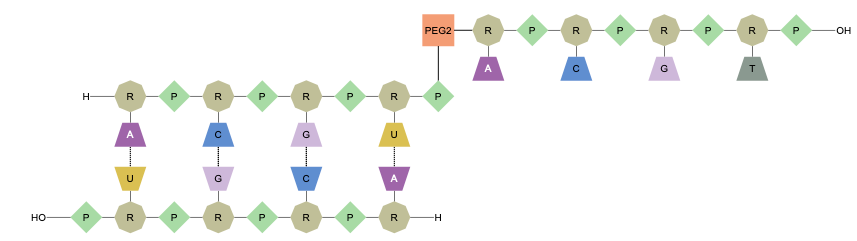
ChemDraw now supports hairpin structures in oligonucleotides. When hydrogen bonds are drawn between complementary bases within a single sequence, cleanup automatically forms the corresponding hairpin loop. Monomers within the hairpin can also be expanded and contracted. Pendant chemical and peptide attachments are also supported.

Image 2 from 26.0 ChemDraw Desktop May 2026.docx

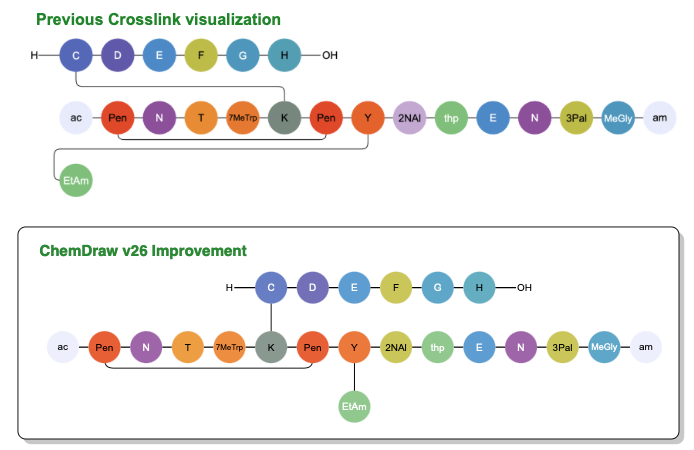
Visual clarity for crosslinking between sequences has been enhanced, with bonds now vertically aligned whenever possible to minimize unnecessary wrapping between sequences.

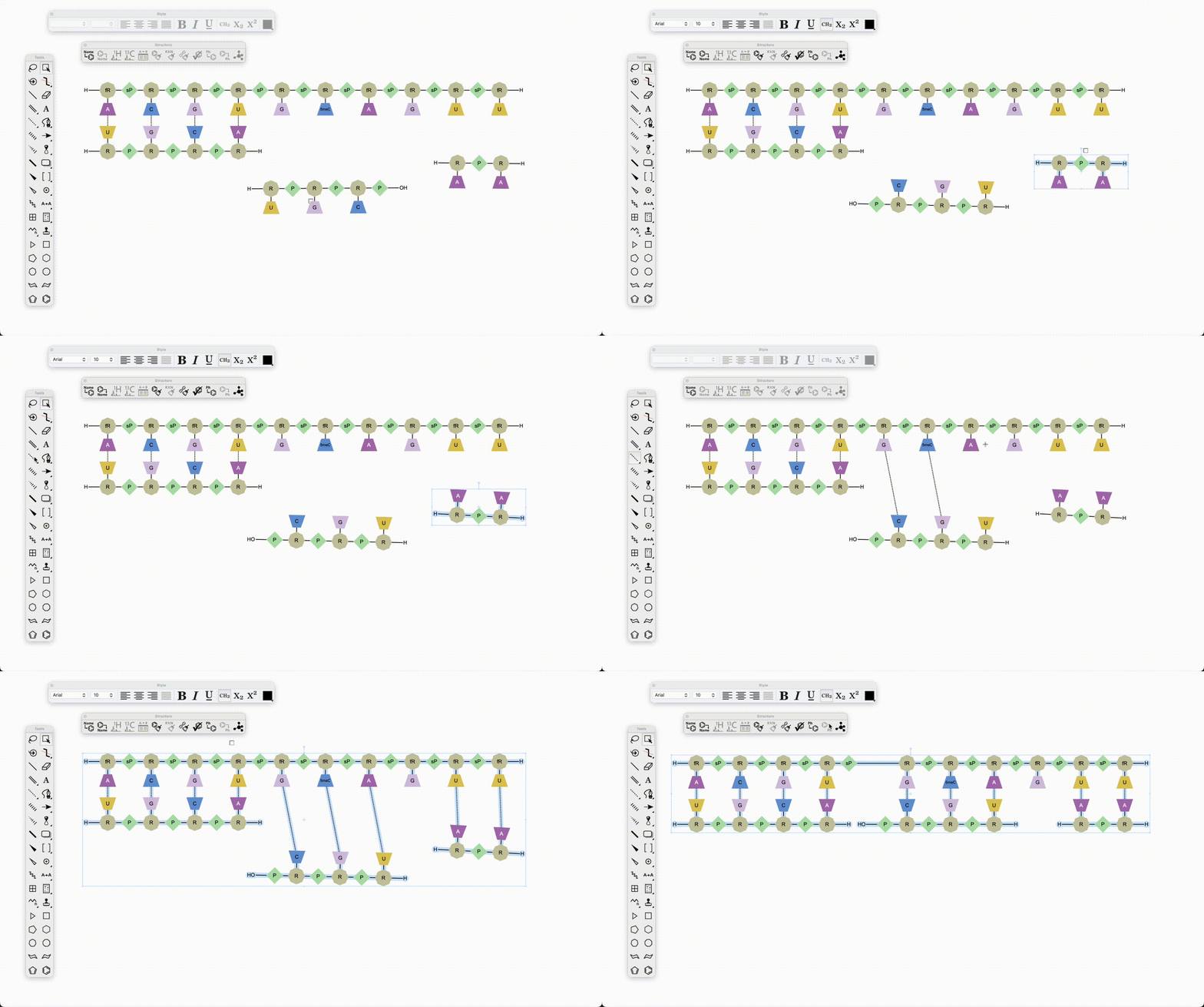
ChemDraw now allows users to draw biopolymers with multiple complementary RNA strands for a single sense strand. When a set of hydrogen-bonded RNA sequences is created, ChemDraw detects the strands, and appropriately places each complement beneath the sense strand according to hydrogen bond positions on clean up. The sense backbone is stretched as needed to minimize overlap, enabling side-by-side display of complements with proper alignment.

Image 3 from 26.0 ChemDraw Desktop May 2026.docx

Selecting a routed bond between sequences now highlights the entire bond rather than only the center section.

Python Support

ChemScript now supports Python version 3.14, giving developers greater flexibility for integration and automation.

What’s New

This latest Signals release includes updates to ChemDraw+. Highlights include Drawing and Notebook properties, new filtering capabilities and expanded complex biopolymer support. This release also includes bug fixes.

The following improvements are available for users of Signals ChemDraw. Certain features may only be available with enablement by an administrator.

ChemDraw+

  • Drawing & Notebook Properties
  • New column filters for faster list view searching
  • Multi-strand and branched complex biopolymers now supported

ChemDraw+

Drawing & Notebook Properties

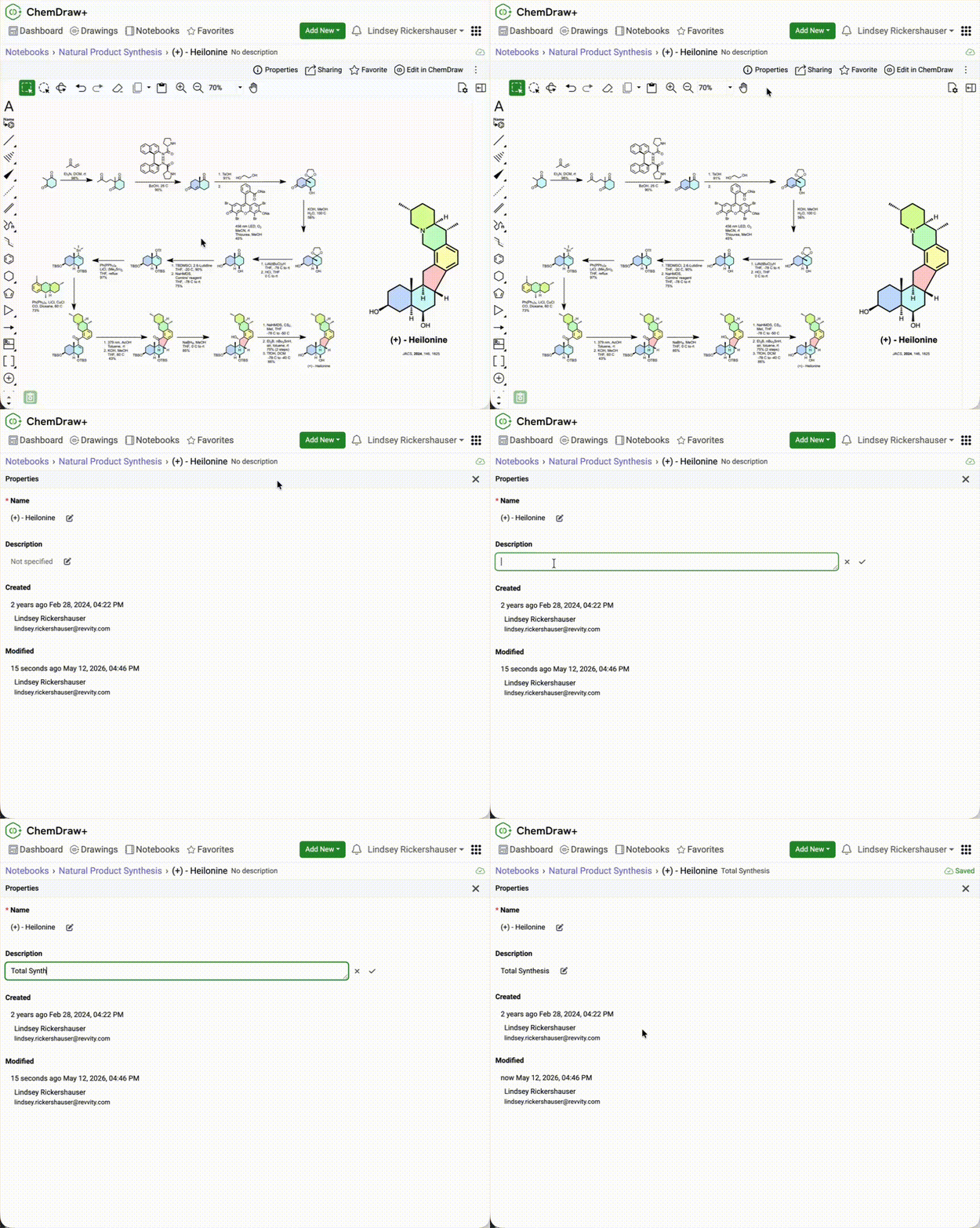
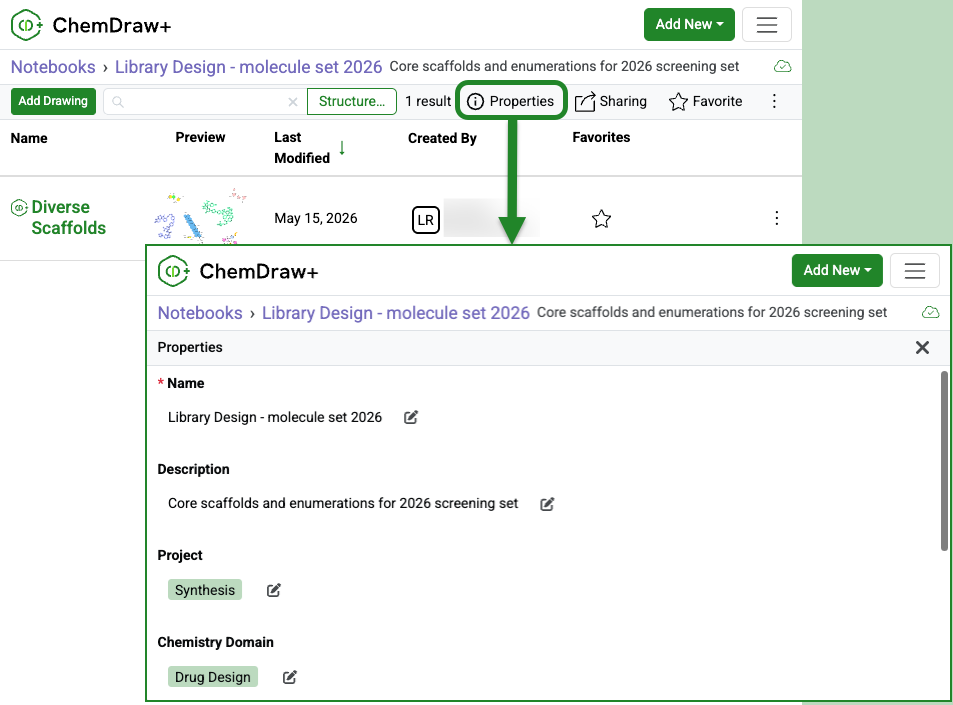
ChemDraw+ now includes a properties page for notebooks and drawings, making it easier to view and update details like name, description, created and modified information details in one place.

Image 1 from Signals ChemDraw What's New 26.4_May_2026.docx

Custom properties configured by an administrator can also be viewed and edited directly from the same page for Notebooks.

New column filters for faster list view searching

Image 2 from Signals ChemDraw What's New 26.4_May_2026.docx

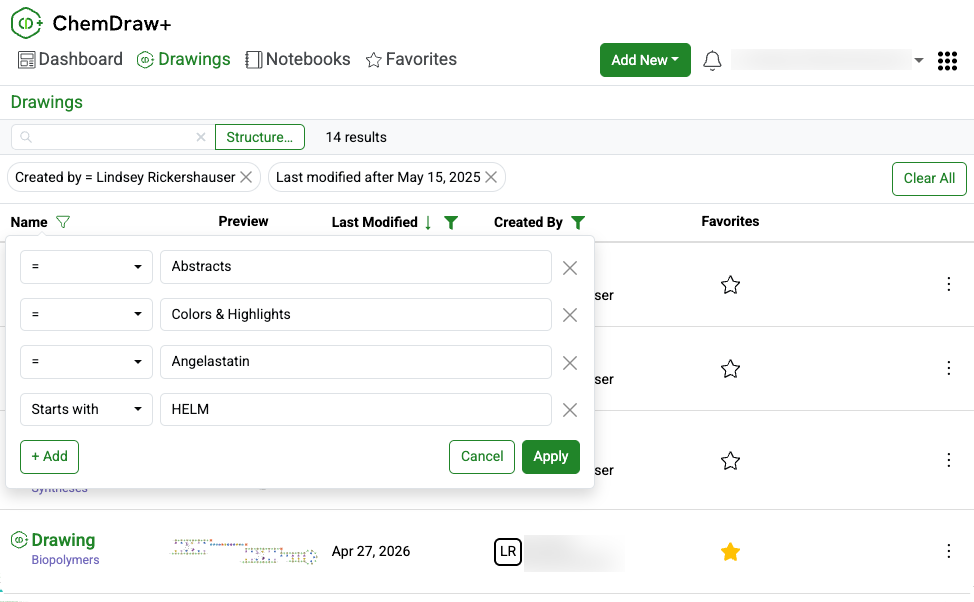
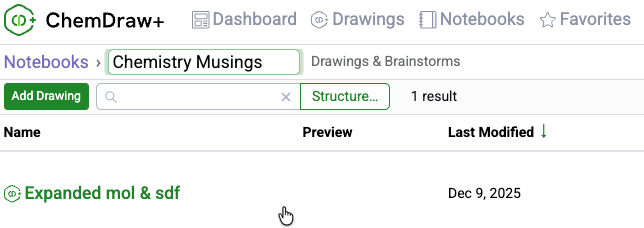
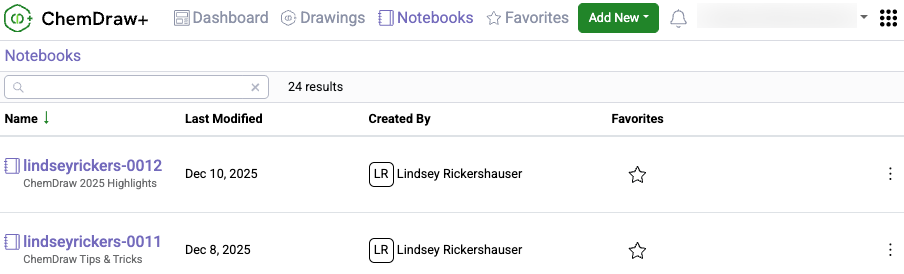
New column filters in ChemDraw+ make it easier to find drawings and notebooks in Drawings, Notebooks, Notebook Details, and Favorites. Filter by name, creator, or last modified date using options like exact match, starts with, today, this week, last month, or a custom date range.

Image 3 from Signals ChemDraw What's New 26.4_May_2026.docx

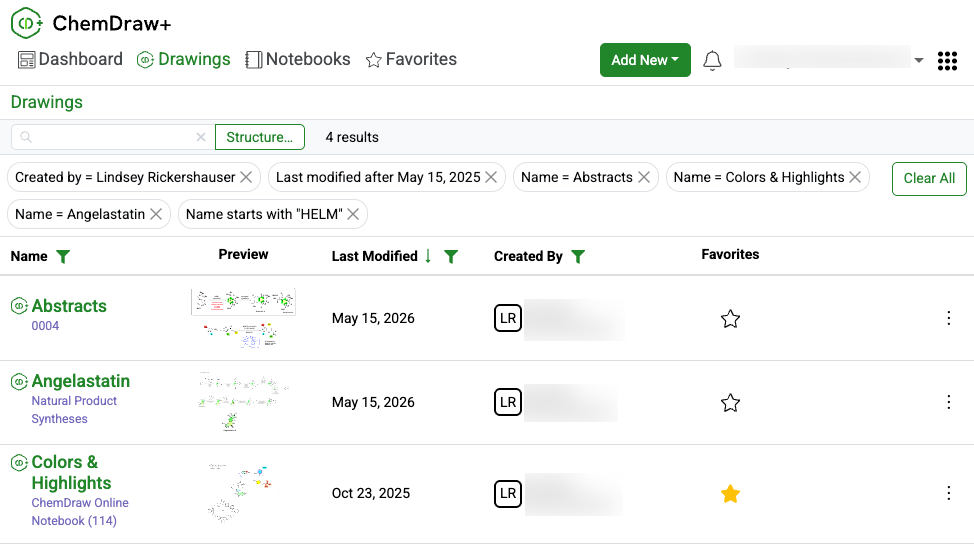
Use multiple filters across one or more columns to narrow results faster. Active filters appear above the table and can be removed individually or cleared all at once.

Support for Multi-strand and Branched Biopolymers

Image 4 from Signals ChemDraw What's New 26.4_May_2026.docx

ChemDraw Editor now supports cleanup for multi-strand and branched complex biopolymers, making these structures easier to display in a clear, aligned, and readable layout.

What's New

This latest Signals release includes updates to ChemDraw+, Signals Home Portal, and HELM Monomer Curation. Highlights include installer checksums in Signals Home Portal, structure search in HELM Monomer Curation, and accessibility improvements in ChemDraw+ that support WCAG 2.1 AA compliance. This release also includes bug fixes.

The following improvements are available for users of Signals ChemDraw. Certain features may only be available with enablement by an administrator.

Signals Home Portal

  • ChemDraw installer checksums are now available

ChemDraw+

  • Add/edit drawing descriptions from the breadcrumb
  • Pair multiple RNA/DNA strands to a single RNA/DNA sequence
  • Accessibility improvements towards WCAG 2.1 AA compliance

HELM Monomer Curation

  • Search for monomers by structure

Signals Home Portal

ChemDraw installer checksums are now available

Image 1 from Signals ChemDraw What's New 26.3_April 2026.docx

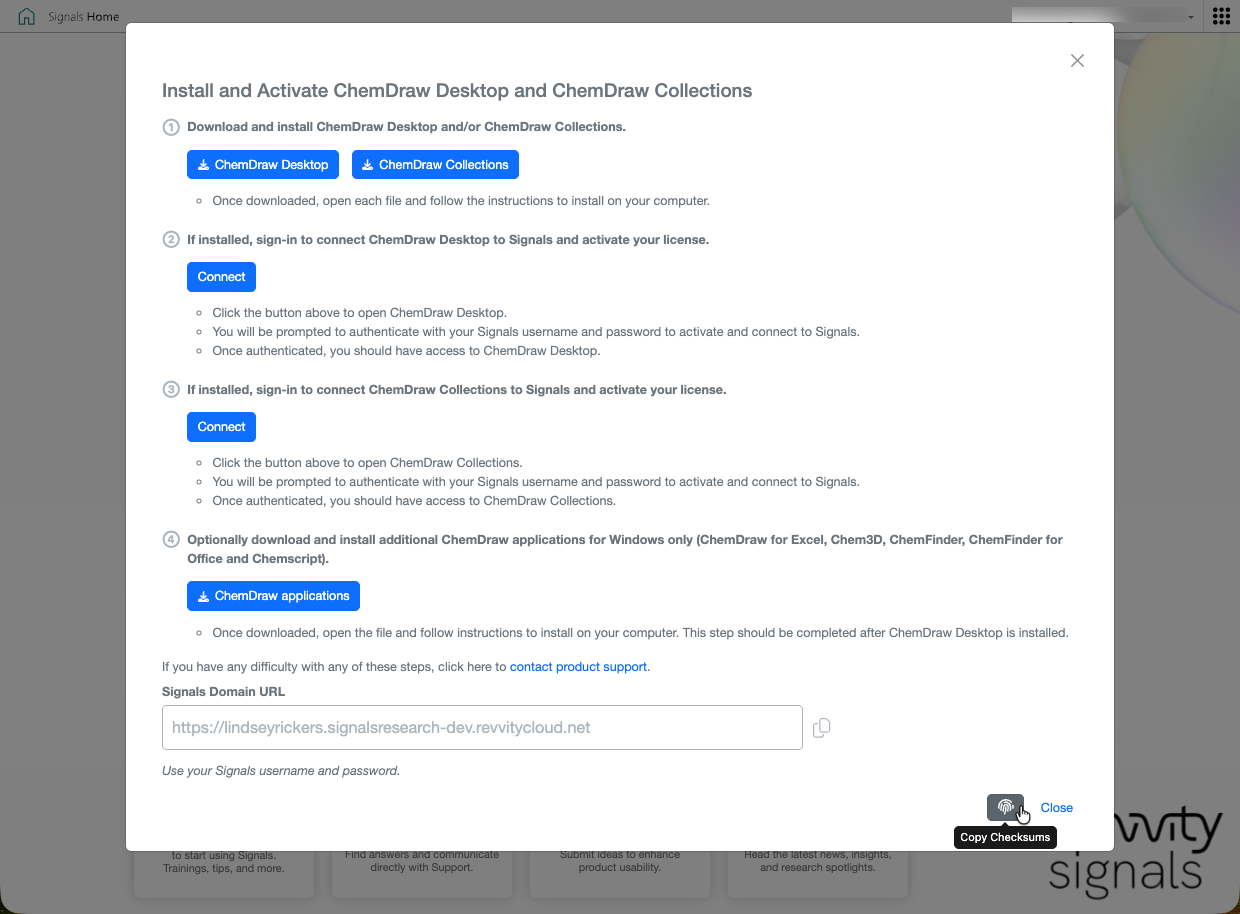
SHA256 checksums are now available from the ‘ChemDraw Installers’ tile in the Signals portal so users and IT teams can verify ChemDraw installers before deployment.

ChemDraw+

Add/Edit drawing descriptions directly from the breadcrumb

Drawing descriptions can now be added or edited directly from the breadcrumb whenever needed.

Pair multiple RNA/DNA strands to a single RNA/DNA sequence

ChemDraw now allows users to draw biopolymers with multiple complementary RNA strands for a single sense strand. When a set of hydrogen-bonded RNA sequences is created, ChemDraw detects the sense strand, identifies each first-degree complementary strand, and automatically places each complement beneath the sense strand according to hydrogen bond positions. The sense backbone is stretched as needed to minimize overlap, enabling side-by-side display of complements with proper alignment.

Accessibility improvements towards WCAG 2.1 AA compliance

ChemDraw+ now includes accessibility improvements that support WCAG 2.1 AA compliance and make the experience easier to use with keyboards, screen readers, and zoomed displays. The following improvements have been made:


    – Improved color contrast, focus states, and navigation cues
    – Expanded keyboard support across navigation, toolbars, and popovers
    – Enhanced screen reader support with better labels, headings, link text, and dialog names
    – Improved form accessibility, error messaging, and autocomplete behavior
    – Updated zoom, reflow, session timeout, and login page accessibility


HELM Monomer Curation

Image 4 from Signals ChemDraw What's New 26.3_April 2026.docx

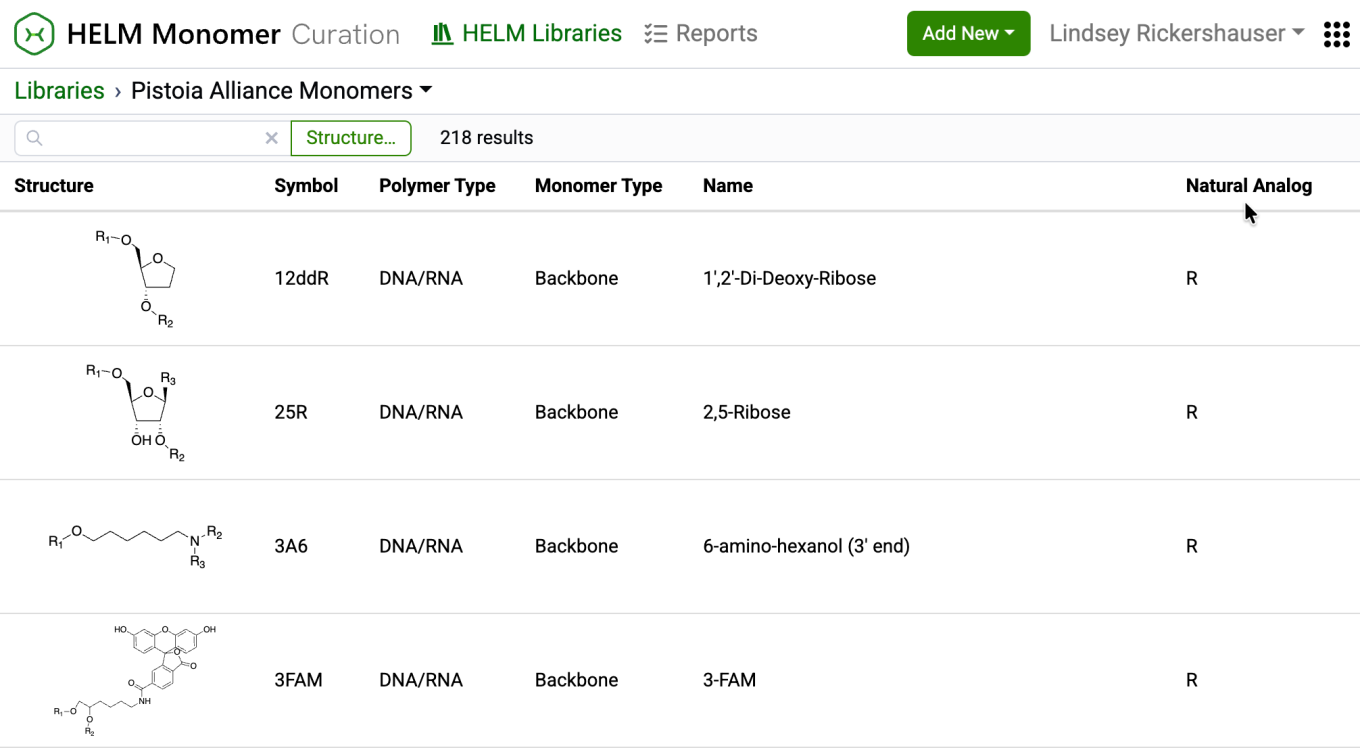
New capabilities have been added to the HELM Monomer Curation application for filtering and searching monomers based on chemical structures. Available as a button next to the text search field in the HELM Libraries list view, the ‘Structure…’ button opens a structure editor.

Image 5 from Signals ChemDraw What's New 26.3_April 2026.docx

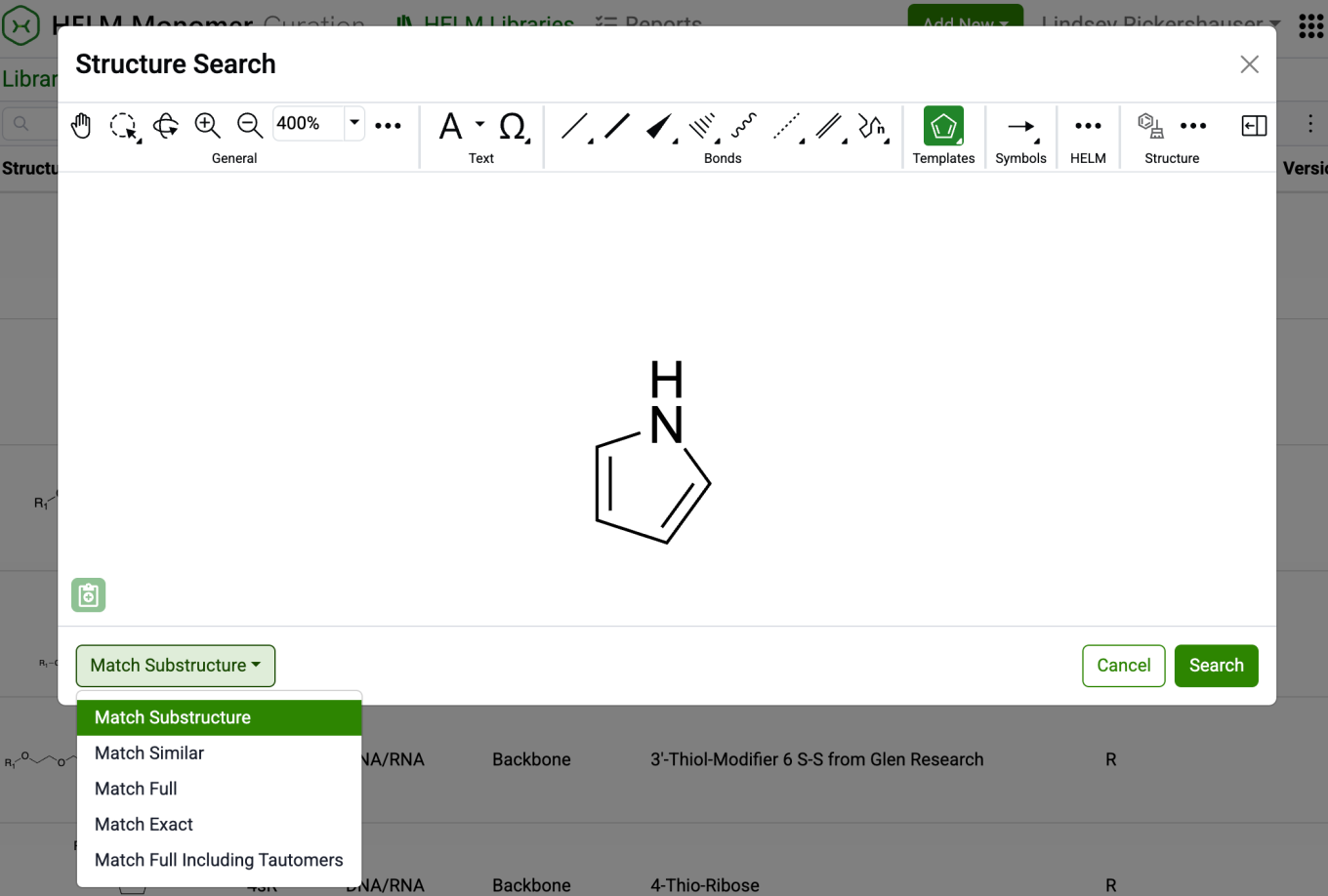
After drawing a structure, users can select from substructure, similarity, full, and exact search options. Selecting ‘Search’ will then initiate the search filter.

Image 6 from Signals ChemDraw What's New 26.3_April 2026.docx

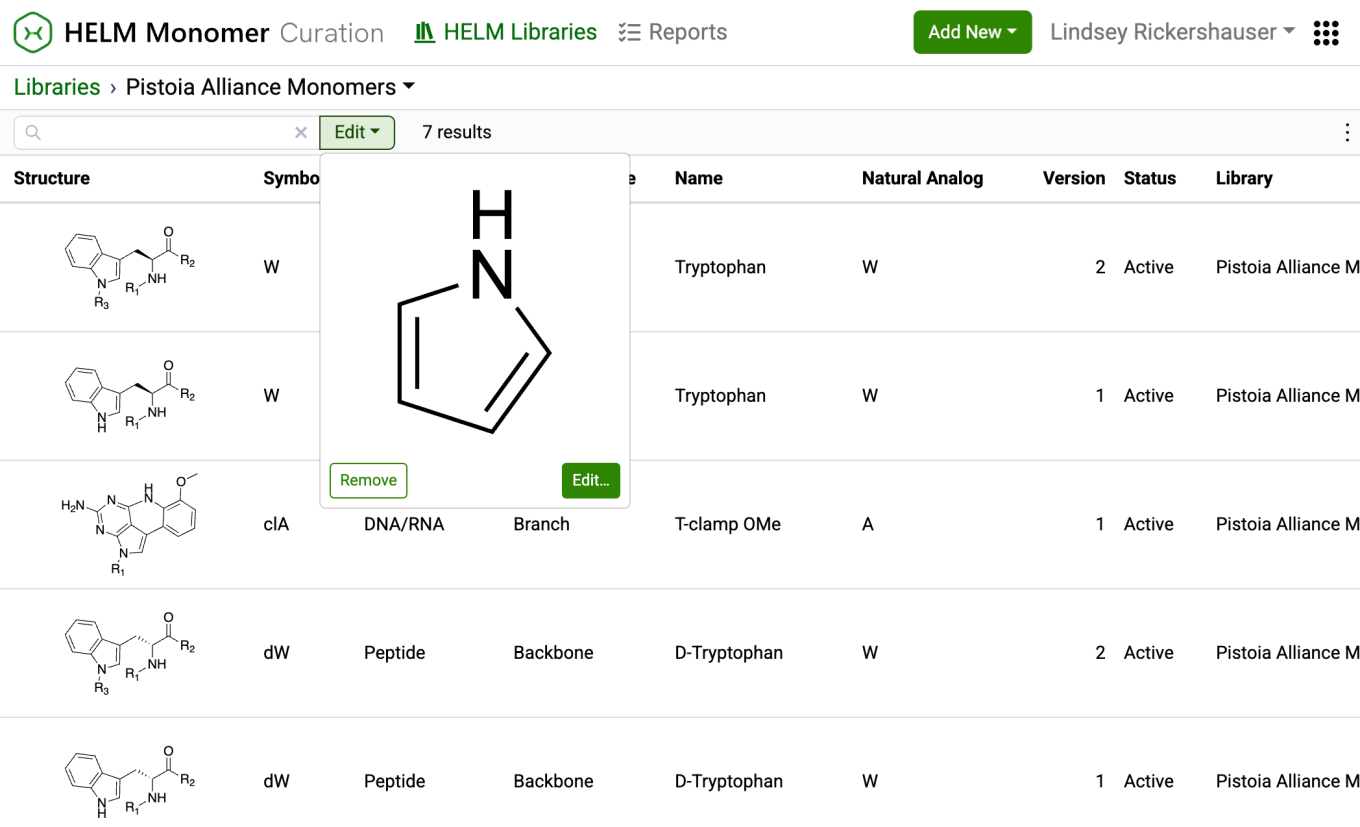
After completing a structure search, the ‘Structure…’ button transforms into an ‘Edit’ button. Selecting this button allows for previewing the structure, making changes to it, or removing it from the search filter. Structure searches can be combined with text-based searches to refine results even further.

What’s New

The latest release of Signals brings improvements to the ChemDraw+ application. This release enhances the drawing and analysis experience with predicted pKa calculations now available in the ChemDraw analysis panel and expanded capabilities of the auto-pair tool for complementary strands and hairpins. Finally, we have also fixed a small number of bugs.

The following improvements are available for users of Signals ChemDraw. Certain features may only be available with enablement by an administrator.


ChemDraw+

  • Edit notebook descriptions from the breadcrumb
  • Calculate predicted pKa in the Analysis panel
  • Generate hairpins with pendant linkers or peptides
  • Preserve user-defined hydrogen bonds when auto-pairing
  • Auto-pair selected oligonucleotide fragments

ChemDraw+

Edit notebook descriptions directly from the breadcrumb

Notebook descriptions can now be edited directly from the breadcrumb whenever needed.

Calculate predicted pKa in the Analysis panel

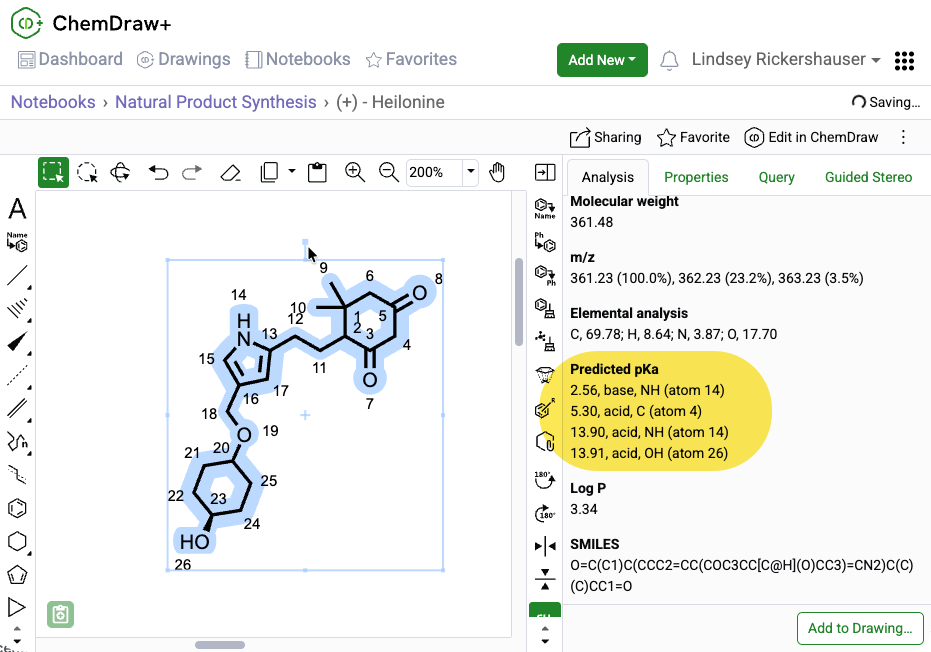
Predicted pKa is now available as a calculated property in the ChemDraw Analysis panel. The calculation uses the current selection, supports structures with fewer than 100 heavy atoms, and returns the predicted pKa value, type (acid or base), and atom label. When atom numbering is enabled in the drawing, the corresponding atom number is also shown in the Analysis panel.

Generate hairpins with pendant linkers or peptides

Hairpins can now be generated from oligonucleotide sequences that include pendant chemical linkers or peptides by using the auto-pair tool to automatically find base complementarity and place hydrogen bonds to form the hairpin structure.

Preserve user-defined hydrogen bonds when auto-pairing 

When there are multiple ways to create a complementary strand or hairpin, the auto-pair tool can now be used after placing one or more hydrogen bonds between nucleobases. ChemDraw then uses those existing hydrogen bonds as a guide, preserves them, finds the best remaining base complementarity, and adds the hydrogen bonds needed to complete the complementary strand or hairpin.

Auto-pair selected oligonucleotide fragments

The auto-pair tool now supports partial selections of oligonucleotide strands, pairing compatible nucleobases within the selected regions and adding the corresponding hydrogen bonds between them.

What’s New

The latest release of Signals brings improvements to the ChemDraw+ application. This release enhances the drawing and analysis experience with LogP calculation in the ChemDraw analysis panel, new support for generating hairpins, and streamlined notebook workflows in ChemDraw+. Additionally, support has been added for SD/RD files in the application. Finally, we have also fixed a small number of bugs.

The following improvements are available for users of Signals ChemDraw. Certain features may only be available with enablement by an administrator.


ChemDraw+

  • Add drawing to a notebook from its detail page
  • Copy drawings into a notebook
  • Rename notebooks directly from the breadcrumb
  • Import now supports SD and RD files
  • Calculate LogP in the Analysis panel
  • Generate hairpins from a single oligonucleotide
  • Drag-and-drop SD/RD files onto the ChemDraw canvas

ChemDraw+

Add drawing to a notebook from its detail page

Create and add a new drawing to a Notebook directly from the Notebook detail page in ChemDraw+. The drawing is created using the most recently used style sheet and given an automatic name, which can be updated from the breadcrumb.

Copy drawings into a notebook

Drawings can now be copied into a Notebook in ChemDraw+ from the drawing view and added to any selected Notebook in the application

Rename notebooks directly from the breadcrumb

Notebooks can be renamed directly from the breadcrumb whenever needed. Renaming is available for any Notebook that is not automatically named when created.

Import now supports SD and RD files

ChemDraw+ now supports importing SD and RD files. When these files are brought into the application, they are automatically converted to CDXML format, enabling full editing capabilities within the application.

Calculate LogP in the Analysis panel

LogP is now available as a calculated property in the analysis panel of the ChemDraw editor. The calculation is based on the current selection and supports structures containing fewer than 1,000 atoms or 150 heavy atoms.

Generate hairpins from a single oligonucleotide

The ‘auto-pair’ tool in the ChemDraw editor can now generate hairpins from a single oligonucleotide sequence. It identifies the region of maximum complementarity within the strand, places hydrogen bonds between complementary nucleobases, and forms a hairpin loop from the remaining unpaired nucleobases.

Drag-and-drop SD/RD files onto the ChemDraw canvas

SD and RD files can now be dragged and dropped onto a ChemDraw canvas and converted automatically to cdxml for continued editing.

What’s New

The latest release of Signals brings improvements to the ChemDraw+ application. This release brings enhancements to the drawing experience including the introduction of a new context sensitive toolbar in the drawing editor, monomer searching in the HELM editor, and highlight coloring options. Additionally, import/export support has been expanded. Finally, we have also fixed a small number of bugs.

The following improvements are available for users of Signals ChemDraw. Certain features may only be available with enablement by an administrator.


ChemDraw+

  • New context-sensitive ChemDraw floating toolbar
  • RXN file support in the ChemDraw editor
  • Turn on atom numbers for chemical objects
  • HELM editor now supports monomer structure searching
  • Highlight coloring now available
  • Notebook descriptions are now viewable in the application
  • Import & Export options have expanded

ChemDraw+

New context-sensitive ChemDraw floating toolbar
 

A context-sensitive floating toolbar is now available in the ChemDraw editor. When objects are selected on the ChemDraw canvas, a toolbar appears above the selection, displaying commonly used tools based on the selected object. As the pointer moves away from the toolbar, it automatically hides to minimize disruption to the editing process.


RXN file support in the ChemDraw editor

RXN files can now be dragged and dropped onto a ChemDraw canvas and converted automatically to cdxml for continued editing.
 

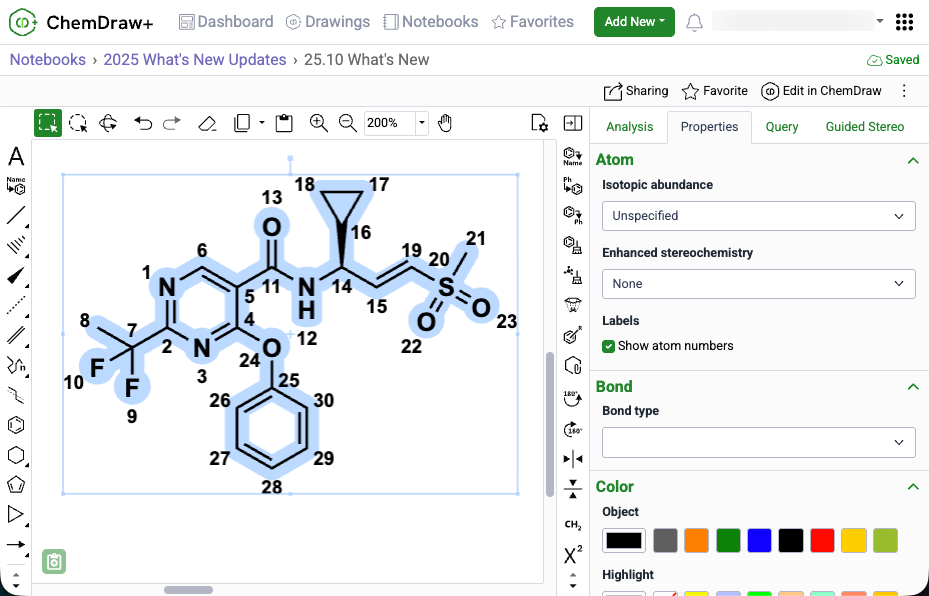
Turn on atom numbers for chemical objects

Atom numbers in ChemDraw can now be enabled for a selected object by selecting 'Show atom numbers' in the Atom section of the Properties panel.
 

HELM editor now supports monomer structure searching

The HELM editor now supports structure-based monomer search alongside text search, using a new Structure button and preview panel in the Peptide, RNA/DNA, and Chem/Blob tabs. Structures can be pasted from common formats (cdxml, cdx, SMILES, molV2000/3000, InChI) and searched as substructure, similar, full, exact, or full including tautomers, with results returned directly in the monomer panel. Structure and text filters can be combined to refine monomer results within the active library.


Highlight coloring is now available

You can now highlight atoms, labels, and bonds to draw attention to specific parts of a chemical structure to facilitate clear communication and focused presentations. This feature is available in the Colors section of the Properties panel or as a tool in the right-hand context toolbar. Choose a highlight color from the predefined palette or enter an exact hex code to create publication-ready chemical drawings.

Notebook descriptions are now viewable in the application

Notebook descriptions are now displayed in ChemDraw+ in both the Notebook List and Notebook Details views.

Import & Export options have expanded

ChemDraw+ now supports importing MOL and RXN files. When these files are brought into the application, they are automatically converted to CDXML format, enabling full editing capabilities within ChemDraw+. Additionally, export options in ChemDraw+ have expanded to include expanded MOL and SD files (V3000) as well as RXN files. 
 

What’s New

We’re excited to introduce new enhancements that improve accuracy, performance, and flexibility across Signals ChemDraw. This release focuses on property calculations, HELM handling, and extended Python support for ChemScript. Finally, we have also fixed a small number of bugs.


ChemDraw Desktop

  • Properties Calculations
  • HELM Improvements
  • Support of Python 3.13.x, 3.10.x & 3.9.x

ChemDraw Desktop

Properties Calculations

LogP and Molar Refractivity (MR) calculations are now powered by RDKit, delivering more accurate and consistent results in the Chemical Properties window.

Property calculations have also been optimized for efficiency: when editing large structures with the Chemical Properties window open, updates are now queued to minimize lag and ensure a smoother editing experience.


HELM Improvements

Biopolymer cleanup has been significantly. Sequences appended to complementary strands are now properly arranged, and pendant sequences are tidied for clarity.

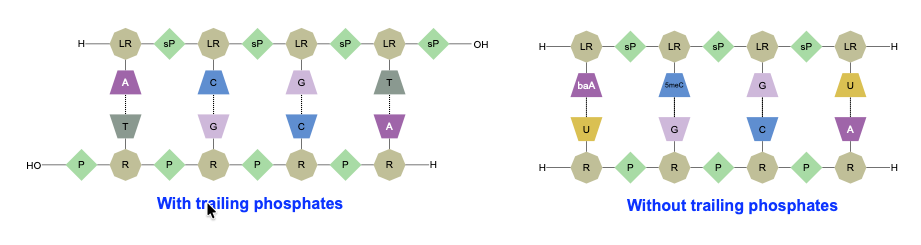
Leading and trailing phosphates, when omitted from a sequence, are matched with natural phosphates in the complementary strand.

Sequence selection behavior has also been improved: double-click and triple-click actions now provide intuitive selection of monomers, sequences, and groups.

Finally, the menu option Edit > Copy As HELM (Natural Analog) has been renamed to Edit > Copy As FASTA for clarity.

Python Support

ChemScript now supports Python versions 3.13.x, 3.10.x, and 3.9.x, giving developers greater flexibility for integration and automation.