What's New

Explore recent and historical product updates for Revvity Signals' Cloud Native SaaS Software 

Collapse All


What’s New

The latest release of Signals introduces significant enhancements to the ChemDraw+ application.  We've improved the user drawing experience by incorporating new rotate tools into the interface. The HELM editing capabilities have been expanded, now featuring the ability to add sense & antisense annotations to sequences and draw hydrogen bonds between natural and non-natural nucleobases. Additionally, the HELM Monomer Curation application now has an improved editing experience with the integration of a new ChemDraw editor.

The following improvements are available for users of Signals ChemDraw. Certain features may only be available with enablement by an administrator.

ChemDraw+

-    Sharing Drawings
-    Rotate 180 degrees vertically and horizontally
-    Complementary strands inserted to canvas in a single line with no line wraps
-    Atom-mapped SMILES now supported in HELM strings for copy/paste
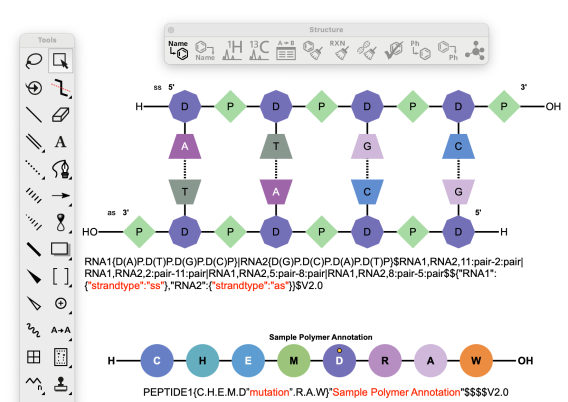
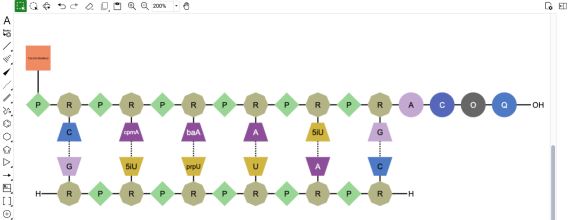
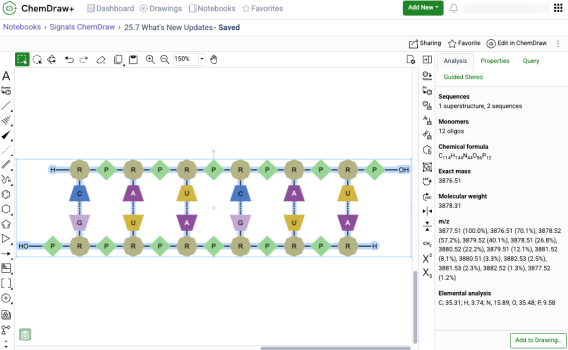
-    Sense & antisense annotations now available on oligonucleotide biopolymers
-    Drawing hydrogen bonds between complementary strands with non-natural nucleobases
 

HELM Monomer Curation 

-    New ChemDraw editor available in ‘New Monomer’ form
 

ChemDraw+

Sharing Drawings
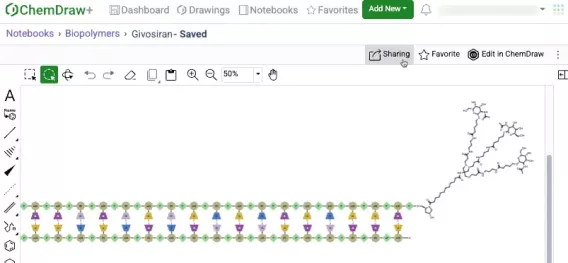
Users with sharing privileges can now share drawings in ChemDraw+ with other users or groups. This can be done either from an open drawing in the web editor view or from the actions menu in the Drawings, Favorites, or Notebook detailed list views within the application.
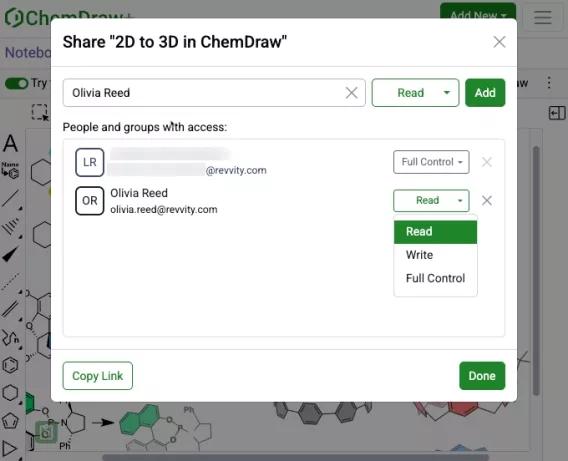
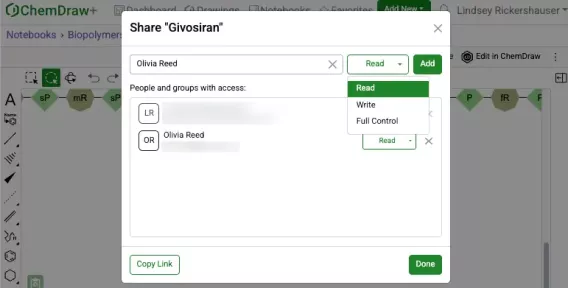
Read, Write or Full access control can be specified during the sharing process. Once shared, access can be removed or modified as needed.  

Rotate 180 degrees vertically and horizontally

New rotate tools are available in the right-side context based toolbar in the new editor. When used, these allow 180-degree rotation both horizontally and vertically, preserving molecular stereochemistry. This differs from flip tools, which mirror stereochemistry within a structure when used.

Complementary strands inserted to canvas in a single line with no line wraps
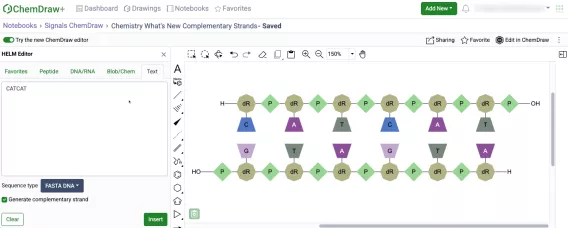
Complementary strands of any sequence length are now inserted onto the ChemDraw canvas from the HELM Text tab in a single horizontal line without line wrapping. The strands are aligned based on the complementarity of the base pairing. 

Atom-mapped SMILES now supported in HELM strings for copy/paste
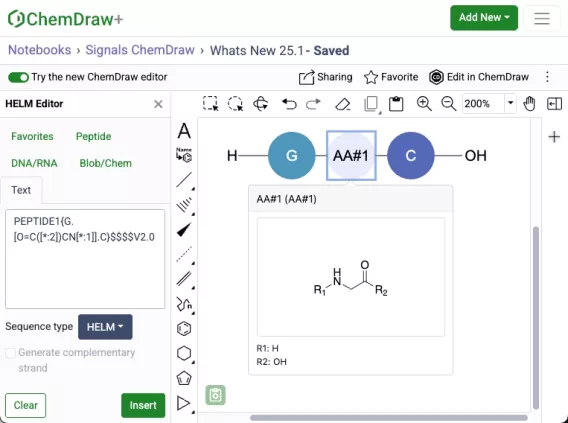
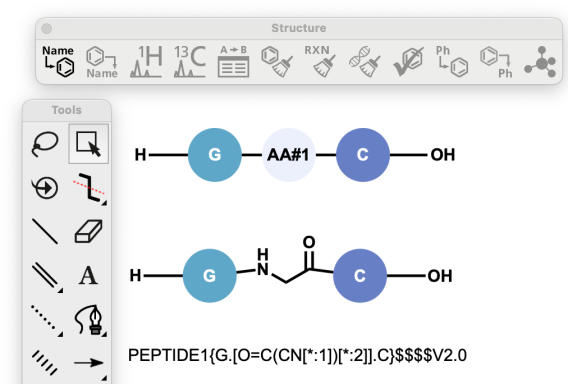
Atom-mapped SMILES are now supported in ChemDraw when inserting HELM strings or pasting them to the canvas. Additionally, when generating a HELM string for a sequence that includes an unknown or in-line monomer, the resulting HELM string will now use atom-mapped SMILES. This replaces the previously used extended SMILES format.

Sense & antisense annotations now available on oligonucleotide biopolymers
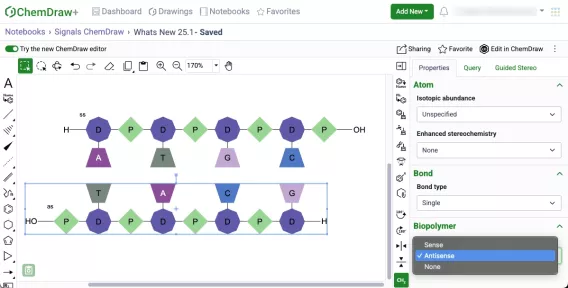
A new biopolymer section has been added to the Properties panel which will allow the addition of sense & antisense annotations to an oligonucleotide in the new ChemDraw editor. When an annotation is applied, a label will be added to the oligonucleotide on the canvas. The annotation will also be included in the generated HELM string for that biopolymer.

Drawing hydrogen bonds between complementary strands with non-natural nucleobases

Chemists can now manually draw hydrogen bonds between complimentary strands of DNA/RNA that are generated in ChemDraw containing non-natural nucleobases. The hydrogen bonding tool can be selected and used to place the appropriate hydrogen bonds according to Watson-Crick base pairing of the natural nucleobase analog.

HELM Monomer Curation

New ChemDraw Editor available in New Monomer form
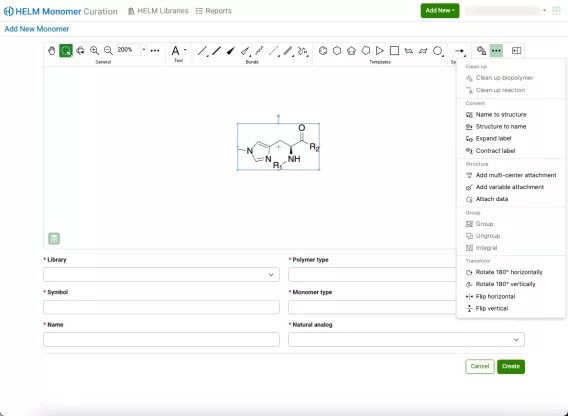
A new ChemDraw editor is now available in the New Monomer form of the HELM Monomer Curation application. The new drawing experience provides a redesigned interface with a dynamic toolbar that adapts to the space available. As tools collapse to fit the view, they remain easily accessible through menus on the toolbar. The new editor offers additional tools to enhance the drawing experience, including panning, expanded zoom controls, rotate tools, and template tools.
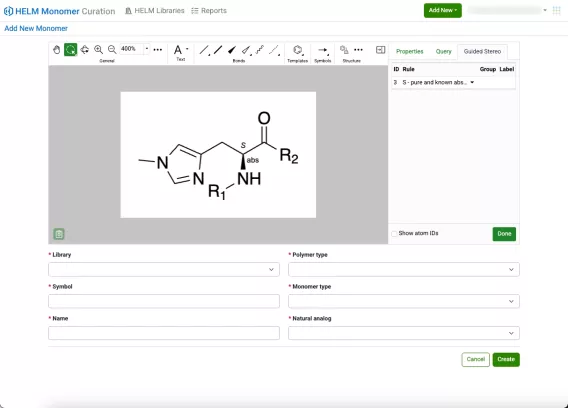
Additionally, new collapsible and resizable ‘Properties’, ‘Query’ and ‘Guided Stereo’ panels are available on the right side of the editing canvas.

What’s New

The latest release of Signals introduces significant enhancements to the ChemDraw+ application.  HELM editing capabilities have been substantially expanded, now featuring the ability to create complementary strands with hydrogen bonding with several different new tools. We've improved the user drawing experience by incorporating a new drawing tool and access to symbols commonly used in chemical names and reactions. Finally, several bug fixes have been extended with this release. 

The following improvements are available for users of Signals ChemDraw. Certain features may only be available with enablement by an administrator.

ChemDraw+

-    Selection of attachment points between monomers to create biopolymer crosslinks
-    Complementary strands generated from text tab now contain hydrogen bonds
-    Generate complementary strand tool 
-    HELM Auto-pair tool
-    Show 3' and 5' ends of oligonucleotides
-    Chemical Symbols
-    Join tool


ChemDraw+

Selection of attachment points between monomers to create biopolymer crosslinks 

The creation of biopolymer crosslinks between monomers with multiple possible attachment points is now supported. When creating a crosslink, the monomers will now expand, allowing users to select specific attachment points to make the connection. After making the selection, users can finalize the process by selecting "Connect," and the monomers will be successfully crosslinked. 

Complementary strands generated from text tab now contain hydrogen bonds

Complementary strands of RNA or DNA that are created from the text tab of the HELM editor are now created with hydrogen bonds automatically mapped between the strands. The hydrogen bonds are placed according to Watson-Crick base pairing. Hydrogen bond pairing information is also now supported in ChemDraw when inserting HELM strings or pasting them on the canvas. Additionally, when generating a HELM string for a sequence containing hydrogen bonds, the resulting HELM string will now contain the pairing details.

Generate complementary strand tool

Complementary strands of oligonucleotides can now be generated from a selected oligonucleotide on the ChemDraw canvas.  This new tool is available on the right-hand context toolbar allows users to generate a complementary strand when an oligonucleotide is selected. When this new tool is used, a complementary strand will be generated with hydrogen bonds automatically mapped between the strands. The hydrogen bonds are placed according to Watson-Crick base pairing. For sequences containing custom monomers, the complement will be based on the natural monomer equivalents of the selected sequence.

HELM Auto-pair tool

Complementary strands of oligonucleotides can now be selected and automatically paired in the new ChemDraw editor. When paired, hydrogen bonds will be placed between the strands according to Watson-Crick base pairing, with maximum overlap in complementarity between the strands. For sequences containing custom monomers, the hydrogen bonding will be placed according to Watson-Crick base pairings based on the natural monomer analogs. The auto-pair tool will appear on the right-hand context toolbar when two oligonucleotide sequences are selected.

Show 3' and 5' ends of oligonucleotides

A new option has been added to the Biopolymer section of the Properties panel in the new ChemDraw editor which allows users to display the 3' and 5' ends of an oligonucleotide on the canvas. When an oligonucleotide is selected, users can choose to show or hide the label by selecting or unselecting this option.

Chemical Symbols

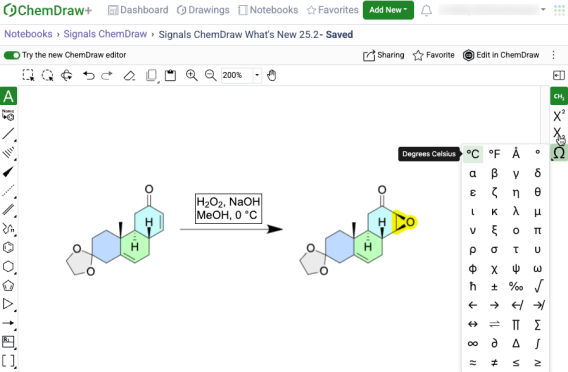
Common symbols used in chemical names and reaction conditions can now be added to a ChemDraw text element in the new ChemDraw editor using the new Chemical Symbols tool. This tool will be available on the right-hand context toolbar when editing in a text element on the ChemDraw canvas.

Join tool

A new join tool is now available on the right-hand context toolbar of the new ChemDraw editor. When used, the join tool allows users to combine structures on the ChemDraw canvas by merging two or more selected atoms into a single atom.


What’s New

The latest release of Signals introduces enhancements to the ChemDraw+ application.  Structure based searching capabilities have been added to allow users to filter and search for drawings containing chemical structures. Additionally new capabilities and enhancements have been made to the HELM drawing capabilities. Finally, several bug fixes have been extended with this release.

The following improvements are available for users of Signals ChemDraw. Certain features may only be available with enablement by an administrator.

ChemDraw+

-    Structure based searching
-    Sharing of Drawings
-    HELM in-line annotation support for monomers and polymers 
-    Biopolymer connections now appear curved instead of sharp corners


ChemDraw+

Structure based searching

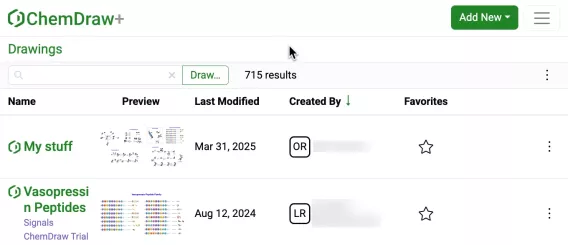
New filtering and search capabilities have been added to the application for filtering and searching drawings based on chemical structures. Available as a button next to the text search field in the list views, the ‘Draw…’ button opens a structure editor. 

After drawing a structure, users can select from substructure, similarity, full, and exact search options. Selecting 'Search' will then initiate the search filter.  

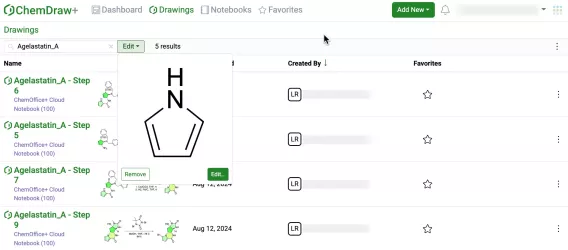
After completing a structure search, the 'Draw' button transforms into an 'Edit' button. Selecting this button allows for previewing the structure, making changes to it, or removing it from the search filter. Structure searches can be combined with text-based searches to refine results even further.

Sharing of Drawings

Users can now share Drawings with other users or groups in ChemDraw+ from within a drawing or from the Actions menu in a Drawings list view.

During the sharing process, you can specify Read, Write, or Full access permissions. Once shared, these permissions can be modified or revoked as needed.


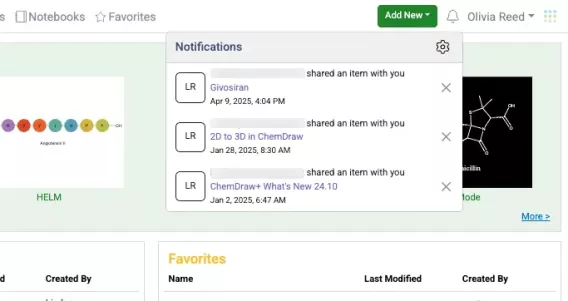
Recipients will receive an automatic notification when a drawing is shared with them.

HELM in-line annotation support for monomers and polymers

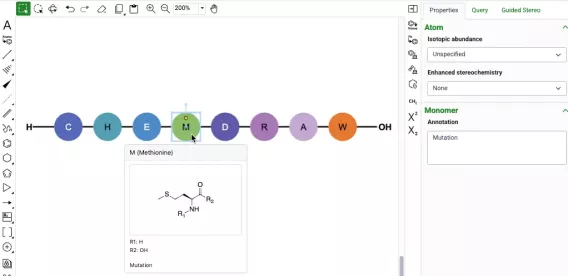
Annotation capabilities are now available for monomers and biopolymers through the properties panel. When a monomer or biopolymer is selected, users can access a new Annotation field in the Monomer or Biopolymer section, allowing them to add simple text and descriptions to specific parts of their sequence. For annotated monomers, a badge appears on the graphic to indicate the presence of an annotation which is also viewable in the hover-over preview. 

Biopolymer annotations are directly added to the ChemDraw canvas, appearing centered above or below the sequence. These annotations can be imported from HELM strings and are added as in-line annotations to the HELM string when generated. 

Biopolymer connections now appear curved instead of sharp corners

Biopolymer visualization has been refined in this release with the introduction of curved crosslinks and connections, replacing the previous sharp-cornered design. This enhancement significantly improves the visual clarity of complex structures, allowing users to easily distinguish between crosslinks and chemical linkages between monomers.


What’s New

The latest release of Signals introduces enhancements to the ChemDraw+ application. Specifically, coordination bonds are now treated identically to dative bonds in both chemical perception as well as chemical search. Additionally, improvements to visualization of biopolymers have been made. Finally, several bug fixes have been extended with this release.

The following improvements are available for users of Signals ChemDraw. Certain features may only be available with enablement by an administrator.

ChemDraw+

-    Coordination bonds are now identical to dative bonds
-    Show/hide residue IDs of biopolymers


ChemDraw+

Coordination bonds are now identical to dative bonds

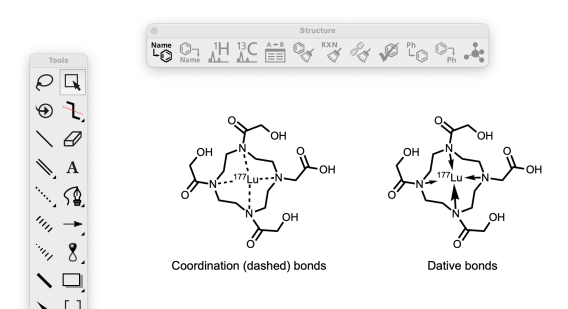
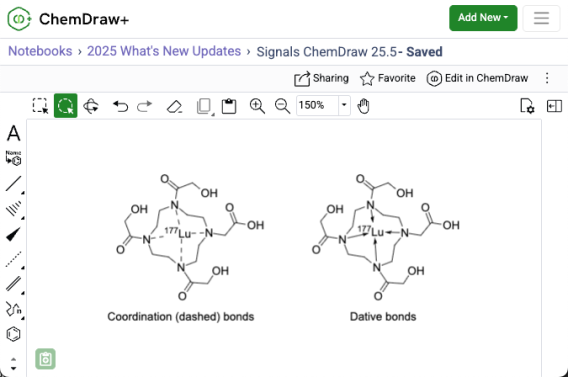
ChemDraw now treats coordination bonds and dative bonds identically, ensuring consistent valence calculations and stereochemical perception for these chemically equivalent bond types. Additionally, these bonds will match each other when searching, meaning that structures containing a dative bond will match those containing a coordination bond in the same position and vice versa.  

Show/hide residue IDs of biopolymers

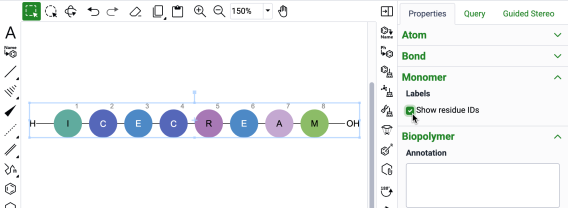
It is now possible to show and hide the residue IDs of biopolymers on the ChemDraw canvas. Upon selection of a biopolymer, the show/hide residue ID option checkbox will be available in the “Monomer” section of the Properties panel.


What’s New

ChemDraw version 25.0 introduces a range of enhancements designed to improve the drawing and representation of large molecules and complementary strands. This latest release also includes installation and system improvements, along with enhanced chemical intelligence updates. Finally, we have also fixed a number of small bugs.

The following updates are available as part of this release:

  • Advanced biopolymer (HELM) improvements - Improved visualization and clean-up of biopolymers
      - Curved connections between biopolymer sequences for improved visual clarity
      - Flexible line wrapping options for biopolymer display
      - Hydrogen bonds can be drawn between complementary DNA/RNA strands
      - Support for atom-mapped SMILES in HELM strings
      - HELM in-line annotation, sense/antisense annotations & 5’ and 3’ designations of RNA/DNA now supported
 

  • Enhanced chemical intelligence
     - Unified handling of coordination and dative bonds 
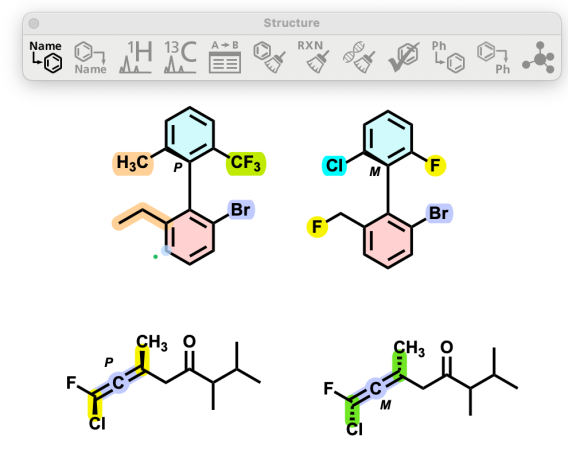
     - Updated stereochemistry labeling of allenes and atropisomers (R/S -> M/P)
 

  • Installation and system improvements
     - Streamlined installation with combined all user/current user options and improved installer behavior
     - ChemDraw is now available for ARM Macs and Intel Macs
     - Separate ChemDraw and ChemDraw Applications installers now provided
 

Advanced biopolymer (HELM) improvements

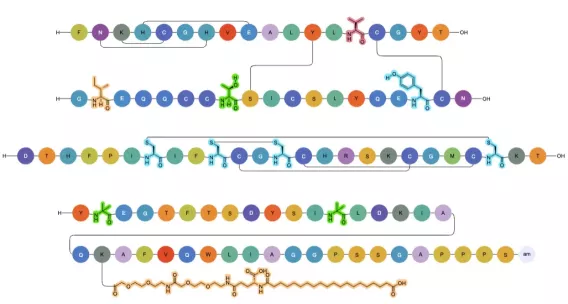
There have been significant improvements to how ChemDraw renders complex biopolymer sequences to provide a clear and concise representation of complex sequences. These improvements include updates to the visualization and routing of crosslinks between sequences, as well as clean structural visualizations for all monomers that may be expanded within a sequence.

Crosslinks between biopolymer sequences are also now curved, replacing the previous sharp-cornered design. This change significantly improves the visual clarity of complex structures, allowing users to easily distinguish between crosslinks and chemical linkages between monomers.

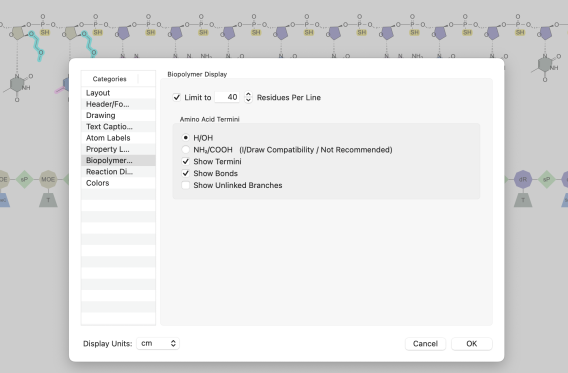
There are now enhanced options for the drawing and display of biopolymers in ChemDraw. In addition to being able to set the number of residues per line for biopolymers, a new feature is now available in the biopolymer document settings allows users to disable line wrapping of sequences entirely. When this setting is turned off, biopolymers will be drawn in a single, continuous line without any wrapping. Finally, the residues per block option has been removed from the biopolymer display settings.

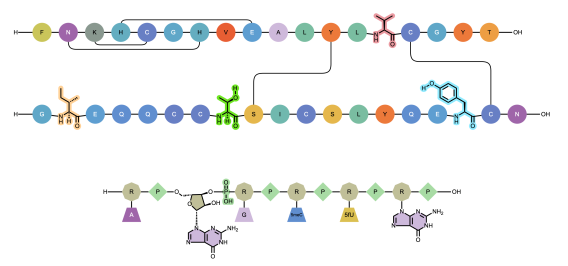
Chemists can now manually draw hydrogen bonds between complimentary strands of DNA/RNA that are generated in ChemDraw containing non-natural nucleobases. The hydrogen bonding tool can be selected and used to place the appropriate hydrogen bonds according to Watson-Crick base pairing of the natural nucleobase analog.

Atom-mapped SMILES are now supported in ChemDraw when inserting HELM strings or pasting them to the canvas. Additionally, when generating a HELM string for a sequence that includes an unknown or in-line monomer, the resulting HELM string will now use atom-mapped SMILES. This replaces the previously used extended SMILES format.

Inline annotations of monomers and polymers as well as sense/antisense annotations and 5’/3’ designations are supported in ChemDraw and appear when present in a cdxml or are part of a pasted HELM string. They also now also persist to MOL files in SGROUPS.

Enhanced Chemical Intelligence

Stereocenters of allenes and atropisomers are now labelled with M and P (instead of the former R and S).

ChemDraw now treats coordination bonds and dative bonds identically, ensuring consistent valence calculations and stereochemical perception for these chemically equivalent bond types. Additionally, coordination and dative bonds match each other in searches, but do not match single bonds. 
 

The handling of the DISPLAY option in MOL files has been changed, as follows: 

  • The value of DISP is set to COORD by default if not present in the MOL file
  • DISP is always set to COORD for coordination bonds

Installation and System Improvements

The installation of ChemDraw has been streamlined with this release, containing combined all user/current user options and improved installer behavior. This update simplifies the installation process by merging user options and enhancing the overall behavior of the installer, making it more user-friendly and efficient. 

ChemDraw is now available for ARM Macs and Intel Macs. The type of installation is selected at run time depending on the machine architecture. 

Two separate installers are now available: one for ChemDraw and another for ChemDraw Applications. The ChemDraw Applications installer includes ChemDraw for Excel, Chem3D, ChemFinder, ChemScript, and ChemFinder for Office.


What’s New

The latest release of Signals brings significant improvements to the ChemDraw+ application. Users can now enjoy an enhanced drawing experience with the ability to customize structure appearances using 'Drawing Settings'. Additionally, a new 'Analysis' panel has been introduced, allowing users to analyze structures and biopolymers and obtain basic chemical properties based on their selection. The auto-pair tool has been expanded with new capabilities, and a new selection behavior provides clearer visualization of selections on the ChemDraw canvas. Export options within the application have also been expanded. This release also includes several bug fixes, further improving the overall user experience.

The following improvements are available for users of Signals ChemDraw. Certain features may only be available with enablement by an administrator.

ChemDraw+

  • Drawing settings are now customizable
  • Basic properties are now accessible in the Analysis panel
  • Auto-pair tool now accepts RNA/DNA strands with pendant Chem or peptide monomers 
  • Enhanced selection behavior for atoms, bonds and structures
  • Attach Data can now be added as chemically significant
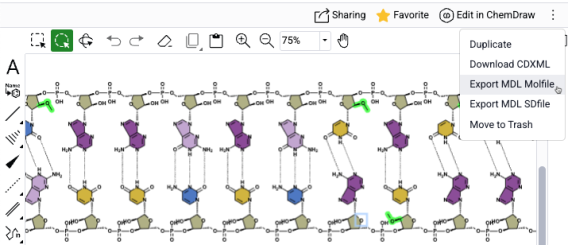
  • Drawings can now be exported as molfile and SDfile (v3000)


ChemDraw+

Drawing Settings are now customizable

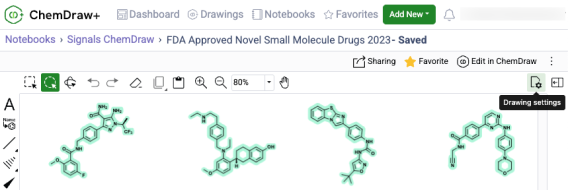
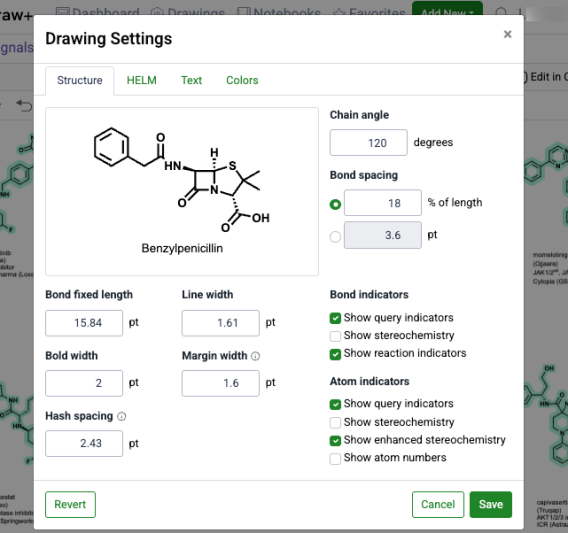
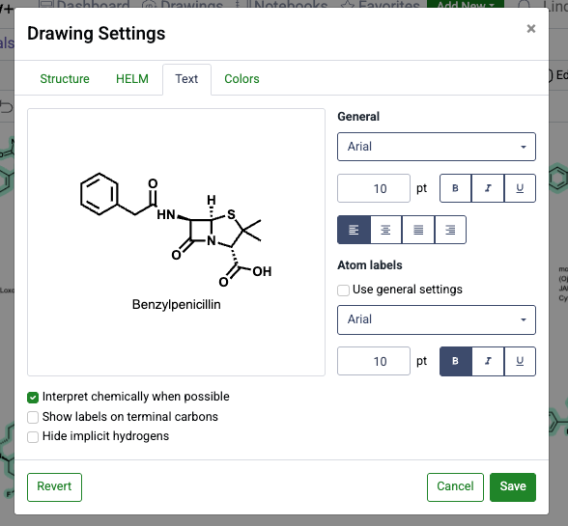
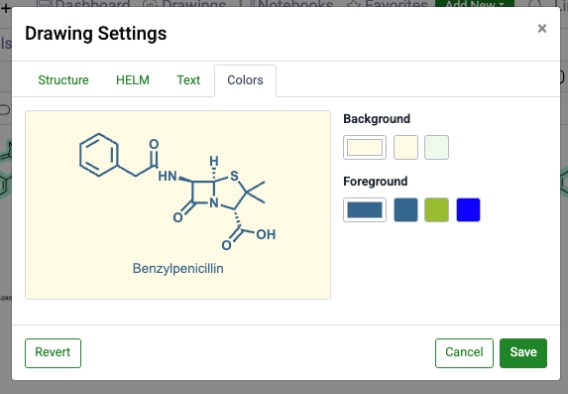
Users can now customize drawing settings in ChemDraw+, providing enhanced control to create drawings tailored to specific formatting needs. These settings are accessible from a new 'Drawing Settings' tool in the top right of the toolbar, which opens a dialog with tabbed sections that allow for customization of structure and HELM settings, as well as text and color settings. Each section contains a preview of a structure or biopolymer that reflects the current settings. When changes are made, the preview dynamically updates to display these changes. 

In the "Structure" tab, users can adjust various drawing settings to change how a structure looks on the canvas. They can modify bond lengths and widths, as well as chain angles. Users can also set other preferences to match their preferred drawing style, such as showing stereochemistry or atom numbers.  

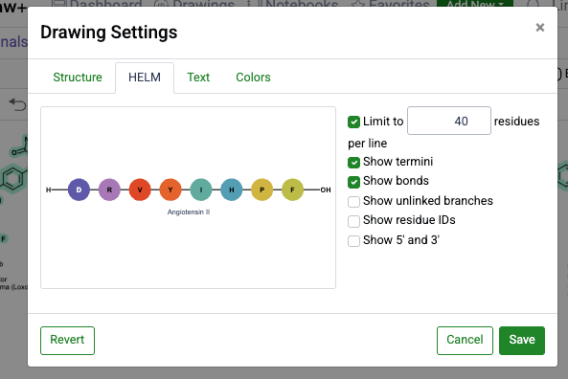
In the 'HELM' tab, users can adjust various drawing settings that change how biopolymers are displayed on the canvas. These settings include the option to limit the number of residues per line and showing or hiding termini, bonds, unlinked branches, residue IDs and the 5' and 3' ends of oligonucleotides.

In the 'Text' tab, users can modify text properties such as font, text size and style to ensure text captions and atom labels are presented exactly as required.

In the 'Colors' tab, users can customize the foreground and background colors of the drawing, creating visually distinct drawings that align with their preferences and needs.


Basic chemical properties are now accessible in the Analysis panel

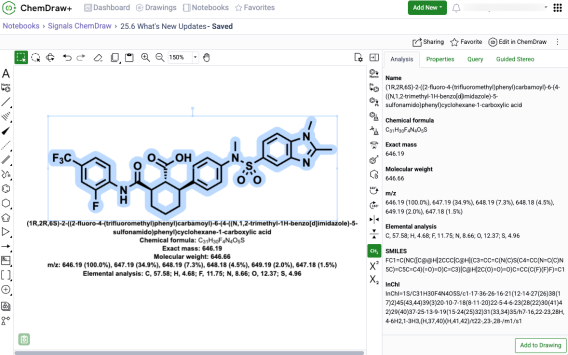
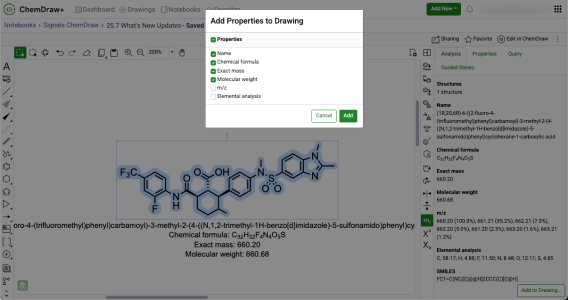
A new 'Analysis' panel in the ChemDraw editor now displays basic chemical properties for structures and biopolymers. These properties are context-sensitive, based on the selection on the canvas, and include information such as chemical name, molecular weight, molecular formula, and exact mass. Users can also add a selection of these properties directly to their drawing by using the 'Add to Drawing' button located at the bottom of the panel. 

Auto-pair tool now accepts RNA/DNA strands with pendant Chem or peptide monomers

The auto-pair tool has been improved to work with a wider range of RNA and DNA strands. This enhancement allows strands that include additional Chem or peptide monomers when finding the complementarity between strands and placing hydrogen bonds between them. 

Enhanced selection behavior for atoms, bonds and structures

There is now enhanced visualization in ChemDraw when atoms, bonds and structures are selected on the canvas. ChemDraw now individually highlights all the atoms, bonds and structures that are part of the selection, in addition to the selection box that appears upon selection on the canvas. This new behavior provides a clear distinction between selected and unselected elements on the canvas.

Attach Data can now be added as chemically significant

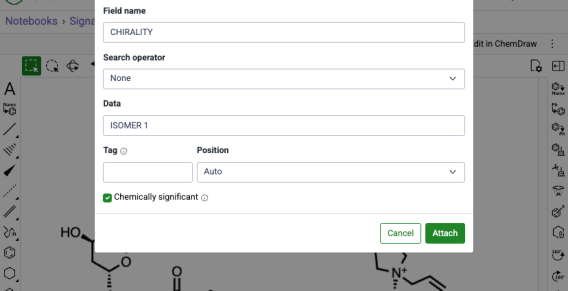
When annotating a molecule or stereocenter in ChemDraw using the 'Attach Data' capability, annotations can now be specified as 'chemically significant'. When this option is selected, annotations become chemically significant and are recognized and honored in chemical searches. Additionally, users can now edit existing annotations by selecting them and reopening the 'Attach Data' dialog in ChemDraw.

Drawings can now be exported as molfile and SDfile (v3000)

ChemDraw+ now offers more ways to export drawings. Users can now save their work as V3000 molfiles and sdfiles.


What’s New

The latest release of Signals brings improvements to the ChemDraw+ application. Basic chemical properties of structures and biopolymers can now be selected for addition to a drawing from the Analysis panel. Additionally, hydrogen bonded fragments are now recognized as a single structure. This release also includes several bug fixes, further improving the overall user experience.

The following improvements are available for users of Signals ChemDraw.

ChemDraw+

  • Enhanced property selection control when adding to drawings
  • Hydrogen-bonded fragments are treated as a single structure


ChemDraw+

Add selected chemical properties to the ChemDraw canvas

The Analysis panel now offers improved flexibility when adding chemical properties to drawings. Users can now choose which properties to add to their drawing when using the 'Add to Drawing' button located at the bottom of the Analysis panel. Selecting this button now opens a window where properties can be selected to be pasted onto the canvas.

Hydrogen-bonded fragments are treated as a single structure

Hydrogen bonded fragments in ChemDraw will now be recognized as a single structure with properties such as molecular weight, molecular formula and exact mass being calculated accordingly.

What’s New

The latest release of Signals brings improvements to the ChemDraw+ application. This release brings enhancements to the structure to name capabilities in the application. We also have new improvements to increase the efficiency of drawing biopolymers in ChemDraw. Finally, we have also fixed a small number of bugs. The following improvements are available for users of Signals ChemDraw. Certain features may only be available with enablement by an administrator.

The following improvements are available for users of Signals ChemDraw.

ChemDraw+

  • Name to Structure capability expanded to use ChemACX
  • Drawing of individual RNA or DNA monomers when editing biopolymers
  • Selection and replacement of multiple monomers at once in biopolymers 


ChemDraw+

Name to Structure capability expanded to use ChemACX

Converting names to structures in ChemDraw+ now utilizes the ChemACX, which is a unified chemical database containing 10s of millions of substances. The use of ChemACX now allows the conversion of synonyms, trade names or common names of the substances within the database to a structure.

Drawing of individual RNA or DNA monomers when editing biopolymers

Support for drawing individual RNA/DNA monomers has been added to the HELM editor. When editing in the RNA/DNA tab of the HELM Editor, there is a new "none' option available in the dropdown menu for secondary monomers. When 'None' is selected, a monomer of that type will not be drawn when the primary monomer is added to the ChemDraw canvas. Additionally, if the user wishes to draw using only the primary monomer (ribose, base or phosphate), a modifier key is available. Selecting alt/option + the monomer will only add the primary monomer to the canvas.

Selection and replacement of multiple monomers at once in biopolymers

Bulk selection of monomers while in HELM edit mode is now possible by using the 'Shift' key and selecting multiple monomers on the canvas. Once selected, these monomers can be replaced simply by selecting a new monomer in the HELM editor.

What’s New

The latest release of Signals brings improvements to the ChemDraw+ application. This release brings enhancements to the drawing experience including the introduction of a new periodic table tool, object and ring fill coloring options, as well as tools for mass fragmentation and alignment. Additionally, improvements to the biopolymer editing experience with the introduction of a find and replace capability within the HELM editor. Finally, we have also fixed a small number of bugs.

The following improvements are available for users of Signals ChemDraw. Certain features may only be available with enablement by an administrator.


ChemDraw+

  • Created by filter now available on the Dashboard
  • Periodic table available in ChemDraw editor
  • Creation of atom lists are now possible in the periodic table tool
  • Chemical objects can now be copied as 'MOLV3000 (Expanded)'
  •  'Copy As HELM (natural analog)' updated to 'Copy as FASTA'
  • Chemical Object colors can now be changed
  • Ring Fill coloring can now be applied
  • Mass Fragmentation tool now available
  • Alignment tools now available
  • Monomers can now be searched for, found and replaced when editing biopolymers
     

ChemDraw+

Created by filter now available on the Dashboard

Periodic table available in ChemDraw editor

Use the new ‘Created by’ filter on the ChemDraw+ Dashboard to control what appears in Recent Drawings. Select ‘Created by me’ to see only recently modified drawings that you created (not ones shared by other users). Select ‘Created by anyone’ to see all recently modified drawings you can access in your account.


The periodic table tool, now available in the ChemDraw toolbar, enables selection of any element to add to the canvas. When an object is selected, choosing an element from the periodic table replaces it; otherwise, any atom or blank space on the canvas can be replaced with the selected element. 


Creation of atom lists are now possible in the periodic table tool

Creation of atom lists for the generation of generic structures is now also possible with the new periodic table tool. Upon opening the tool in ChemDraw, users can select List which will allow the selection of multiple elements. Once the list is generated, selecting 'Apply' will allow the user to place the atom list on the canvas in brackets.


Chemical objects can now be copied as 'MOLV3000 (Expanded)'

Chemical objects on the ChemDraw canvas can now be copied as an expanded V3000 molfile. When using 'Copy As MOLV3000 (Expanded)', a fully expanded version of the chemical object will be copied, including the expansion of all nicknames, labels, and HELM biopolymers.

Monomers are now searchable and replaceable when editing biopolymers

The HELM Editor in ChemDraw now supports finding and selecting specific monomers on the canvas for replacement. One or more monomers can be identified and selected simultaneously using the ‘Find….’ dialog in the HELM editor, and all instances found will be selected for replacement. Selecting a new monomer from the HELM editor replaces all selected monomers on the canvas with the chosen selection. This bulk find and replace capability streamlines large-scale modifications of sequences, enabling rapid transformation of a natural sequence from a FASTA string into a highly complex sequence with custom modifications.

'Copy As HELM (natural analog)' replaced by 'Copy as FASTA'

The Copy As options for HELM biopolymers in ChemDraw have been updated. The 'Copy as HELM (natural analog)' function has been replaced by 'Copy as FASTA.' This change more accurately reflects that a FASTA sequence containing all natural analogs will be copied when this option is selected, with no change in the underlying behavior.

Object colors can now be changed

Object colors can be now adjusted directly from the Colors section in the Properties panel. Choose a hue from the color picker’s pre-defined palette or enter an exact hex code for precise control when creating publication-ready chemical drawings.

Ring Fill coloring is now available

Ring fill color can be now be applied to chemical rings enabling clearer communication of ideas and concepts by directing the focus of a reader or an audience to a given part of a chemical structure. Available in the Colors section of the Properties panel, users can choose a fill color from the color picker’s pre-defined palette or enter an exact hex code to fill ring systems and create publication-ready chemical drawings.

Mass Fragmentation tool now available

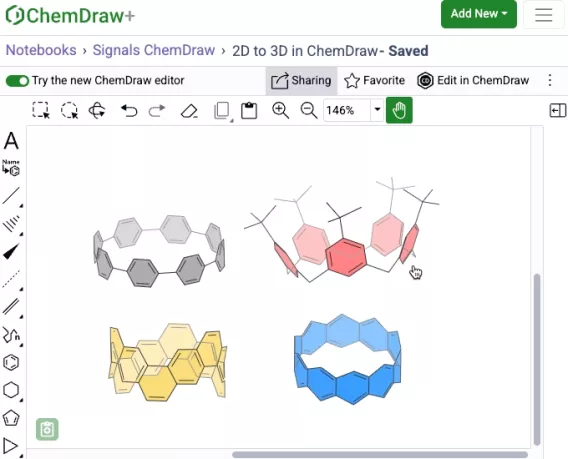
A new fragmentation tool is available in the left hand general drawing toolbar in the ChemDraw editor. When used, the mass fragmentation tool mimics the Mass Spec fragmentation to generate fragment structures with calculated molecular formulas and masses.

Alignment tools now available

Structure and reaction alignment is now available in the ChemDraw editor. With objects selected on the canvas, use the right-hand context toolbar to center, align horizontally or vertically, and distribute evenly to produce clean, consistent, publication-ready figures.

What’s New

We’re excited to introduce new enhancements that improve accuracy, performance, and flexibility across Signals ChemDraw. This release focuses on property calculations, HELM handling, and extended Python support for ChemScript. Finally, we have also fixed a small number of bugs.


ChemDraw Desktop

  • Properties Calculations
  • HELM Improvements
  • Support of Python 3.13.x, 3.10.x & 3.9.x

ChemDraw Desktop

Properties Calculations

LogP and Molar Refractivity (MR) calculations are now powered by RDKit, delivering more accurate and consistent results in the Chemical Properties window.

Property calculations have also been optimized for efficiency: when editing large structures with the Chemical Properties window open, updates are now queued to minimize lag and ensure a smoother editing experience.


HELM Improvements

Biopolymer cleanup has been significantly. Sequences appended to complementary strands are now properly arranged, and pendant sequences are tidied for clarity.

Leading and trailing phosphates, when omitted from a sequence, are matched with natural phosphates in the complementary strand.

Sequence selection behavior has also been improved: double-click and triple-click actions now provide intuitive selection of monomers, sequences, and groups.

Finally, the menu option Edit > Copy As HELM (Natural Analog) has been renamed to Edit > Copy As FASTA for clarity.

Python Support

ChemScript now supports Python versions 3.13.x, 3.10.x, and 3.9.x, giving developers greater flexibility for integration and automation.

What’s New

The latest release of Signals brings improvements to the ChemDraw+ application. This release brings enhancements to the drawing experience including the introduction of a new context sensitive toolbar in the drawing editor, monomer searching in the HELM editor, and highlight coloring options. Additionally, import/export support has been expanded. Finally, we have also fixed a small number of bugs.

The following improvements are available for users of Signals ChemDraw. Certain features may only be available with enablement by an administrator.


ChemDraw+

  • New context-sensitive ChemDraw floating toolbar
  • RXN file support in the ChemDraw editor
  • Turn on atom numbers for chemical objects
  • HELM editor now supports monomer structure searching
  • Highlight coloring now available
  • Notebook descriptions are now viewable in the application
  • Import & Export options have expanded

ChemDraw+

New context-sensitive ChemDraw floating toolbar
 

A context-sensitive floating toolbar is now available in the ChemDraw editor. When objects are selected on the ChemDraw canvas, a toolbar appears above the selection, displaying commonly used tools based on the selected object. As the pointer moves away from the toolbar, it automatically hides to minimize disruption to the editing process.


RXN file support in the ChemDraw editor

RXN files can now be dragged and dropped onto a ChemDraw canvas and converted automatically to cdxml for continued editing.
 

Turn on atom numbers for chemical objects

Atom numbers in ChemDraw can now be enabled for a selected object by selecting 'Show atom numbers' in the Atom section of the Properties panel.
 

HELM editor now supports monomer structure searching

The HELM editor now supports structure-based monomer search alongside text search, using a new Structure button and preview panel in the Peptide, RNA/DNA, and Chem/Blob tabs. Structures can be pasted from common formats (cdxml, cdx, SMILES, molV2000/3000, InChI) and searched as substructure, similar, full, exact, or full including tautomers, with results returned directly in the monomer panel. Structure and text filters can be combined to refine monomer results within the active library.


Highlight coloring is now available

You can now highlight atoms, labels, and bonds to draw attention to specific parts of a chemical structure to facilitate clear communication and focused presentations. This feature is available in the Colors section of the Properties panel or as a tool in the right-hand context toolbar. Choose a highlight color from the predefined palette or enter an exact hex code to create publication-ready chemical drawings.

Notebook descriptions are now viewable in the application

Notebook descriptions are now displayed in ChemDraw+ in both the Notebook List and Notebook Details views.

Import & Export options have expanded

ChemDraw+ now supports importing MOL and RXN files. When these files are brought into the application, they are automatically converted to CDXML format, enabling full editing capabilities within ChemDraw+. Additionally, export options in ChemDraw+ have expanded to include expanded MOL and SD files (V3000) as well as RXN files. 
 

What’s New

The latest release of Signals brings improvements to the ChemDraw+ application. This release enhances the drawing and analysis experience with LogP calculation in the ChemDraw analysis panel, new support for generating hairpins, and streamlined notebook workflows in ChemDraw+. Additionally, support has been added for SD/RD files in the application. Finally, we have also fixed a small number of bugs.

The following improvements are available for users of Signals ChemDraw. Certain features may only be available with enablement by an administrator.


ChemDraw+

  • Add drawing to a notebook from its detail page
  • Copy drawings into a notebook
  • Rename notebooks directly from the breadcrumb
  • Import now supports SD and RD files
  • Calculate LogP in the Analysis panel
  • Generate hairpins from a single oligonucleotide
  • Drag-and-drop SD/RD files onto the ChemDraw canvas

ChemDraw+

Add drawing to a notebook from its detail page

Create and add a new drawing to a Notebook directly from the Notebook detail page in ChemDraw+. The drawing is created using the most recently used style sheet and given an automatic name, which can be updated from the breadcrumb.

Copy drawings into a notebook

Drawings can now be copied into a Notebook in ChemDraw+ from the drawing view and added to any selected Notebook in the application

Rename notebooks directly from the breadcrumb

Notebooks can be renamed directly from the breadcrumb whenever needed. Renaming is available for any Notebook that is not automatically named when created.

Import now supports SD and RD files

ChemDraw+ now supports importing SD and RD files. When these files are brought into the application, they are automatically converted to CDXML format, enabling full editing capabilities within the application.

Calculate LogP in the Analysis panel

LogP is now available as a calculated property in the analysis panel of the ChemDraw editor. The calculation is based on the current selection and supports structures containing fewer than 1,000 atoms or 150 heavy atoms.

Generate hairpins from a single oligonucleotide

The ‘auto-pair’ tool in the ChemDraw editor can now generate hairpins from a single oligonucleotide sequence. It identifies the region of maximum complementarity within the strand, places hydrogen bonds between complementary nucleobases, and forms a hairpin loop from the remaining unpaired nucleobases.

Drag-and-drop SD/RD files onto the ChemDraw canvas

SD and RD files can now be dragged and dropped onto a ChemDraw canvas and converted automatically to cdxml for continued editing.

What’s New

The latest release of Signals brings improvements to the ChemDraw+ application. This release enhances the drawing and analysis experience with predicted pKa calculations now available in the ChemDraw analysis panel and expanded capabilities of the auto-pair tool for complementary strands and hairpins. Finally, we have also fixed a small number of bugs.

The following improvements are available for users of Signals ChemDraw. Certain features may only be available with enablement by an administrator.


ChemDraw+

  • Edit notebook descriptions from the breadcrumb
  • Calculate predicted pKa in the Analysis panel
  • Generate hairpins with pendant linkers or peptides
  • Preserve user-defined hydrogen bonds when auto-pairing
  • Auto-pair selected oligonucleotide fragments

ChemDraw+

Edit notebook descriptions directly from the breadcrumb

Notebook descriptions can now be edited directly from the breadcrumb whenever needed.

Calculate predicted pKa in the Analysis panel

Predicted pKa is now available as a calculated property in the ChemDraw Analysis panel. The calculation uses the current selection, supports structures with fewer than 100 heavy atoms, and returns the predicted pKa value, type (acid or base), and atom label. When atom numbering is enabled in the drawing, the corresponding atom number is also shown in the Analysis panel.

Generate hairpins with pendant linkers or peptides

Hairpins can now be generated from oligonucleotide sequences that include pendant chemical linkers or peptides by using the auto-pair tool to automatically find base complementarity and place hydrogen bonds to form the hairpin structure.

Preserve user-defined hydrogen bonds when auto-pairing 

When there are multiple ways to create a complementary strand or hairpin, the auto-pair tool can now be used after placing one or more hydrogen bonds between nucleobases. ChemDraw then uses those existing hydrogen bonds as a guide, preserves them, finds the best remaining base complementarity, and adds the hydrogen bonds needed to complete the complementary strand or hairpin.

Auto-pair selected oligonucleotide fragments

The auto-pair tool now supports partial selections of oligonucleotide strands, pairing compatible nucleobases within the selected regions and adding the corresponding hydrogen bonds between them.

What's New

This latest Signals release includes updates to ChemDraw+, Signals Home Portal, and HELM Monomer Curation. Highlights include installer checksums in Signals Home Portal, structure search in HELM Monomer Curation, and accessibility improvements in ChemDraw+ that support WCAG 2.1 AA compliance. This release also includes bug fixes.

The following improvements are available for users of Signals ChemDraw. Certain features may only be available with enablement by an administrator.

Signals Home Portal

  • ChemDraw installer checksums are now available

ChemDraw+

  • Add/edit drawing descriptions from the breadcrumb
  • Pair multiple RNA/DNA strands to a single RNA/DNA sequence
  • Accessibility improvements towards WCAG 2.1 AA compliance

HELM Monomer Curation

  • Search for monomers by structure

Signals Home Portal

ChemDraw installer checksums are now available

Image 1 from Signals ChemDraw What's New 26.3_April 2026.docx

SHA256 checksums are now available from the ‘ChemDraw Installers’ tile in the Signals portal so users and IT teams can verify ChemDraw installers before deployment.

ChemDraw+

Add/Edit drawing descriptions directly from the breadcrumb

Drawing descriptions can now be added or edited directly from the breadcrumb whenever needed.

Pair multiple RNA/DNA strands to a single RNA/DNA sequence

ChemDraw now allows users to draw biopolymers with multiple complementary RNA strands for a single sense strand. When a set of hydrogen-bonded RNA sequences is created, ChemDraw detects the sense strand, identifies each first-degree complementary strand, and automatically places each complement beneath the sense strand according to hydrogen bond positions. The sense backbone is stretched as needed to minimize overlap, enabling side-by-side display of complements with proper alignment.

Accessibility improvements towards WCAG 2.1 AA compliance

ChemDraw+ now includes accessibility improvements that support WCAG 2.1 AA compliance and make the experience easier to use with keyboards, screen readers, and zoomed displays. The following improvements have been made:


    – Improved color contrast, focus states, and navigation cues
    – Expanded keyboard support across navigation, toolbars, and popovers
    – Enhanced screen reader support with better labels, headings, link text, and dialog names
    – Improved form accessibility, error messaging, and autocomplete behavior
    – Updated zoom, reflow, session timeout, and login page accessibility


HELM Monomer Curation

Image 4 from Signals ChemDraw What's New 26.3_April 2026.docx

New capabilities have been added to the HELM Monomer Curation application for filtering and searching monomers based on chemical structures. Available as a button next to the text search field in the HELM Libraries list view, the ‘Structure…’ button opens a structure editor.

Image 5 from Signals ChemDraw What's New 26.3_April 2026.docx

After drawing a structure, users can select from substructure, similarity, full, and exact search options. Selecting ‘Search’ will then initiate the search filter.

Image 6 from Signals ChemDraw What's New 26.3_April 2026.docx

After completing a structure search, the ‘Structure…’ button transforms into an ‘Edit’ button. Selecting this button allows for previewing the structure, making changes to it, or removing it from the search filter. Structure searches can be combined with text-based searches to refine results even further.

What’s New

This latest Signals release includes updates to ChemDraw+. Highlights include Drawing and Notebook properties, new filtering capabilities and expanded complex biopolymer support. This release also includes bug fixes.

The following improvements are available for users of Signals ChemDraw. Certain features may only be available with enablement by an administrator.

ChemDraw+

  • Drawing & Notebook Properties
  • New column filters for faster list view searching
  • Multi-strand and branched complex biopolymers now supported

ChemDraw+

Drawing & Notebook Properties

ChemDraw+ now includes a properties page for notebooks and drawings, making it easier to view and update details like name, description, created and modified information details in one place.

Image 1 from Signals ChemDraw What's New 26.4_May_2026.docx

Custom properties configured by an administrator can also be viewed and edited directly from the same page for Notebooks.

New column filters for faster list view searching

Image 2 from Signals ChemDraw What's New 26.4_May_2026.docx

New column filters in ChemDraw+ make it easier to find drawings and notebooks in Drawings, Notebooks, Notebook Details, and Favorites. Filter by name, creator, or last modified date using options like exact match, starts with, today, this week, last month, or a custom date range.

Image 3 from Signals ChemDraw What's New 26.4_May_2026.docx

Use multiple filters across one or more columns to narrow results faster. Active filters appear above the table and can be removed individually or cleared all at once.

Support for Multi-strand and Branched Biopolymers

Image 4 from Signals ChemDraw What's New 26.4_May_2026.docx

ChemDraw Editor now supports cleanup for multi-strand and branched complex biopolymers, making these structures easier to display in a clear, aligned, and readable layout.

What’s New

We’re delighted to introduce new enhancements that improve accuracy, performance, and flexibility in version 26.0 of ChemDraw Desktop. This release focuses on more efficient chemical property calculations, expanded HELM rendering capabilities, updated atomic standards, and extended Python support. We have also addressed several bugs to ensure a smoother experience.

ChemDraw Desktop

  • Chemistry Improvements
  • Advanced Biopolymer (HELM) Improvements
  • Extended Python Support

Chemdraw Desktop

Chemistry Improvements

Image 1 from 26.0 ChemDraw Desktop May 2026.docx

A stereochemical warning is now shown when a stereo bond originates from a non-stereo atom, improving structural validation.

When viewing structures in 3D, selection highlighting is suppressed while dragging so that depth and perspective shading are easier to observe.

Chemical property calculations now run more efficiently, allowing you to continue drawing and editing seamlessly, even with large structures.

LogP calculations support up to 150 heavy atoms or 50 fluorine atoms, while other property calculations support up to 1,000 atoms.

Element atomic weights have been updated to IUPAC 2024 standards for Gadolinium, Lutetium, and Zirconium.

HELM Improvements

ChemDraw now supports hairpin structures in oligonucleotides. When hydrogen bonds are drawn between complementary bases within a single sequence, cleanup automatically forms the corresponding hairpin loop. Monomers within the hairpin can also be expanded and contracted. Pendant chemical and peptide attachments are also supported.

Image 2 from 26.0 ChemDraw Desktop May 2026.docx

Visual clarity for crosslinking between sequences has been enhanced, with bonds now vertically aligned whenever possible to minimize unnecessary wrapping between sequences.

ChemDraw now allows users to draw biopolymers with multiple complementary RNA strands for a single sense strand. When a set of hydrogen-bonded RNA sequences is created, ChemDraw detects the strands, and appropriately places each complement beneath the sense strand according to hydrogen bond positions on clean up. The sense backbone is stretched as needed to minimize overlap, enabling side-by-side display of complements with proper alignment.

Image 3 from 26.0 ChemDraw Desktop May 2026.docx

Selecting a routed bond between sequences now highlights the entire bond rather than only the center section.

Python Support

ChemScript now supports Python version 3.14, giving developers greater flexibility for integration and automation.